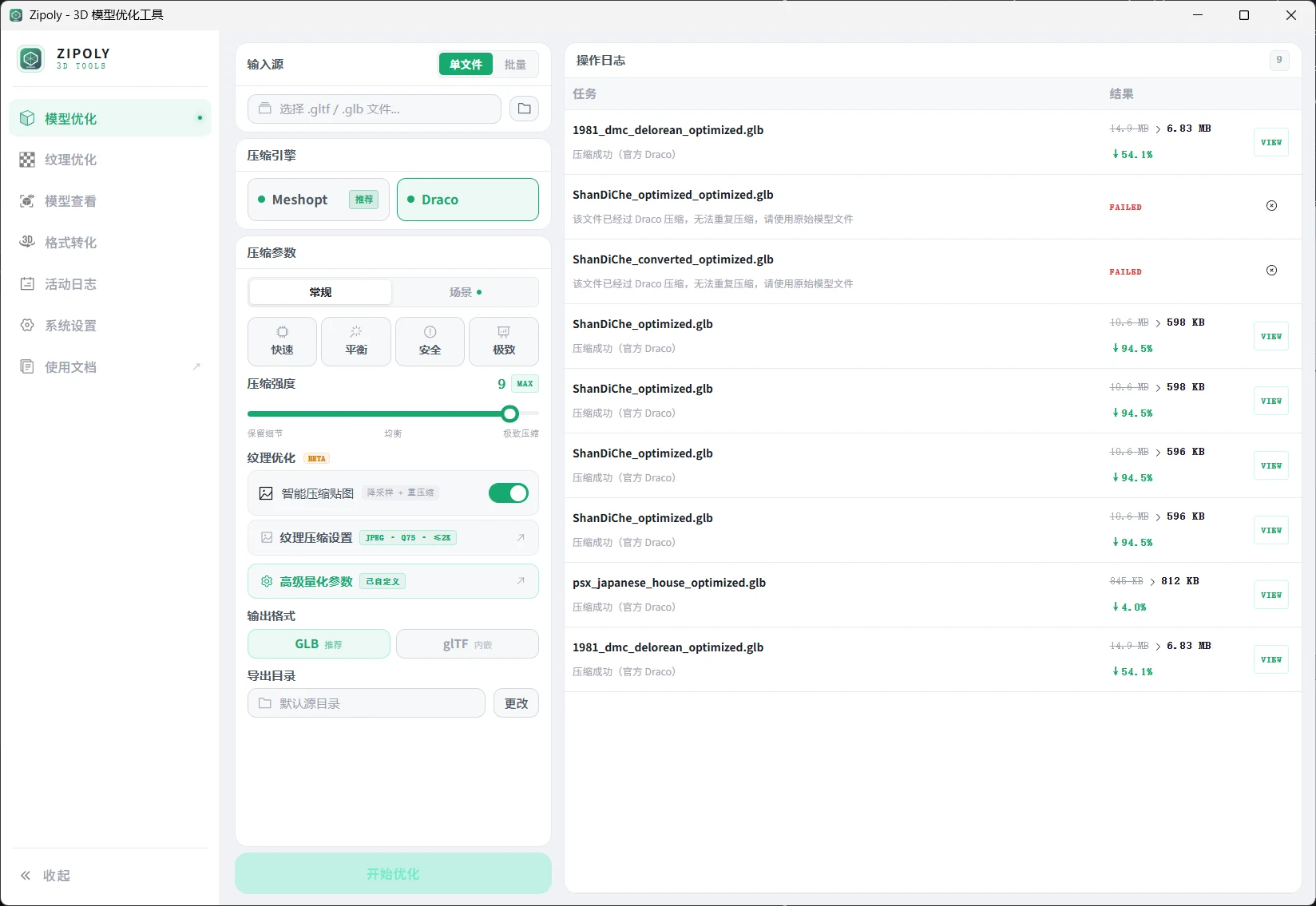




Draco + Meshopt Dual Engine · KTX2 GPU Textures · Diagnostics · Batch Processing · 100% Offline
Zipoly is a Windows desktop tool designed for front-end developers, 3D artists, and designers, focused on quality control and optimization of Web3D assets before delivery.
- ⚡ Up to 90% size reduction — Draco / Meshopt dual engine with smart fallback
- 🔄 7 format conversions — GLB, glTF, FBX, OBJ, STL, DAE, PLY
- 🎨 KTX2 GPU texture compression — Basis Universal ETC1S / UASTC, native GPU decoding
- 🔒 100% offline operation — No uploads, no tracking, no internet required, only 5 MB installer
- 🩺 Smart diagnostics — Auto-scan on import: duplicate vertices, oversized textures, missing normals
- 📦 Batch processing — Recursive folder scanning, concurrent processing, pause/resume/cancel support

System Requirements: Windows 10 / 11 (64-bit) · 4 GB RAM or more · No internet required
Don't have Windows? Try Zipoly Web Online Version — Free, no installation, supports Draco compression and format conversion (100 MB file limit)
| Module | Description | License |
|---|---|---|
| Compression | Draco / Meshopt geometry compression, 70–90% size reduction, scene presets | Available during trial |
| Format Convert | FBX / OBJ / STL / DAE / PLY → GLB / glTF, auto-embed external textures | Available during trial |
| Texture Optimize | Standalone image compression & resize, JPEG / WebP / KTX2 output | Available during trial |
| 3D Viewer | Three.js real-time preview, 24-hour daylight simulation, screenshot & recording | Free Forever |
| History Log | Operation history, parameter reuse, report export | Free Forever |
| Diagnostics | Auto-scan on import, detect potential model issues | Available during trial |
| Draco | Meshopt (Recommended) | |
|---|---|---|
| Compression Ratio | High | Higher |
| Decode Speed | Fast | 5–10× faster |
| Texture Compression | JPEG / WebP / KTX2 | BasisU (ETC1S / UASTC) |
| Framework Support | Three.js / Babylon.js / model-viewer | Three.js (r136+) |
| Best For | Legacy projects, broad compatibility | New projects, peak performance |
💡 Unsure which to choose? Pick Meshopt. When Meshopt is unavailable, the software automatically falls back to Draco without affecting the workflow.
Built-in 4 scene presets that auto-fill optimal parameters without manual tuning:
| Preset | Recommended Engine | Use Case |
|---|---|---|
| 🌐 Web 3D Scenes | Meshopt | Web 3D displays, balanced quality & load speed |
| 📱 Mobile Apps | Meshopt | iOS / Android, aggressive compression to save bandwidth |
| 🏭 Industrial Visualization | Draco | CAD / BIM models, preserve high precision & node structure |
| 🛒 E-commerce Display | Meshopt | 3D product previews, high-quality textures + fast loading |
① Drag .glb / .gltf file into the software window
② Select compression engine (Meshopt recommended) or choose a scene preset
③ Adjust compression level (default 7, suitable for most scenarios)
④ Click "Start Optimization"
⑤ Preview compression result, confirm appearance is correct, then save
Draco Compression Format:
import { GLTFLoader } from 'three/addons/loaders/GLTFLoader.js'
import { DRACOLoader } from 'three/addons/loaders/DRACOLoader.js'

const dracoLoader = new DRACOLoader()
// Recommended: Copy decoder files to project's public directory (avoid external CDN dependency)
// cp node_modules/three/examples/jsm/libs/draco public/draco -r
dracoLoader.setDecoderPath('/draco/')

const loader = new GLTFLoader()
loader.setDRACOLoader(dracoLoader)
loader.load('model_optimized.glb', gltf => scene.add(gltf.scene))
Meshopt Compression Format:
import { GLTFLoader } from 'three/addons/loaders/GLTFLoader.js'
import { MeshoptDecoder } from 'three/addons/libs/meshopt_decoder.module.js'

const loader = new GLTFLoader()
loader.setMeshoptDecoder(MeshoptDecoder)
loader.load('model_optimized.glb', gltf => scene.add(gltf.scene))
Meshopt + KTX2 Textures:
import { GLTFLoader } from 'three/addons/loaders/GLTFLoader.js'
import { MeshoptDecoder } from 'three/addons/libs/meshopt_decoder.module.js'
import { KTX2Loader } from 'three/addons/loaders/KTX2Loader.js'

const ktx2Loader = new KTX2Loader()
// Recommended: Copy transcoder to project's public directory
// cp node_modules/three/examples/jsm/libs/basis public/basis -r
ktx2Loader.setTranscoderPath('/basis/')
ktx2Loader.detectSupport(renderer) // Detect current GPU supported KTX2 subformats

const loader = new GLTFLoader()
loader.setMeshoptDecoder(MeshoptDecoder)
loader.setKTX2Loader(ktx2Loader)
loader.load('model_optimized.glb', gltf => scene.add(gltf.scene))
💡 Using Babylon.js or model-viewer? These two frameworks have built-in Draco support, no extra configuration needed, just load directly. However, they do not support Meshopt format, please use Draco engine for compression.
| Format | Import | Export |
|---|---|---|
| GLB | ✅ | ✅ |
| glTF | ✅ | ✅ |
| OBJ | ✅ | ✅ |
| FBX | ✅ | — |
| STL | ✅ | ✅ |
| DAE (Collada) | ✅ | — |
| PLY | ✅ | ✅ |
| Level | Use Case |
|---|---|
| 1–3 | Engineering / Medical models, precision first |
| 4–6 | Product display, architectural visualization |
| 7 (default) | General Web3D scenarios, best starting point |
| 8–9 | Mobile, low bandwidth, acceptable slight distortion |
| 10 | Background decorations, visible geometry distortion |
⚠️ Higher level ≠ Better: Compression level 10 may cause vertex position offset and surface deformation. Start from 7, adjust downward if issues occur.
First installation automatically grants a 6-hour complete trial (cumulative duration, pauses when software is closed).
| Plan | Price | Description |
|---|---|---|
| 1 Year License | ¥29.9 | Full features for one year |
| 2 Year License | ¥49.9 | Full features for two years |
| 3 Year License | ¥68 | Full features for three years |
| Lifetime License | ¥99 | One-time payment, permanent use |
Plan Details:
- ✅ All plans include full features (compression, conversion, texture optimization, screenshot recording)
- ✅ Device-bound offline verification, no internet required
- ✅ No auto-renewal
- ❌ One device per license, not transferable (reinstalling OS or changing PC requires repurchase)
How to Purchase:
- Open software → System Settings
- Copy your Device ID
- Scan QR code to follow WeChat Official Account RayChart, reply
zipoly - Provide Device ID to complete purchase
Model won't load after compression?
You need to configure a decoder. See complete code in Three.js Loading Examples above.
Babylon.js and model-viewer have built-in Draco support, no extra configuration needed.
Getting "File already Draco-compressed, cannot compress again" error?
Draco does not support compressing already-compressed files. Please use the original uncompressed GLB file exported from modeling software (Blender / Maya / 3ds Max).
File size increased after compression?
Common with models having very few faces (< 1,000) or very small size (< 100 KB). Compression metadata overhead exceeds benefits, consider lowering compression level (1–3) or skip compression.
Model appears distorted or has artifacts after compression?
Insufficient quantization precision. Solutions:
- Lower compression level (e.g., 9 → 7)
- Or increase position precision
qpin "Advanced Parameters" (Draco engine only)
KTX2 texture loading errors?
You need to configure KTX2Loader, see Meshopt + KTX2 Loading Code above.
If target environment doesn't support KTX2 (e.g., older mobile browsers), switch to JPEG or WebP in texture settings.
Mac or Linux support?
Currently only supports Windows 10/11 (64-bit). Mac / Linux support is on the roadmap, expected in v1.3.
Will batch processing overwrite original files?
No. By default adds _optimized suffix. If suffix is empty, automatically adds _1 numbering to prevent overwriting.
Will license remain valid after system reinstall?
No. Licenses use device fingerprinting. After OS reinstall or hardware change, original key becomes invalid and requires repurchase.
Recommendation: Fully utilize the 6-hour trial to confirm software meets your needs and device is stable before purchasing.
- 🐛 Fix: Removed all external CDN dependencies (Draco decoder, KTX2 transcoder, Google Fonts), now fully self-hosted
- 🐛 Fix: Hardened Tauri CSP security policy, removed googleapis / gstatic / jsdelivr external whitelist
- ⚡ Optimization: Web fonts now use @fontsource local packages (Noto Sans SC / Plus Jakarta Sans / JetBrains Mono)
- 🎉 Architecture upgrade: Introduced unified compression engine interface, Draco / Meshopt hot-swappable with improved fallback mechanism
- ✨ New: Scene-based compression presets (Web / Mobile / Industrial / E-commerce)
- ✨ New: Smart engine recommendations (auto-suggest based on model characteristics)
- ⚡ Meshopt: Added mesh simplification, GPU Instancing, node merging with real-time staged progress
- ⚡ KTX2: Added UASTC mode with fine-grained quality parameters
- 🔧 Optimization: draco_transcoder size reduced (6 MB → 2.5 MB)
- Desktop Framework: Tauri 2 · Vue 3 · TypeScript · Rust
- 3D Rendering: Three.js
- Compression Engines: draco_transcoder · gltfpack / meshoptimizer
- Texture Compression: Basis Universal (basisu)
- 📖 Online Documentation — Complete user manual
- 🌐 Web Online Version — Free, no installation required
- 📦 Download Page — Historical version downloads
- 🐛 Issue Reporting — Submit bugs or suggestions
- 💬 WeChat Official Account: RayChart — Purchase licenses & technical support
| Model Type | Original Size | Optimized | Compression Ratio | Load Speed |
|---|---|---|---|---|
| Architectural Visualization | 128 MB | 18 MB | -86% | ↑ 7.1× |
| E-commerce Product Display | 56 MB | 9 MB | -84% | ↑ 6.2× |
| PNG Texture Maps | 22 MB | 2.1 MB | -90% | ↑ 10.5× |
| Industrial CAD Model | 84 MB | 12 MB | -86% | ↑ 7× |
Data tested using default parameters (compression level 7)
Commercial Software
- ✅ 6-hour free trial
- 💰 Full license starts from ¥29.9/year
- 📜 See Licensing & Pricing for details
This is a closed-source commercial software project. To report issues or suggest features, please contact us through:
- Submit GitHub Issue
- Follow WeChat Official Account RayChart and leave a message
Built with ❤️ by v-plugin
© 2024–2026 v-plugin. All rights reserved.