A Home Assistant custom integration that provides Text-to-Speech using TikTok's voice engine, supporting a wide range of languages and expressive voices.
| Role | Person / Project | Link |
|---|---|---|
| Original integration author | Philipp Lüttecke | philipp-luettecke/tiktoktts |
| Community TTS proxy | Weilbyte | Weilbyte/tiktok-tts |
| Voice list reference | oscie57 | oscie57/tiktok-voice |
| Fork author | Steven Fox | sfox38/tiktoktts |
Note
This fork modernises the original integration for current Home Assistant versions, fixes several bugs, adds a UI config flow, more than triple the voices, direct API mode with endpoint fallback, automatic text chunking, a Random Voice feature, helper entities plus a custom dashboard card, improved error handling, and improved documentation.
If you were using philipp-luettecke/tiktoktts, this fork has breaking changes that require a clean removal before installing. You cannot simply overwrite the old files. You can skip this section if you have not installed the previous integration.
| What changed | Original | This fork |
|---|---|---|
| Configuration method | configuration.yaml |
UI config flow (Settings -> Devices & Services) |
| Entity ID | May vary | tts.tiktoktts_proxy (proxy mode) or tts.tiktoktts_direct (direct mode) |
| Default language | de (German) |
en_us (English US) |
| Default voice | de_001 |
en_us_001 |
platform: entry in YAML |
Required | Must be removed |
Open your configuration.yaml and delete the TikTok TTS platform entry. It will look something like this - remove the whole block:
tts:
  - platform: tiktoktts
    api_endpoint: https://tiktok-tts.weilnet.workers.dev
    voice: en_us_001
If tts: was only used for TikTok TTS, remove the entire tts: section. If you have other TTS platforms listed under tts:, remove only the tiktoktts entry and leave the others.
In your config/custom_components/ directory, delete the entire tiktoktts/ folder and everything inside it.
HA caches generated audio files and sometimes holds on to old entity state. Go to Developer Tools -> States and confirm no tiktoktts entities remain. If any do, click each one and use the delete (bin) icon to remove them.
Go to Settings -> System -> Restart and do a full restart (not Quick Reload).
Follow the Installation steps below. When you reach Settings -> Devices & Services -> Add Integration, you will go through the new UI setup wizard to reconfigure your endpoint and default voice.
[!NOTE] Any automations that used the deprecated
tts.tiktoktts_sayservice call will need to be updated to use thetts.speakaction format shown in the Usage section below.
- Open HACS in your Home Assistant sidebar.
- Click the three-dot menu (top right) and choose Custom repositories.
- Paste
https://github.com/sfox38/tiktokttsand select Integration as the category. - Click Add, then find tiktoktts in the HACS Integration list and click Download.
- Restart Home Assistant.
- Download the latest release zip from this repository and unpack it.
- Copy the
tiktokttsfolder into yourconfig/custom_components/directory. The result should beconfig/custom_components/tiktoktts/. - Restart Home Assistant.
After restarting, go to Settings -> Devices & Services -> Add Integration and search for TikTok TTS.
Uses the open-source proxy by Weilbyte. No TikTok account required. The default endpoint is https://tiktok-tts.weilnet.workers.dev.
For better reliability, you can self-host your own proxy instance and enter its URL during setup. See the Weilbyte repo for instructions.
Note
Privacy: In proxy mode, your message text and chosen voice are sent to the proxy server (Weilbyte or your self-hosted instance) in plain text. The proxy forwards the request to TikTok on your behalf. If privacy is a concern, self-host your own proxy instance.
If both proxy and direct API modes are configured, proxy mode takes priority for the Speak button and automations that do not specify an entity ID.
Calls TikTok's internal API directly using your TikTok session cookie.
Important
This uses TikTok's undocumented API and may violate TikTok's Terms of Service. Use at your own risk.
Requires a sessionid cookie from a logged-in TikTok browser session:
- Log in to TikTok in your browser (you must have a TikTok account)
- Open Developer Tools (F12) -> Application -> Cookies
- Copy the value of the
sessionidcookie
The integration will automatically try multiple regional TikTok endpoints if the primary one fails. You must input a valid sessionid cookie value or you will not be able to proceed.
Each configured instance creates its own entity with a fixed ID based on the connection mode:
| Mode | Friendly Name | Entity ID |
|---|---|---|
| Community Proxy | TikTokTTS Proxy | tts.tiktoktts_proxy |
| Direct API | TikTokTTS Direct | tts.tiktoktts_direct |
Both entities can coexist if you have configured both modes. Use the appropriate entity ID in your automations depending on which connection you want to use.
The integration also creates these shared helper entities (one set regardless of how many instances you have configured). They are only used by the Home Assistant UI and dashboard cards, you generally won't need to manage them yourself:
| Entity ID | Purpose |
|---|---|
select.tiktoktts_language |
Language selector dropdown |
select.tiktoktts_voice |
Voice selector dropdown (filtered by language) |
select.tiktoktts_device |
Output device selector (auto-populated from your media players) |
text.tiktoktts_message |
Text input field for the message to speak |
button.tiktoktts_speak |
Speak button - reads the above entities and calls tts.speak |
Proxy mode:
action: tts.speak
target:
  entity_id: tts.tiktoktts_proxy
data:
  media_player_entity_id: media_player.your_speaker
  message: "Hello, this is TikTok TTS"
  language: en_us
  options:
    voice: en_us_007
Direct API mode:
action: tts.speak
target:
  entity_id: tts.tiktoktts_direct
data:
  media_player_entity_id: media_player.your_speaker
  message: "Hello, this is TikTok TTS"
  language: en_us
  options:
    voice: en_us_007
The language field filters available voices in the Automations editor UI, however it is recommended to leave this blank. The options.voice field selects the specific voice. If you omit options.voice, the integration uses your configured default voice if it belongs to the requested language, or falls back to the first available voice for that language.
You can configure a pool of language groups to draw from randomly on each tts.speak call. Press the 🎲 dice button next to the Speak button in the dashboard card to open the Random Voice settings panel. Tick the language groups you want included in the pool and press "Save and close". Once at least one language is selected, 🎲 Random Voice appears as an option in the language dropdown with a single Random Voice voice option beneath it.
A different voice is picked on every call. The Speak button automatically bypasses HA's TTS cache when random voice is active.
To use random voice in an automation, pass voice: random in the options:
action: tts.speak
target:
  entity_id: tts.tiktoktts_proxy
data:
  media_player_entity_id: media_player.your_speaker
  message: "Hello, this is TikTok TTS"
  options:
    voice: random
Note
When calling tts.speak directly from an automation with voice: random, add cache: false to the action data. Home Assistant checks its audio file cache before calling the integration, so without cache: false a repeated message may replay previously cached audio rather than generating a new random voice.
These samples were generated using TikTok TTS with a selection of English voices.
Note
GitHub doesn't support inline audio playback - you will need to download these MP3 files first.
| Sample | Voice ID |
|---|---|
| ▶ Listen | en_us_rocket |
| ▶ Listen | en_male_narration |
| ▶ Listen | en_us_ghostface |
| ▶ Listen | en_us_006 |
| ▶ Listen | en_male_m03_lobby |
| ▶ Listen | en_female_emotional |
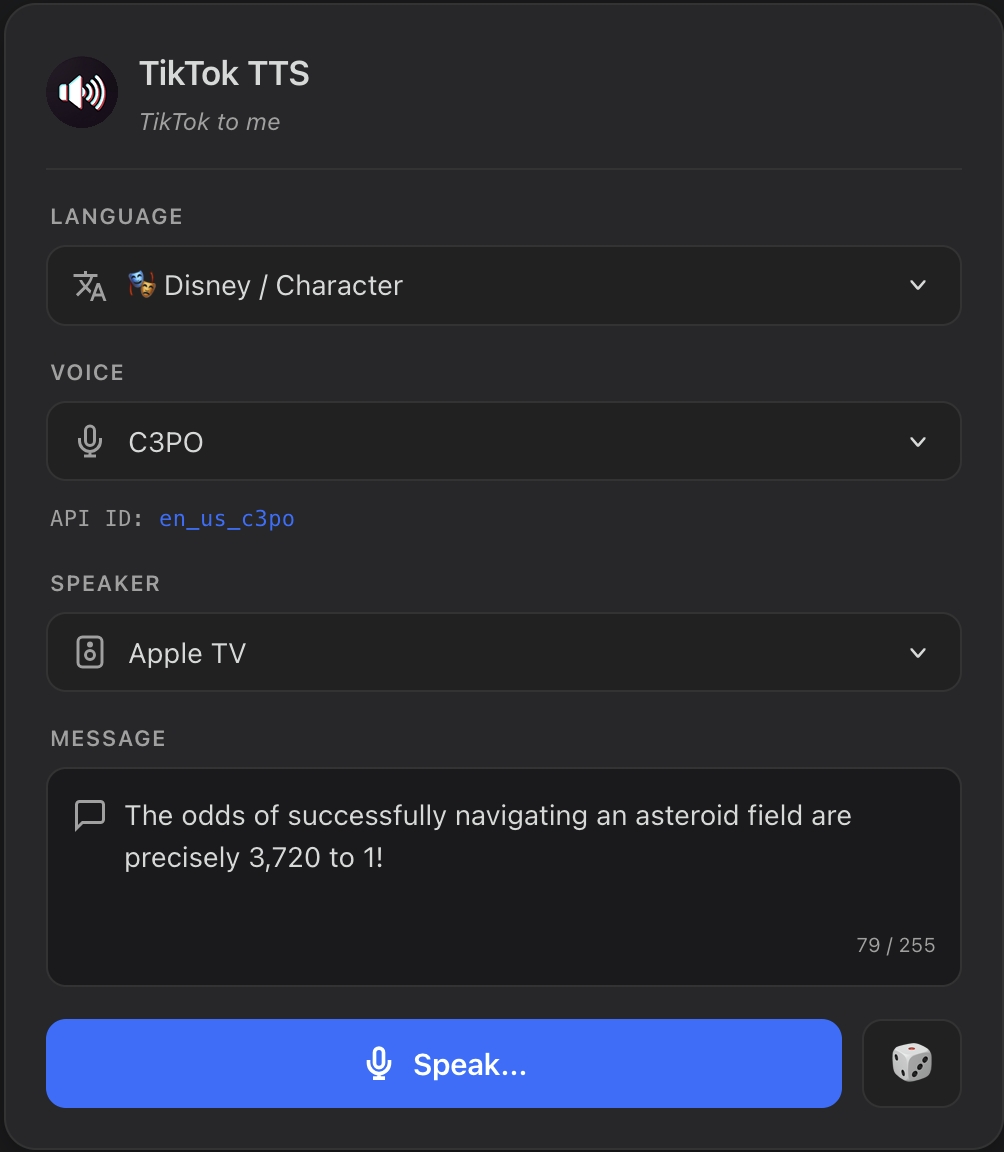
This integration creates a set of shared helper entities plus a custom dashboard card which all work together as a TTS control panel. You can use this card to easily preview voices, or to send impromptu messages to speakers around your home. The dashboard card will look like the one shown at the top of this page.
You don't need to install this dashboard card separately, it is automatically installed along with this integration. To add this card to any dashboard - search for TikTokTTS when adding a new card using the wizard, or just create an empty dashboard card with the following text:
type: custom:tiktoktts-cardAlternatively, you can create a standard dashboard card using only the TikTok TTS entities:
type: entities
title: TikTok TTS
entities:
  - select.tiktoktts_language
  - select.tiktoktts_voice
  - text.tiktoktts_message
  - select.tiktoktts_device
  - button.tiktoktts_speak
How it works:
- Select a language from
select.tiktoktts_language- the voice list filters automatically. Select🎲 Random Voiceto use the random voice feature. - Select a voice from
select.tiktoktts_voice - Type your message in
text.tiktoktts_message(maximum 255 characters) - Select your output speaker from
select.tiktoktts_device- auto-populated from all available media players in your HA instance, and updates automatically when new devices come online - Press the Speak button - reads all fields and calls
tts.speakserver-side - Press the 🎲 dice button next to Speak to open the Random Voice settings panel, where you can select which language groups to include in the random voice pool
Note
All selections are remembered across HA restarts. The device list automatically refreshes when media players become available, including late-loading integrations like browser_mod.
The Voice ID is the value to use in the options.voice field of the tts.speak action.
Click any language group to expand its full voice list.
🇺🇸 English (US) - en_us (24 voices)
| Voice ID | Description |
|---|---|
en_male_santa_narration |
Author |
en_female_betty |
Bae |
en_female_makeup |
Beauty Guru |
en_female_richgirl |
Bestie |
en_us_010 |
Confidence |
en_male_cupid |
Cupid |
en_female_shenna |
Debutante |
en_female_samc |
Empathetic |
en_male_jomboy |
Game On |
en_female_grandma |
Granny |
en_us_001 |
Jessie |
en_us_006 |
Joey |
en_male_wizard |
Magician |
en_male_trevor |
Marty |
en_male_deadpool |
Mr. GoodGuy |
en_us_007 |
Professor |
en_male_santa |
Santa |
en_male_santa_effect |
Santa (with effect) |
en_us_009 |
Scientist |
en_male_cody |
Serious |
en_male_narration |
Story Teller |
en_male_grinch |
Trickster |
en_female_pansino |
Varsity |
en_male_funny |
Wacky |
🇬🇧 English (UK) - en_uk (8 voices)
| Voice ID | Description |
|---|---|
en_male_jarvis |
Alfred |
en_male_ashmagic |
Ash Magic |
en_male_ukneighbor |
Lord Cringe |
en_uk_003 |
Male English UK |
en_male_ukbutler |
Mr. Meticulous |
en_uk_001 |
Narrator |
en_male_olantekkers |
Olan Tekkers |
en_female_emotional |
Peaceful |
🇦🇺 English (AU) - en_au (2 voices)
| Voice ID | Description |
|---|---|
en_au_001 |
Metro |
en_au_002 |
Smooth |
🎭 Disney / Character - disney (9 voices)
| Voice ID | Description |
|---|---|
en_us_c3po |
C3PO |
en_us_chewbacca |
Chewbacca |
en_male_ghosthost |
Ghost Host |
en_female_madam_leota |
Madame Leota |
en_male_pirate |
Pirate |
en_us_rocket |
Rocket |
en_us_ghostface |
Scream |
en_us_stitch |
Stitch |
en_us_stormtrooper |
Stormtrooper |
🎵 Music / Singing - music (15 voices)
These voices are optimised for musical or expressive text rather than natural speech.
| Voice ID | Description |
|---|---|
en_male_sing_deep_jingle |
Caroler |
en_male_m03_classical |
Classic Electric |
en_female_f08_salut_damour |
Cottagecore |
en_male_m2_xhxs_m03_christmas |
Cozy |
en_female_ht_f08_glorious |
Euphoric |
en_male_sing_funny_it_goes_up |
Hypetrain |
en_male_m03_lobby |
Jingle |
en_female_ht_f08_wonderful_world |
Melodrama |
en_female_ht_f08_newyear |
NYE 2023 |
en_female_f08_warmy_breeze |
Open Mic |
en_female_ht_f08_halloween |
Opera |
en_female_f08_twinkle |
Pop Lullaby |
en_male_m2_xhxs_m03_silly |
Quirky Time |
en_male_sing_funny_thanksgiving |
Thanksgiving |
en_male_m03_sunshine_soon |
Toon Beat |
🇫🇷 French - fr (2 voices)
| Voice ID | Description |
|---|---|
fr_001 |
French - Male 1 |
fr_002 |
French - Male 2 |
🇮🇹 Italian - it (1 voice)
| Voice ID | Description |
|---|---|
it_male_m18 |
Italian Male |
🇪🇸 Spanish - es (4 voices)
| Voice ID | Description |
|---|---|
es_female_f6 |
Alejandra |
es_male_m3 |
Julio |
es_female_fp1 |
Mariana |
es_002 |
Spanish - Male |
🇲🇽 Spanish (Mexico) - es_mx (2 voices)
| Voice ID | Description |
|---|---|
es_mx_female_supermom |
Super Mamá |
es_mx_002 |
Álex |
🇩🇪 German - de (2 voices)
| Voice ID | Description |
|---|---|
de_001 |
German - Female |
de_002 |
German - Male |
🇧🇷 Portuguese (Brazil) - pt_br (5 voices)
| Voice ID | Description |
|---|---|
br_004 |
Ana |
bp_female_ivete |
Ivete Sangalo |
br_003 |
Júlia |
br_005 |
Lucas |
bp_female_ludmilla |
Ludmilla |
🇵🇹 Portuguese (Portugal) - pt_pt (3 voices)
| Voice ID | Description |
|---|---|
pt_male_bueno |
Galvão Bueno |
pt_female_laizza |
Laizza |
pt_female_lhays |
Lhays Macedo |
🇮🇩 Indonesian - id (4 voices)
| Voice ID | Description |
|---|---|
id_male_darma |
Darma |
id_female_icha |
Icha |
id_female_noor |
Noor |
id_male_putra |
Putra |
🇯🇵 Japanese - ja (20 voices)
| Voice ID | Description |
|---|---|
jp_003 |
Keiko (恵子) |
jp_001 |
Miho (美穂) |
jp_male_keiichinakano |
Morio's Kitchen |
jp_006 |
Naoki (直樹) |
jp_005 |
Sakura (さくら) |
jp_female_machikoriiita |
まちこりーた |
jp_female_fujicochan |
りーさ |
jp_male_hikakin |
ヒカキン |
jp_male_matsudake |
マツダ家の日常 |
jp_male_matsuo |
モジャオ |
jp_male_osada |
モリスケ |
jp_female_hasegawariona |
世羅鈴 |
jp_female_rei |
丸山礼 |
jp_male_yujinchigusa |
低音ボイス |
jp_male_shuichiro |
修一朗 |
jp_female_yagishaki |
八木沙季 |
jp_female_shirou |
四郎 |
jp_female_oomaeaika |
夏絵ココ |
jp_female_kaorishoji |
庄司果織 |
jp_male_tamawakazuki |
玉川寿紀 |
🇰🇷 Korean - ko (3 voices)
| Voice ID | Description |
|---|---|
kr_003 |
Korean - Female |
kr_002 |
Korean - Male 1 |
kr_004 |
Korean - Male 2 |
🇻🇳 Vietnamese - vi (2 voices)
| Voice ID | Description |
|---|---|
BV074_streaming |
Vietnamese - Female |
BV075_streaming |
Vietnamese - Male |
Note
The voices currently supported by this integration represent the entire confirmed working set as of early 2026. TikTok's internal API supports additional voices beyond this list, but their exact API IDs are not publicly documented. Further, some voices may be locale specific, so you may not be able to use certain voices in your region, although in my own tests they all seem to work when using proxy mode. If you discover a working voice ID that is not already in our list, please submit a new Issue here and I can add it to the next release.
Go to Settings -> Devices & Services -> TikTok TTS -> Configure (gear icon). Changes take effect immediately after saving, no restart required.
The community Weilbyte proxy is a free, volunteer-run service and may occasionally be unavailable. For a more reliable setup, self-host your own proxy instance. See Weilbyte/tiktok-tts.
TikTok session IDs expire periodically. If you see errors about an invalid or expired session ID, go to the integration options and update the value from your browser cookies.
The message text entity has a maximum length of 255 characters, which is enforced by HA's text entity platform. The dashboard card enforces this limit in the textarea. If you are calling tts.speak from an automation with a longer message, the integration automatically splits it into chunks of up to 200 characters (direct API mode) or sends the full text in one request (proxy mode, which handles chunking server-side). Only the HA text entity has the 255-character restriction.
Go to Settings -> System -> Logs and filter for tiktoktts to find detailed error messages.
This integration is not affiliated with, endorsed by, or connected to TikTok or ByteDance in any way. The direct API mode uses an unofficial, reverse-engineered endpoint. Use of the direct API mode may violate TikTok's Terms of Service.