A self-hosted web dashboard for spawning and managing Claude Code remote-control
bridges into any project directory on a remote host — then attach to them from
claude.ai/code or the Claude mobile app. No SSH session required.









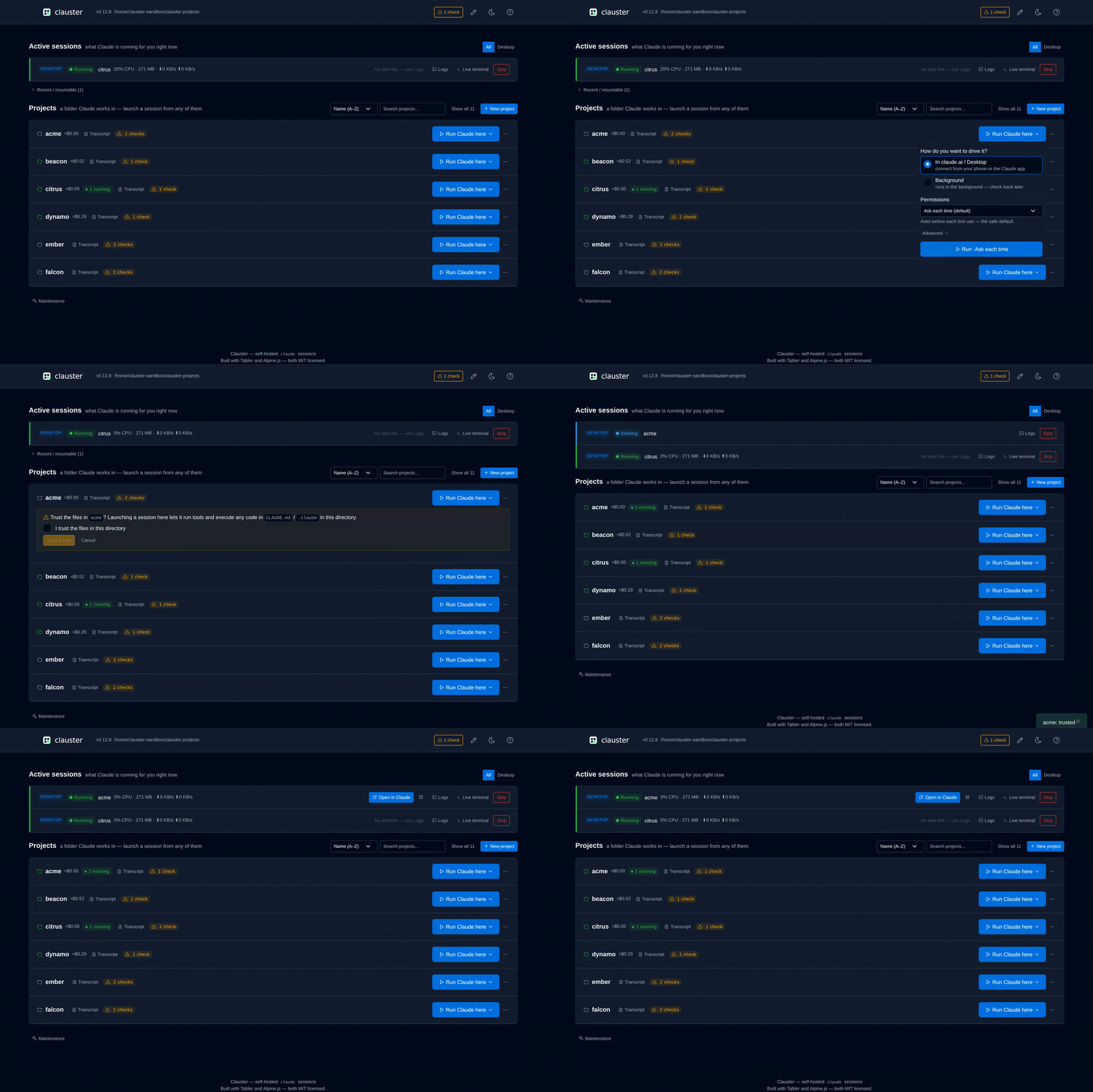
Anthropic's first-party tooling assumes terminal access on the host to spawn a
bridge in a given project directory. Clauster fills that gap: a browser-based dispatcher of
claude remote-control instances on a remote machine (NAS, homelab box). You pick
a project, start a bridge, and attach to it from claude.ai/code or the mobile app.
Status: pre-1.0, in active development. Loopback-only by default; password and reverse-proxy auth are available for networked deployments (see Auth & networking). No telemetry, ever — see Privacy & data at rest for what Clauster keeps locally.
Install now: curl -fsSL https://raw.githubusercontent.com/schubydoo/clauster/main/install.sh | bash
The full install recipes and verification steps are in the Installation guide.
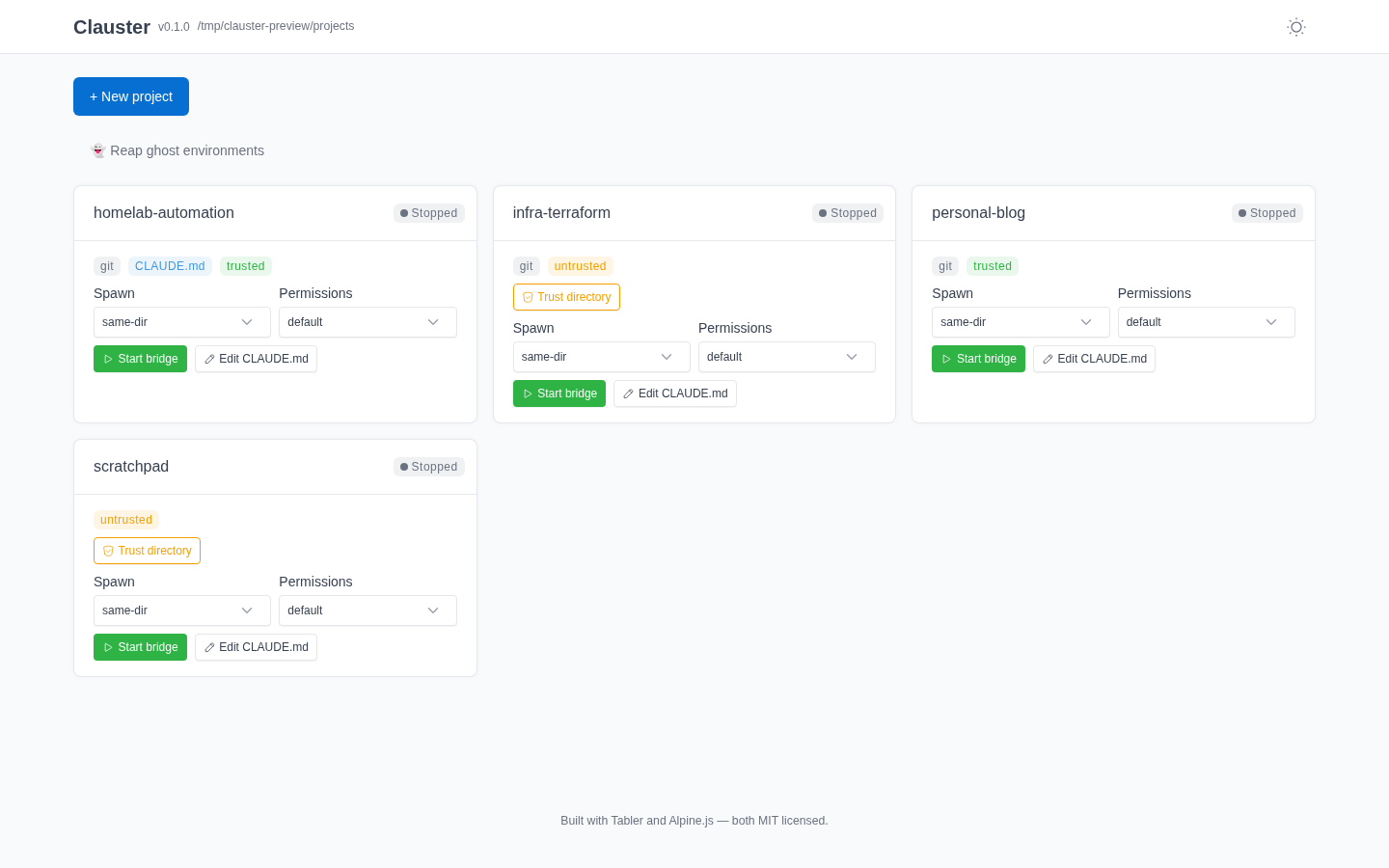 Dark / light — theme toggle persists across reloads |
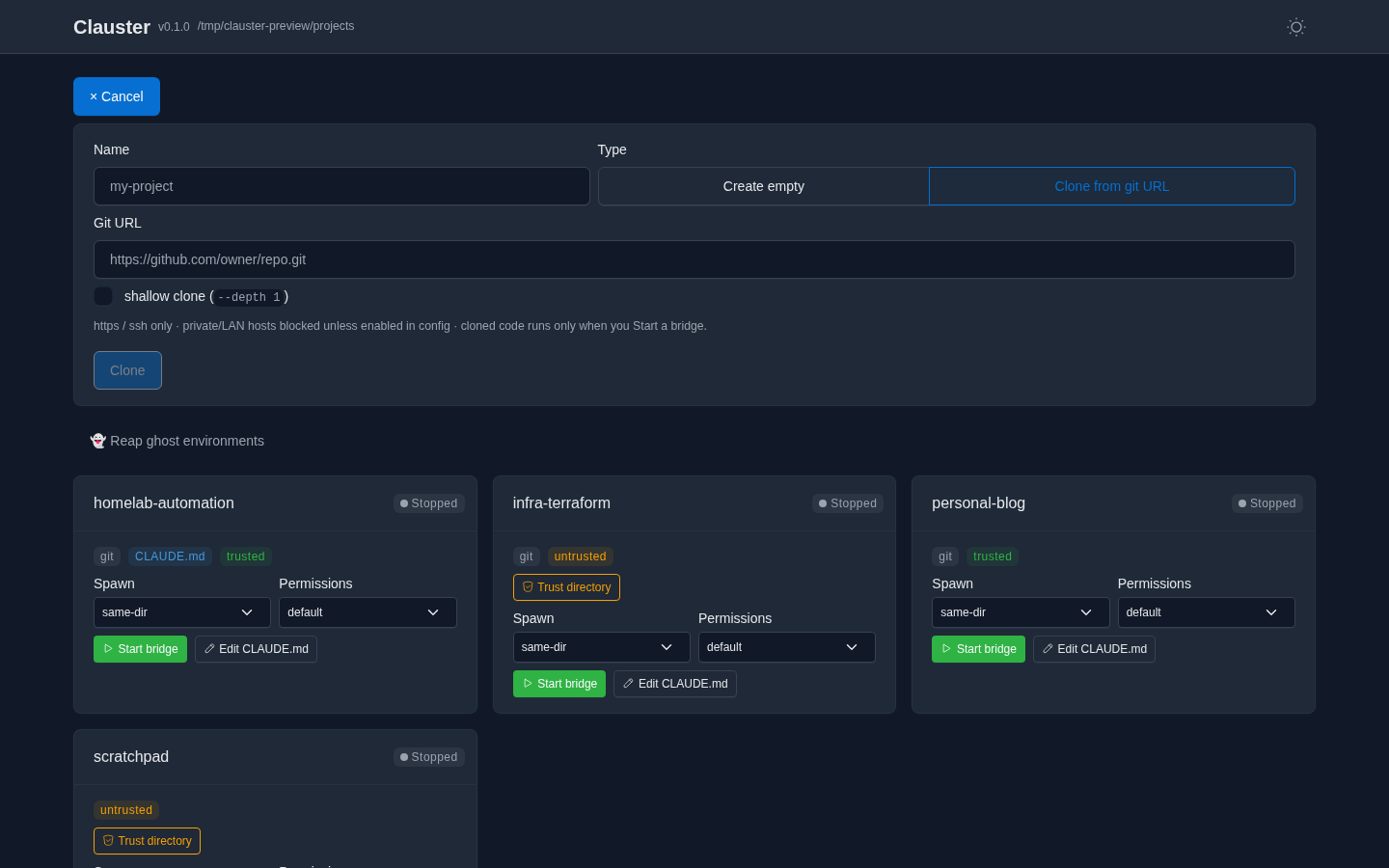 Create or clone — SSRF-guarded, cloned code runs only on Start |
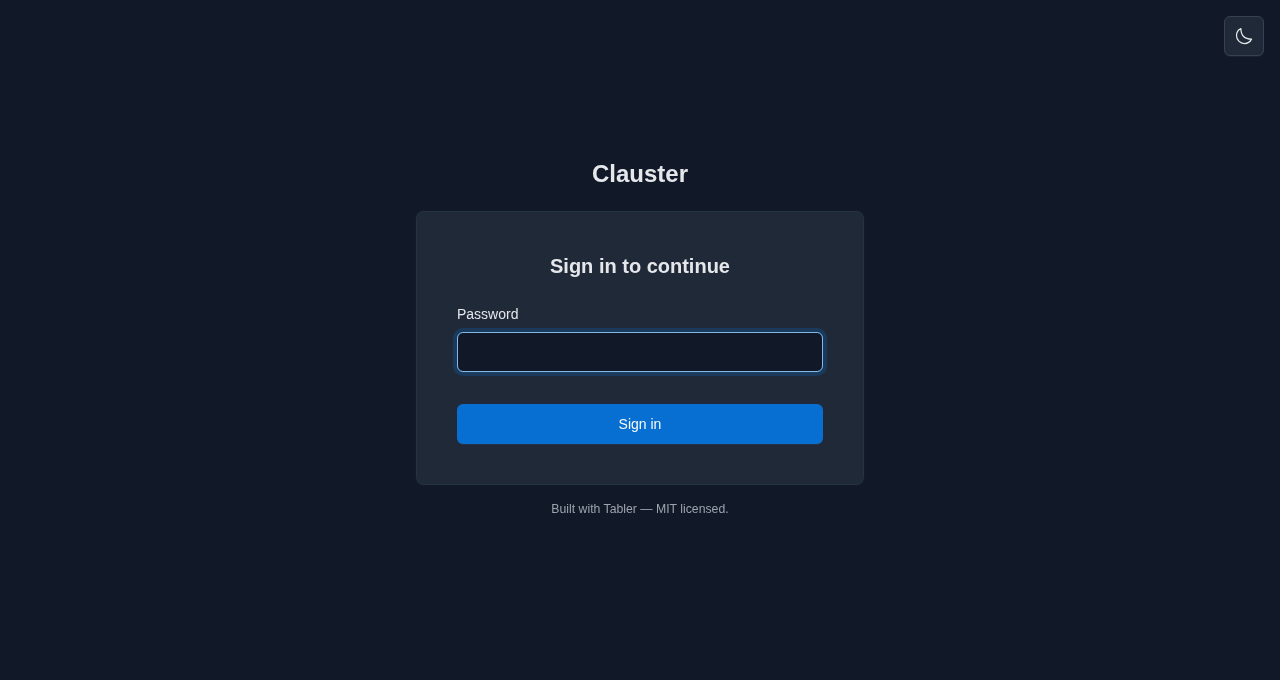 Password login — for non-loopback / networked deploys |
Every action is reactive — cards insert, badges flip, and clone progress streams without a full-page reload. Self-hosted assets; no CDN, no trackers. |
Everything below is implemented and shipping. Items marked (opt-in) are gated
behind a config flag and off by default — the flag is named inline so you can find
it in clauster.yml.example.
Show all features
- Project discovery — one card per directory under
projects_root, with git /CLAUDE.md/ trust badges. - Bridge lifecycle — start / stop / resume bridges; live status
(Starting / Running / Stopped / Crashed / Error). A bridge that launches but
never registers an environment is reported honestly as
Errorafter a grace window, not a phantomRunning. - Spawn controls — pick the spawn mode (same-dir / worktree / session),
permission mode, and resume mode (Server Mode / Interactive Session true-resume, POSIX) per launch;
claude.launch_modeis the pre-selected default.bypassPermissionsis double-gated: a per-project config ceiling (projects.<name>.allow_bypass_permissions) and a type-the-project-name confirm in the UI. - Open in Claude — a deep link to the primary session plus a scannable QR code that opens it in the Claude app (claude.ai/code or mobile), attached to the running bridge. Bridges are cloud-visible; the experimental hosted live-view channel is local-only — it streams in the dashboard but is never attachable from the Claude app.
- External session surfacing — sessions you started from a terminal or Desktop (not via Clauster) are discovered and shown with a distinct indicator.
- Create / clone projects — make a new project or clone a git URL, with SSRF guards, transport lockdown, a size cap, and a "code runs on start" warning for cloned repos. Clones stream live progress over a WebSocket and never auto-spawn (they land discovered-but-stopped).
- Live log tail — the bridge debug log streamed over a WebSocket, ANSI-stripped
and ID-redacted (
env_/session_/cse_IDs, bare UUIDs, and secret-shaped tokens — API keys, bearer headers). Redaction is hybrid by default (verbatim on disk, redacted over the wire);logs.redact_session_urlredacts on disk too. - CLAUDE.md editor — view/edit a project's
CLAUDE.mdfrom the dashboard (size-capped, lost-update-guarded, trust-gated, audit-logged). - Config editor — edit an allowlist of operational
clauster.ymlsettings from the dashboard (GET/PUT /api/config). Only a Tier-A allowlist is exposed — auth, bind, secret, and structural fields are never editable or even read back to the browser. Writes are lost-update-guarded (a content hash from the read must still match on write), backed up, and applied atomically with your comments preserved; the running process keeps its startup config until restarted. See docs/configuration.md. - Per-project cost badge — approximate USD + token totals rolled up from a
project's session transcripts. Token counts are exact (read from the transcript
usage); the dollar figure is a ballpark — a hand-maintained USD price table (usage.py, as of 2026-05) that drifts as pricing changes, with unpriced models counting as 0.usage.modeselects what the badge shows —cost,tokens, oroff(hide it for privacy / screen-share);usage.show_cost: falseis a deprecated alias foroff.
- Workspace trust — starting a bridge in an untrusted directory prompts a just-in-time "trust the files in this folder?" confirm (an explicit checkbox) that writes the Claude workspace-trust flag and then spawns; trusted directories show a green shield by the project name and start with no prompt.
- Auto-enable remote control — before the first spawn, Clauster marks remote
control as acknowledged in the runtime user's
~/.claude.jsonso a detached-stdin bridge isn't stuck on the one-time interactive "Enable Remote Control?" prompt. On by default (claude.auto_enable_remote_control); set false to manage it yourself.
Show all opt-in extras
- Conversation recap on restart (opt-in) —
claude remote-controlrestarts into a fresh, empty context, so a restarted bridge "forgets" the prior conversation. Withclaude.resume_recapenabled, Clauster installs aSessionStarthook in the runtime user's Claude settings that recaps the most recent prior transcript for that directory back into the new session. - Native true-resume / "Interactive Session" mode (opt-in, POSIX) —
claude.launch_mode: ptyruns theclaude --remote-controlflag form under a PTY keeper sidecar, which genuinely restores prior conversation context on Resume (--continue) rather than recapping it. The keeper outlives a Clauster restart and is stopped by signal. Single-session (vs. the default multi-session server). The dashboard surfaces the resume mode per bridge and rediscovers a running pty bridge after a Clauster restart. - Ghost-environment reaper — find and archive/delete the server-side bridge
environments that outlive their bridge and clutter the claude.ai/code "New session"
selector. The CLI (
clauster reap-environments) is always available; the dashboard UI is opt-in (reaper.ui_enabled) because it exposes a destructive first-party API in the browser. Archive is reversible; force-delete requires typingDELETE. - Background agents (experimental) — a dashboard panel that lists, dispatches,
stops, and resumes Claude Code background sessions (
claude --bg), backed byGET/POST/DELETE /api/agentsplusPOST /api/agents/{job_id}/resume. It rides Claude Code's agent-view research preview, so it's experimental and may change with the upstream CLI. - Outbound notifications & webhooks — get told when a bridge changes state.
notificationspush a human message (Slack/Discord/Telegram/email via Apprise, thenotifyextra) on a crash;webhooksdeliver a JSONPOSTto your own endpoint on everyspawn/ready/stop/crashtransition (no extra dependency,http(s)only), plus three opt-in events —bg-settled,permission-needed,clone-done(default off; enable per-event underwebhooks.events). Both are off by default, and a failing endpoint is always logged-and-swallowed so it never affects a bridge's lifecycle. See Operations → Crash alerts and Lifecycle webhooks. - Prometheus
/metrics— opt into a read-only text-format scrape endpoint (observability.prometheus_enabled) exposing build info, bridge counts by status, a crash counter, and per-bridge CPU/RSS. It stays behind the auth guard unless you setobservability.metrics_token_hashfor token-based scraping. See Operations → Metrics. - Hosted live-view channel (opt-in, experimental) — an alternate substrate to
the remote-control bridge. With
claustrum.enabled: true, Clauster connect-or-spawns a singleclaustrumdaemon per deployment and runsclaudeheadless over its stream-json channel, streaming the session live in the browser (with permission prompts surfaced in the UI) instead of being driven from Claude Desktop / claude.ai. Off by default and fail-closed — an unreachable daemon surfaces in/healthzand never affects the bridge lifecycle. Requires the separateclaustrumdaemon binary, which is not yet publicly distributed — there is currently no public install or build recipe, so leaveclaustrum.enabled: falseunless you already have the binary on yourPATH.
No Python needed — the install script grabs the signed standalone binary for your
OS, verifies its checksum, and installs it to ~/.local/bin (Linux & macOS),
printing a PATH hint if that directory isn't already on your PATH:
curl -fsSL https://raw.githubusercontent.com/schubydoo/clauster/main/install.sh | bashOn Windows, the PowerShell equivalent installs clauster.exe the same way:
irm https://raw.githubusercontent.com/schubydoo/clauster/main/install.ps1 | iexOr pick another path — uv tool install clauster (recommended for a Python host),
pip/pipx, Scoop on Windows (scoop bucket add clauster https://github.com/schubydoo/clauster && scoop install clauster), or
Docker. Full recipes — including supply-chain verification — are in the
Installation guide. To hack
on Clauster itself, use the dev quick-start below.
- Install script / standalone binary: remove
~/.local/bin/clausteron Linux or macOS; on Windows, delete%LOCALAPPDATA%\Programs\clauster\clauster.exeunless you set a custom install directory. - Python tools: run
uv tool uninstall clauster,pipx uninstall clauster, orpip uninstall clauster, matching how you installed it. - Scoop: run
scoop uninstall clauster. - Docker: stop and remove the container with
docker rm -f clauster, then remove the image withdocker rmi ghcr.io/schubydoo/clauster:latest(substitute the pinned tag you pulled, e.g.:X.Y.Z, if you used a specific release) if you no longer need it. Docker Compose users: rundocker compose downfrom the directory containingcompose.yaml(add-vto also delete named volumes). - Full purge: stop Clauster first, then remove your
state_dirif you want local state/config gone too. See Privacy & data at rest and the Installation guide.
Just running Clauster, not hacking on it? Follow the canonical Quickstart guide — it takes you from nothing to your first attachable bridge in a few minutes. The steps below are the from-source path for working on Clauster itself.
uv sync --extra dev
cp clauster.yml.example clauster.yml    # edit projects_root
uv run clauster
Then open http://127.0.0.1:7621. claude must be on your PATH (Clauster spawns
it; it isn't vendored).
With the server running (above) and an authenticated claude on your PATH,
spawning your first bridge is a handful of clicks — no terminal needed once it's
started. Clauster spawns claude — it doesn't vendor it — and a spawned bridge
inherits the host user's claude authentication, so claude must be logged in
(interactive claude login or ANTHROPIC_API_KEY in the environment — either
satisfies the check) before any bridge can connect. clauster doctor (step 2)
confirms it; see the Quickstart prerequisites for the full
list.
- Point Clauster at your code. Set
projects_rootinclauster.ymlto a directory whose subfolders are projects (e.g.~/code); each child directory becomes a card. - Sanity-check the host (optional).
clauster doctorconfirmsclaudeis found, new enough, and logged in (the bridge inherits this login), and thatprojects_root/ the state dir are usable — fix any ✗ before spawning. - Open the dashboard at http://127.0.0.1:7621. You'll see one card per project.
- Launch a bridge. On a project's card, click Run Claude here ▾, choose
In claude.ai / Desktop, pick a permission mode, then Run. Clauster
launches
claude remote-controlin that directory and the card flips to Running with a live status badge. (The spawn-mode and permission defaults are safe out of the box.) - Attach from anywhere. Use the card's Open in Claude link — or scan its
QR code — to pick the bridge up in
claude.ai/codeor the Claude mobile app. No SSH session. - Stop or resume. Stop signals the bridge; Resume relaunches it (with
claude.resume_recaporclaude.launch_mode: ptyit can carry the prior conversation forward — see Opt-in extras). For a deliberate fresh start, Forget the stopped session and launch again with Run Claude here.
Exposing this beyond loopback (e.g. on your LAN)? Read Auth & networking first — a non-loopback bind requires authentication.
Multi-arch images (linux/amd64, linux/arm64) are published to GHCR on each release.
The image binds 0.0.0.0, so it requires enforced auth to start. First generate a
password hash — this runs clauster inside the image, so you don't need it on the host:
docker run --rm -it ghcr.io/schubydoo/clauster:latest clauster hash-passwordCopy the printed $argon2id$… hash, then start the server with auth enabled:
docker run -d --name clauster \
  -p 7621:7621 \
  -e PUID=1000 -e PGID=1000 \
  -e CLAUSTER_AUTH_ENABLED=true \
  -e CLAUSTER_AUTH_PASSWORD_REQUIRED=true \
  -e 'CLAUSTER_AUTH_PASSWORD_HASH=$argon2id$v=19$...' \
  -v /path/to/config:/config \
  -v /path/to/projects:/projects \
ghcr.io/schubydoo/clauster:latest- The image binds
0.0.0.0, so it won't start without enforced auth — setCLAUSTER_AUTH_ENABLED=trueandCLAUSTER_AUTH_PASSWORD_REQUIRED=trueand aCLAUSTER_AUTH_PASSWORD_HASH(or configure reverse-proxy trust in/config/clauster.yml), or the container exits on start. Single-quote the hash env value — the argon2 hash contains$that your shell would otherwise expand. /configholdsclauster.yml+ state;/projectsis yourprojects_root.PUID/PGIDremap the runtime user to own bind-mounts.claudeis not baked in — tell Clauster where it is one of two ways: mount the binary somewhere on the containerPATH(the defaultclaude.binary: claudeis resolved viaPATH), or setCLAUSTER_CLAUDE_BINARY=/abs/path/to/claude(a.k.a.claude.binary) to an absolute path you've mounted anywhere. Either way, also mount the runtime user's~/.claudecredentials — or build a derived image that installsclaude.- Logs are human text by default; set
CLAUSTER_LOG_FORMAT=jsonfor structured JSON (both redact session URLs / bearer ids). Health is at/healthz. Images are cosign-signed with build provenance + SBOM attestations.
A ready-to-edit compose.yaml is included:
# 1. generate a password hash (runs inside the image)
docker compose run --rm clauster clauster hash-password
# 2. export it single-quoted, then edit the projects/claude volumes in compose.yaml
export CLAUSTER_AUTH_PASSWORD_HASH='$argon2id$v=19$...'
# 3. start (the image's HEALTHCHECK is inherited)
docker compose up -dLoopback (127.0.0.1) needs no auth. Binding to a non-loopback address is refused
unless authentication is actually enforced — set auth.enabled: true (the master
switch) together with either password login (auth.password_required + a hash from
clauster hash-password) or reverse-proxy trust (peer-IP allowlist + HMAC header) —
or, to opt out on a trusted LAN, auth.allow_unauthenticated_network. Sessions
are signed cookies with server-side revocation ("log out everywhere"); WebSocket
connections are authenticated before accept and origin-checked.
All settings live in clauster.yml — see
clauster.yml.example for the full, commented schema. Any
scalar key is overridable by an environment variable of the form
CLAUSTER_<UPPER_SNAKE_PATH>. The schema is additive-only — old configs always
validate against newer versions.
| Common flag | Default | What it does |
|---|---|---|
host / port |
127.0.0.1 / 7621 |
bind address (non-loopback needs auth) |
projects_root |
— | directory whose children become project cards |
auth.enabled |
false |
master auth switch — must be on for password / proxy auth to apply |
auth.password_required |
false |
require login (clauster hash-password for the hash) |
claude.resume_recap |
false |
recap the prior transcript into a restarted bridge |
claude.launch_mode |
standard |
pty = native true-resume on Resume (POSIX); default for new bridges only — a bridge keeps the mode it launched with |
reaper.ui_enabled |
false |
expose the ghost-environment reaper in the dashboard |
claustrum.enabled |
false |
enable the hosted live-view channel (connect-or-spawn the claustrum daemon) |
usage.mode |
cost |
per-project badge contents: cost (≈USD + tokens) · tokens (count only) · off (hide + skip the usage fetch). usage.show_cost: false is a deprecated alias for off |
logs.redact_session_url |
false |
redact the session URL on disk too, not just over WS |
clauster run                  # start the server (default)
clauster hash-password        # generate an argon2id hash for auth.password_hash
clauster hash-token           # mint an API token + hash for auth.api_token_hash
clauster hash-metrics-token   # mint a /metrics scrape token + hash for observability.metrics_token_hash
clauster api-token issue|list|rotate|revoke   # manage named public-API bearer tokens
clauster mcp                  # read-only MCP server over stdio (list + status)
clauster doctor               # diagnose config / environment
clauster backup | restore | migrate
clauster install-service {systemd|launchd|windows}
clauster reap-environments    # reap ghost bridge environments (dry-run by default)
clauster keepers              # list or stop orphaned pty keepers
clauster usage <transcript>   # token + approximate cost for a session transcript
clauster config reconcile     # remove deprecated config keys, writing their replacements
Planned work, roughly in priority order — the public-facing companion to the in-repo
scratch/TODO.md.
- Session naming — predictable/branded session display names instead of the random adjective-noun defaults; list active/resumable sessions in the UI.
Not planned: clauster is a single-operator tool — multi-user accounts, OIDC login, and per-user GDPR tooling were considered and declined (one deployment serves one operator; isolate with separate instances instead). The UI is English-only and not localized — there is no i18n string extraction on the roadmap (re-scope only if a real translation contributor appears).
Shipped:
- Public API — a documented, versioned
/api/v1surface with named Bearer tokens (distinct from the session cookie), managed viaclauster api-token issue|list|rotate|revoke; an opt-in OpenAPI schema (api.openapi_enabled) is available for third-party dashboards. - The in-repo
docs/pages (setup, networking, config reference, security model) are published as a live docs site at schubydoo.github.io/clauster.
Python 3.11+ · FastAPI · Alpine.js + Jinja2 + Tabler · uv · pydantic. Developed
and CI-gated on Linux; macOS / Windows are in the test matrix. Apache-2.0 licensed.
Questions, bugs, and feature requests all go through
GitHub Issues — Discussions are
intentionally not enabled. See SUPPORT.md for how to get help, and
SECURITY.md to report a vulnerability privately.