
Full-featured real-time chat application with rooms, DMs, voice chat, GIFs, emoji, and admin tools.
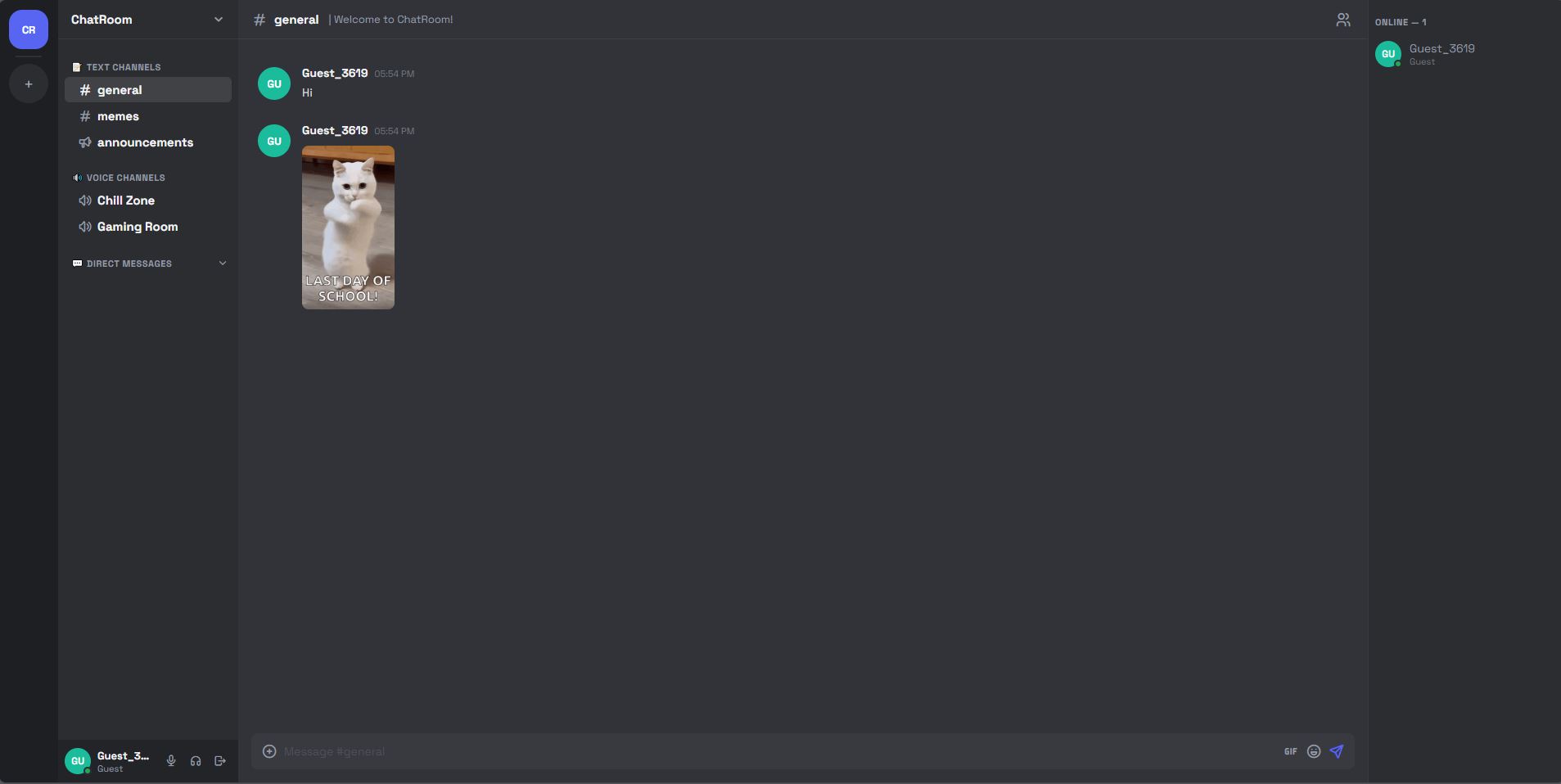
| Feature | Details |
|---|---|
| 🏠 Rooms | Text, Voice, and Announcement channels |
| 💬 DMs | Private direct messages between users |
| 🎙️ Voice Chat | WebRTC peer-to-peer voice in rooms |
| 🎉 GIFs | Search & send GIFs via Tenor API |
| 😀 Emoji | Full emoji picker with categories + reactions |
| 🔐 Auth | Email/Password, Google OAuth, Guest mode |
| 🛡️ Admin | Ban/unban users, assign moderators, clear chat, delete messages |
| 📊 Online Status | Online, Idle, DND, Offline |
git clone <your-repo>
cd chatroom
npm installmysql -u root -p < database/schema.sqlcp .env.example .env
# Edit .env with your valuesRequired values in .env:
DB_HOST=localhost
DB_USER=root
DB_PASSWORD=yourpassword
DB_NAME=chatroom

JWT_SECRET=change_this_to_random_string
SESSION_SECRET=change_this_too

# Tenor API (free): https://developers.google.com/tenor/guides/quickstart
TENOR_API_KEY=your_tenor_key

# Google OAuth (optional): https://console.cloud.google.com
GOOGLE_CLIENT_ID=your_client_id
GOOGLE_CLIENT_SECRET=your_client_secret
GOOGLE_CALLBACK_URL=http://localhost:3000/auth/google/callback
After registering, run this SQL to make yourself admin:
USE chatroom;
UPDATE users SET role='admin' WHERE email='[email protected]';# Development (with auto-restart)
npm run dev
# Production
npm startchatroom/
├── server/
│ ├── index.js # Express + Socket.IO entry point
│ ├── db.js # MySQL connection pool
│ ├── auth.js # Login, Register, Guest, Google OAuth
│ ├── passport.js # Google OAuth strategy
│ ├── middleware.js # JWT auth, admin/mod guards
│ ├── rooms.js # Rooms & messages REST API
│ ├── dms.js # Direct messages REST API
│ ├── admin.js # Admin REST API (ban, mod, clear)
│ ├── gifs.js # Tenor GIF API proxy
│ └── socket.js # All Socket.IO real-time events
├── public/
│ ├── pages/
│ │ ├── app.html # Main chat UI
│ │ ├── login.html # Login page
│ │ └── register.html # Register page
│ └── js/
│ ├── app.js # Client-side logic
│ └── voice.js # WebRTC voice chat
└── database/
└── schema.sql # MySQL schema + seed data
| Event | Payload | Description |
|---|---|---|
room:join |
roomId |
Join a room |
message:send |
{roomId, content, type, gifUrl} |
Send message |
message:delete |
{messageId, roomId} |
Delete message (mod+) |
room:clear |
{roomId} |
Clear all messages (mod+) |
reaction:toggle |
{messageId, emoji, roomId} |
Add/remove reaction |
dm:send |
{toUserId, content, type, gifUrl} |
Send DM |
dm:typing |
{toUserId} |
DM typing indicator |
room:typing |
{roomId} |
Room typing indicator |
voice:join |
{roomId} |
Join voice channel |
voice:leave |
{roomId} |
Leave voice channel |
voice:offer |
{toPeerId, offer} |
WebRTC offer |
voice:answer |
{toPeerId, answer} |
WebRTC answer |
voice:ice |
{toPeerId, candidate} |
ICE candidate |
voice:mute |
{roomId, muted} |
Mute status |
admin:ban |
{userId, reason, duration} |
Ban user |
admin:set-mod |
{userId} |
Promote to moderator |
status:set |
{status} |
Set online status |
| Event | Description |
|---|---|
message:new |
New message in room |
message:deleted |
Message was deleted |
room:cleared |
Room chat cleared |
reaction:update |
Reactions updated |
dm:new |
New DM received |
user:status |
User online/offline |
system:message |
System notification |
banned |
You were banned |
role:update |
Your role changed |
voice:peers |
Existing voice users |
voice:user-joined |
User joined voice |
voice:user-left |
User left voice |
voice:members |
Voice room member list |
| Role | Permissions |
|---|---|
admin |
Everything — ban, unban, assign mods, delete messages, clear rooms, create channels |
moderator |
Delete messages, clear rooms, ban regular users |
user |
Send messages, react, use DMs, join voice |
guest |
Same as user but no account (temporary) |
- Use HTTPS in production (required for WebRTC mic access)
- Set
NODE_ENV=productionin your.env - Use nginx as a reverse proxy with Socket.IO support:
location / {
    proxy_pass http://localhost:3000;
    proxy_http_version 1.1;
    proxy_set_header Upgrade $http_upgrade;
    proxy_set_header Connection "upgrade";
    proxy_set_header Host $host;
}- For voice chat across different networks, consider adding a TURN server to the WebRTC config in
public/js/voice.js