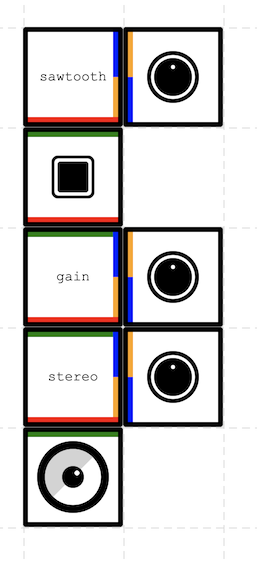
Synt's main idea is to allow the user to assemble tiny modules to build synthetic sounds as easy as pie. Each module is a square with up to 4 inputs or outputs that can be connected to other modules. And that's it.
Synt was also designed to be scalable by facilitating module development by third party developers.
See the live demo here: https://pitpit.github.io/synt
Copyright (C) 2026 Damien Pitard
This program is free software: you can redistribute it and/or modify it under the terms of the GNU Affero General Public License as published by the Free Software Foundation, either version 3 of the License, or (at your option) any later version.
- Architecture — core concepts, module categories, signal flow, connection rules, and design patterns
- Writing an AudioMod — step-by-step guide to implementing a new audio module
- Testing — unit, integration, and end-to-end browser testing strategy
- Web MIDI & MidiIn — Web MIDI API integration, the MidiIn module, implicit learn workflow, and browser support
- Module Reference — catalogue of all built-in modules with their plugs and parameters
- Supported Devices — tested browsers, OS versions, and hardware devices
Here's some articles or libraries that have been useful or inspiring for this project. I'd would like to thank the authors for their help !
- https://konvajs.org
- https://tonejs.github.io/
- https://github.com/wavesjs/waves-ui
- https://people.carleton.edu/~jellinge/mysynth.html
- https://github.com/chrisguttandin/standardized-audio-context
- Clara Rigaud
Install dependencies:
npm install
Run web dev server:
npm start
Run linter:
npm run lint
Run tests:
npm test
The e2e tests use Playwright and run against a production build served locally. Firefox and WebKit browsers are bundled with Playwright; install them once with:
npx playwright install chromium firefox webkit
The tests also include a suite of historical Chrome versions (55 through latest) paired with Android device emulation. Download those binaries once with:
npm run setup:chrome
Then run the full e2e suite:
npm run test:e2e
An HTML report is generated in playwright-report/ after each run.
- Improve backward compatibility on old browsers
- list "work well on"
- Add a way to automaticaly test on old browsers?
- add midi
- Keyboard input (assign a key to a switchOn)
- set a direct value for a Mod?
- have a smaller js bundle for smaller or older device acting as a client. Ability to push remotly a synt setup to it?
- import / export in yaml
- https://www.youtube.com/shorts/kY7BvhUemLE
- https://teenage.engineering/store/po-33
- create duplicable/instanciable modules (to build more complex instruments)
- when connecting a knob on a Mod, it should set its value to the linked Mod value (and animate)
- Wavetable oscillator — playback of user-defined or preset waveforms
- Noise generator — white, pink, and brown noise
- Sample & Hold — periodically captures and holds an input value
- Clock / Tempo — master clock pulse generator with BPM control
- ADSR envelope — Attack, Decay, Sustain, Release with gate input
- AR envelope — simple Attack/Release, loopable
- LFO-to-CV — dedicated slow LFO with depth and rate knobs
- Random / S&H — random voltage generator (stepped or smooth)
- Function generator — slew-limited ramp (rise/fall times)
- [X>] Sequencer — step sequencer with CV and gate outputs (8 or 16 steps)
- VCF low-pass — 12/24 dB/oct ladder-style low-pass filter with cutoff & resonance
- VCF high-pass — high-pass filter with cutoff control
- VCF band-pass — band-pass filter with center frequency and bandwidth
- State-variable filter (SVF) — simultaneous LP/HP/BP outputs
- Comb filter — resonant comb / Karplus-Strong body
- Formant filter — vowel-like formant shaping
- VCA (Voltage-Controlled Amplifier) — amplitude controlled by CV
- Mixer — multi-channel audio/CV mixer with level knobs
- Attenuverter — scales and inverts a CV signal
- CV-to-Audio / Audio-to-CV level shifter
- Crossfader — smooth crossfade between two audio sources
- Delay — echo with time, feedback, and wet/dry
- Reverb — convolution or algorithmic reverb
- Chorus — multi-voice pitch detune effect
- Flanger — short delay with LFO modulation
- Phaser — all-pass chain swept by LFO
- Ring modulator — amplitude modulation producing sum/difference frequencies
- Waveshaper / Distortion — soft-clip, hard-clip, fold-back
- Bit crusher — sample-rate and bit-depth reduction
- Compressor / Limiter — dynamics control with threshold, ratio, attack, release
- Pitch shifter — real-time pitch transposition
- Quantizer — snaps CV to musical scale/chord
- Slew limiter / Portamento — smooths abrupt CV changes
- Voltage offset / DC source — adds a constant CV offset
- Logic gates — AND, OR, XOR, NOT for gate signals
- Clock divider — outputs sub-divisions of a master clock
- Trigger-to-gate / Gate-to-trigger converter
- Pitch-to-CV — detects audio pitch and outputs a V/Oct CV
- MIDI-to-CV — converts MIDI note/velocity/CC to CV signals
- Multiplier / Switch — routes a signal to one of N outputs
- Scope / Oscilloscope — visual display of an audio or CV waveform
- when double clicking on stage, it open the modal with to integer input to set the stage size
- multi selection & multi drag'n drop for mass deletion?
- on Rack, set a "pan" cursor when the cursor is hover the stage and can be pan
- Add several layers to put more Mods?
- Ability to rotate Mod on Rack?
- redesign StickyNote to note be in the Rack anymore and be on a layer above. Save the position in yaml export and restore it.
- import/export current value of the Knob in yaml
- extend the rotate/swipe zone of the knob to the outer circle
- extends the zone to click or tap the switchOn to the outter-square
- on Rack, "drag" cursor when the mod can be drag, "finger" cursor when it can be click
- drag'n drop new Mod in the interface
- add a sticky note mode to write info / doc / quick tour to explain how to use the interface
- replace the green and the red marker by a red & green marker (to show which plug can plug altogether)
- Responsive view on small screens
- Enable again e2e test for firefox "AudioContext reaches running state after user gesture and Tone.start() does not reject"
- Use vite preview instead of http-server for e2e tests
- Add a public licence
- Switch from Gibberish to Tone.js?
- Improve the src/ subtree structure to make it easier to understand
- Switch from webpack to vite
- Upgrade to last node LTS version and update dependencies
- Switch from TravisCI to Github Actions
- PlugType.CTRL should be splitted into PlugType.CTRLOUT and PlugType.CTRLIN
- Specific draw for knob with animation when changing value
- Camel case filenames
- Gain value on Speaker should be controllable by Knob Mod
- How to serve it from various devices (smartphone, esp32...)
- Testing strategy