A high fidelity device simulation platform for Device-Cloud Collaborative Computing



Olearning Simulator is a comprehensive Device-Cloud Collaborative Computing(such as federated learning) sumulation platform that provides convenient usage and flexible customization for various federated learning tasks in both academia and industry. Based on an event-driven architecture, Olearning Simulator integrates rich collections of functionalities to satisfy the burgeoning demands from federated learning, and aims to build up an easy-to-use platform for promoting learning safely and effectively.
In device-cloud collaborative computing,there are two crucial aspects that the simulation framework must take into account.
- the discrepancies between virtual computing units and actual heterogeneous computing devices (HPC vs. real devices)
- the simulation of device behaviors in real-world environments, such as device goes offline, or exhibits periodic access spikes
To handle these two problems, Olearning-Sim uses a hybrid heterogeneous resource and integrates high-performance servers and physical mobile phones. Utilizing this platform, developers can simulate numerous devices for functional testing cost-effectively and capture precise operational responses from varied real devices. The architecture diagram is shown below.

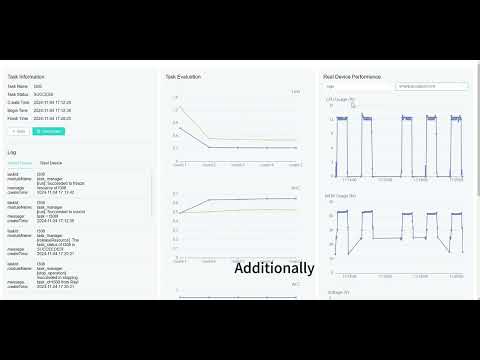
Quick Start | Documentation | Contributing |
- [30-03-2025] We release Olearning Simulator v0.1.0!
- [28-03-2025] Our paper SimDC: A High-Fidelity Device Simulation Platform for Device-Cloud Collaborative Computing has been accepted by ICDCS2025 ✿✿ヽ(°▽°)ノ✿
taskmgr : Task Management Module
resmgr : Resource Management Module
deviceflow: Device Flow Module
kind+k8s :A lightweight K8s foundation, similar to Minikube
ray cluster : KubeRay Cluster, Integrated into Kubernetes (K8s)
mysql : Business Database, Integrated into Kubernetes (K8s)
pulsar : Pulsar Communication Component, Integrated into Kubernetes (K8s)
We provide an end-to-end example for users to start running a standard round of federated learning with Olearning Simulator.
at least
cpu >= 12
mem >= 32G
We should deploy the following models to k8s.
if you have K8s environments you can jump this step.
Turn off Swap
`sudo swapoff -a`
Check whether Swap is turned off
`free -m`
Install kubeadm,kubelet,and kubectl
sudo apt-get update && sudo apt-get install -y apt-transport-https curl `

`curl -s https://mirrors.aliyun.com/kubernetes/apt/doc/apt-key.gpg | sudo apt-key add - `

`cat <<EOF | sudo tee /etc/apt/sources.list.d/kubernetes.list `

`deb https://mirrors.aliyun.com/kubernetes/apt/ kubernetes-xenial main `

`EOF `

`sudo apt-get update `

`sudo apt-get install -y kubelet kubeadm kubectl `

`sudo apt-mark hold kubelet kubeadm kubectl `

`systemctl daemon-reload `

`systemctl restart kubelet`
Docker is already installed in the default environment.
vim kind-example-config.yaml
cat kind-example-config.yaml
# this config file contains all config fields with comments
# NOTE: this is not a particularly useful config file
kind: Cluster
apiVersion: kind.x-k8s.io/v1alpha4
# patch the generated kubeadm config with some extra settings
kubeadmConfigPatches:
- |
  apiVersion: kubelet.config.k8s.io/v1beta1
  kind: KubeletConfiguration
  evictionHard:
    nodefs.available: "0%"
# patch it further using a JSON 6902 patch
kubeadmConfigPatchesJSON6902:
- group: kubeadm.k8s.io
  version: v1beta3
  kind: ClusterConfiguration
  patch: |
    - op: add
      path: /apiServer/certSANs/-
      value: my-hostname
# 1 control plane node and 3 workers
nodes:
# the control plane node config
- role: control-plane
# the three workers
- role: worker
- role: worker
- role: worker
Create a Kind cluster with nodes defined in the YAML file:
export CLUSTER_NAME='simulator'
kind create cluster --name "${CLUSTER_NAME}" --config kind-example-config.yaml  --image=kindest/node:v1.23.0

Creating cluster "simulator" ...
 ✓ Ensuring node image (kindest/node:v1.23.0) 🖼
 ✓ Preparing nodes 📦 📦 📦 📦
 ✓ Writing configuration 📜
 ✓ Starting control-plane 🕹️️️️️️️️️️️️️️️️️️️️️️️️️️️️️️️️️️️️️️️️️️️️️️️️️️️️️️️️️️️️️️️️️️️️️️️️️️️️️️️️️️️️️️️️️️️️️️️️️️
 ✓ Installing CNI 🔌
 ✓ Installing StorageClass 💾
 ✓ Joining worker nodes 🚜
Set kubectl context to "kind-simulator"
You can now use your cluster with:

kubectl cluster-info --context kind-simulator

Have a question, bug, or feature request? Let us know! https://kind.sigs.k8s.io/#community 🙂
(base) tongtailab@OPPO8953:~/benz/software/kind$ kind get nodes
No kind nodes found for cluster "kind".
Check and confirm successful creation:
 kind get nodes -A

simulator-worker
simulator-worker2
simulator-control-plane
simulator-worker3
Kubectl check:
kubectl get nodes

NAME                      STATUS   ROLES                  AGE   VERSION
simulator-control-plane   Ready    control-plane,master   64s   v1.23.0
simulator-worker          Ready    <none>                 46s   v1.23.0
simulator-worker2         Ready    <none>                 33s   v1.23.0
simulator-worker3         Ready    <none>                 46s   v1.23.0
The output indicates that the micro K8s + Kind environment setup is successful.
! helm repo add kuberay https://ray-project.github.io/kuberay-helm/
! helm install kuberay-operator kuberay/kuberay-operator --version 0.5.0
! kubectl get pods
Deploy a kuberay
  ! helm install raycluster kuberay/ray-cluster --version 0.5.0
  ! kubectl get rayclusters
  ! kubectl get pods --selector=ray.io/cluster=raycluster-kuberay
         check if finish deploy:   (until all pods ready)
         ! watch -n 1 kubectl get pod
You can build the image based on the following Dockerfile.
vim Dockerfile
FROM rayproject/ray:2.5.0
#FROM rayproject/ray:2.35.0

SHELL ["/bin/bash", "-c"]
WORKDIR /home/code
ARG DEBIAN_FRONTEND=noninteractive
ARG TZ=Etc/UTC

# change user to root
USER root

RUN rm -f /etc/apt/sources.list.d/kubernetes.list
RUN apt-get update -y
RUN apt-get install -y pip
RUN apt-get install -y git vim


#RUN apt-get update -y \
#    && apt-get install -y pip \
#    && apt install -y git \
#    && apt install -y vim

# install java env
RUN apt install -y openjdk-17-jdk

#RUN git clone https://github.com/ray-project/kuberay.git

RUN git config --global user.email "[email protected]" \
    && git config --global user.name "xiebenchi"

RUN git clone http://W9016862:[email protected]/OppoResearch/dataintel/privacy/olearning-simulator.git \
    && cd  olearning-simulator \
    && git branch opensource-1.0 \
    && git  checkout opensource-1.0 \
    && git  pull origin opensource-1.0

RUN curl --proto '=https' --tlsv1.2 -sSf https://sh.rustup.rs | sh -s -- -y
ENV PATH="/root/.cargo/bin:${PATH}"


RUN python3 -m pip install --upgrade pip setuptools wheel

RUN pip3 install --upgrade pip \
#    && pip config set global.index-url https://pypi.doubanio.com/simple/ \
    && pip install \
      ray==2.5.0 \
      urllib3==1.26.2 \
      protobuf==3.20.3 \
      numpy \
      scipy \
      pandas \
      scikit-learn \
      matplotlib \
      seaborn \
      numpy \
      scipy \
      pandas \
      scikit-learn \
      matplotlib \
      seaborn \
      jupyter \
      tqdm \
      requests \
      tensorboard \
      pydantic==1.10.8 \
      dask[complete] \
      pyzmq \
      joblib \
      pyarrow \
      sqlalchemy==1.4.43 \
      pymysql \
      pulsar-client \
      MNN \
      kubernetes \
      boto3 \
      ray[default] \
      wget \
      websockets \
      websocket-client \
      PuLP==2.6.0 \
      redis \
      pytz \
      traceback2 \
      minio

RUN pip install torch==1.13.1+cpu torchvision==0.14.1+cpu torchaudio==0.13.1+cpu -f https://download.pytorch.org/whl/torch_stable.html

# copy entrypoint.sh to /usr/local/bin
#COPY launch.sh /launch.sh
#COPY bandwidth.sh /bandwidth.sh
#COPY entrypoint.sh /entrypoint.sh
#RUN chmod +x /entrypoint.sh
COPY config /home/ray/.kube/
COPY aws_config /root/.aws/config

#ENTRYPOINT ["/bin/bash", "-c", "/entrypoint.sh"]
ENV JAVA_HOME=/usr/lib/jvm/java-17-openjdk-amd64
Build the image based on the Dockerfile and load it into the Kind cluster.
  build:
    docker build -t testhub.baymax.oppoer.me/80390594/olearning-simulator/opporay:0.2.6 .
  load:
    kind load docker-image testhub.baymax.oppoer.me/80390594/olearning-simulator/opporay:0.2.6
"Deploy a Ray cluster based on the YAML file
vim oppo-simulator.yaml
apiVersion: ray.io/v1alpha1
kind: RayCluster
metadata:
  name: oppo-simulator
spec:
  #entrypoint: python --version
  #runtimeEnv: ewogICAgInBpcCI6IFsKICAgICAgICAicmVxdWVzdHM9PTIuMjYuMCIsCiAgICAgICAgInBlbmR1bHVtPT0yLjEuMiIKICAgIF0sCiAgICAiZW52X3ZhcnMiOiB7ImNvdW50ZXJfbmFtZSI6ICJ0ZXN0X2NvdW50ZXIifQp9Cg==
  #rayClusterSpec:
    rayVersion: '2.5.0' # should match the Ray version in the image of the containers
    # Ray head pod template
    headGroupSpec:
      # The `rayStartParams` are used to configure the `ray start` command.
      # See https://github.com/ray-project/kuberay/blob/master/docs/guidance/rayStartParams.md for the default settings of `rayStartParams` in KubeRay.
      # See https://docs.ray.io/en/latest/cluster/cli.html#ray-start for all available options in `rayStartParams`.
      rayStartParams:
        dashboard-host: '0.0.0.0'
      #pod template
      template:
        spec:
          containers:
            - name: ray-head
              image: testhub.baymax.oppoer.me/80390594/olearning-simulator/opporay:0.2.6
              ports:
                - containerPort: 6379
                  name: gcs-server
                - containerPort: 8265 # Ray dashboard
                  name: dashboard
                - containerPort: 10001
                  name: client
                - containerPort: 8000
                  name: serve
                - containerPort: 60061
                  name: taskmgr
                - containerPort: 60062
                  name: resmgr
                - containerPort: 60063
                  name: rayclustermgr
              resources:
                limits:
                  cpu: "5"
                  memory: "5G"
                requests:
                  cpu: "4"
                  memory: "4G"
              volumeMounts:
                - mountPath: /home/data
                  name: host-data
          volumes:
            # You set volumes at the Pod level, then mount them into containers inside that Pod
            - name: host-data
              hostPath:
                path: /home/data
    workerGroupSpecs:
      # the pod replicas in this group typed worker
      - replicas: 2
        minReplicas: 1
        maxReplicas: 5
        # logical group name, for this called small-group, also can be functional
        groupName: small-group
        # The `rayStartParams` are used to configure the `ray start` command.
        # See https://github.com/ray-project/kuberay/blob/master/docs/guidance/rayStartParams.md for the default settings of `rayStartParams` in KubeRay.
        # See https://docs.ray.io/en/latest/cluster/cli.html#ray-start for all available options in `rayStartParams`.
        rayStartParams: {}
        #pod template
        template:
          spec:
            containers:
              - name: ray-worker # must consist of lower case alphanumeric characters or '-', and must start and end with an alphanumeric character (e.g. 'my-name',  or '123-abc'
                image: testhub.baymax.oppoer.me/80390594/olearning-simulator/opporay:0.2.6
                lifecycle:
                  preStop:
                    exec:
                      command: [ "/bin/sh","-c","ray stop" ]
                resources:
                  limits:
                    cpu: "4"
                    memory: "5G"
                  requests:
                    cpu: "3"
                    memory: "4G"
                volumeMounts:
                - mountPath: /home/data
                  name: host-data
            volumes:
              # You set volumes at the Pod level, then mount them into containers inside that Pod
              - name: host-data
                hostPath:
                  path: /home/data
Deploy a cluster based on the YAML file
kubectl apply -f oppo-simulator.yaml
Check:
 kubectl get pods
NAME                                      READY   STATUS    RESTARTS      AGE
oppo-simulator-head-d2c77                 1/1     Running   0             44s
oppo-simulator-worker-small-group-db2r9   1/1     Running   0             44s
oppo-simulator-worker-small-group-plpvp   1/1     Running   0
The Ray cluster is now successfully deployed.
vim Dockfile
FROM mysql:8.0.28

# 复制自定义配置文件
COPY my.cnf /etc/mysql/mysql.conf.d/my.cnf

# 复制初始化脚本和备份文件
COPY 01_create_db.sql 02_import_data.sh db_backup.sql /docker-entrypoint-initdb.d/

# 暴露MySQL端口
EXPOSE 3306
The relevant scripts are as follows:
Build the image and load it into Kind
 build:
    docker build -t testhub.baymax.oppoer.me/80390594/olearning-simulator/mysql:0.2.0 .
    load:
    kind load docker-image testhub.baymax.oppoer.me/80390594/olearning-simulator/mysql:0.2.0
vim mysql-kind.yaml
apiVersion: apps/v1
kind: Deployment
metadata:
  name: mysql-deployment
spec:
  replicas: 1
  selector:
    matchLabels:
      app: mysql
  template:
    metadata:
      labels:
        app: mysql
    spec:
      containers:
      - name: mysql
        image: testhub.baymax.oppoer.me/80390594/olearning-simulator/mysql:0.2.0
        env:
        - name: MYSQL_ROOT_PASSWORD
          value: "privacy123456"
        ports:
        - containerPort: 3306
        volumeMounts:
        - name: my-hostpath-pv
          mountPath: /var/lib/mysql
      volumes:
      - name: my-hostpath-pv
        hostPath:
          path: /var/lib/mysql
          #type: Directory
---
apiVersion: v1
kind: Service
metadata:
  name: mysql-service
spec:
  selector:
    app: mysql
  ports:
    - protocol: TCP
      port: 3306
      targetPort: 3306
kubectl apply -f mysql-kind.yaml
Check:
kubectl get svc
NAME                      TYPE        CLUSTER-IP      EXTERNAL-IP   PORT(S)
mysql-service             ClusterIP   10.96.129.239   <none>        3306/TCP
kubectl get pods
NAME                                      READY   STATUS    RESTARTS      AGE
mysql-deployment-7f89f86dd6-f5hzg         1/1     Running   1 (26h ago)   26h
MySQL is successfully deployed. Try logging in to verify.
helm repo add apache https://pulsar.apache.org/charts
helm repo update
git clone https://github.com/apache/pulsar-helm-chart
cd pulsar-helm-chart
./scripts/pulsar/prepare_helm_release.sh \
    -n pulsar \
    -k pulsar-mini \
    -c
helm install \
    --values examples/values-minikube.yaml \
    --namespace pulsar \
    pulsar-mini apache/pulsar
kubectl get pods -n pulsar
NAME                                                   READY   STATUS      RESTARTS   AGE
prometheus-pulsar-mini-kube-prometheu-prometheus-0     2/2     Running     0          8h
pulsar-mini-bookie-0                                   1/1     Running     0          8h
pulsar-mini-bookie-init-k4n2c                          0/1     Completed   0          8h
pulsar-mini-broker-0                                   1/1     Running     0          8h
pulsar-mini-grafana-5b9f7cdf7b-xptp6                   3/3     Running     0          8h
pulsar-mini-kube-prometheu-operator-59df65665c-rm2ww   1/1     Running     0          8h
pulsar-mini-kube-state-metrics-7b9db89b4c-qlcsx        1/1     Running     0          8h
pulsar-mini-prometheus-node-exporter-k99tc             1/1     Running     0          8h
pulsar-mini-prometheus-node-exporter-l6vg2             1/1     Running     0          8h
pulsar-mini-prometheus-node-exporter-pwcr5             1/1     Running     0          8h
pulsar-mini-prometheus-node-exporter-zjsv9             1/1     Running     0          8h
pulsar-mini-proxy-0                                    1/1     Running     0          8h
pulsar-mini-pulsar-init-g9jms                          0/1     Completed   0          8h
pulsar-mini-pulsar-manager-0                           1/1     Running     0          8h
pulsar-mini-pulsar-manager-init-zw45f                  0/1     Completed   0          8h
pulsar-mini-toolset-0                                  1/1     Running     0          8h
pulsar-mini-zookeeper-0                                1/1     Running
Expose the service using kubectl port-forward
Qeury service :
 kubectl get svc -n pulsar
NAME                                    TYPE        CLUSTER-IP      EXTERNAL-IP   PORT(S)                               AGE
prometheus-operated                     ClusterIP   None            <none>        9090/TCP                              8h
pulsar-mini-bookie                      ClusterIP   None            <none>        3181/TCP,8000/TCP                     8h
pulsar-mini-broker                      ClusterIP   None            <none>        8080/TCP,6650/TCP                     8h
pulsar-mini-grafana                     ClusterIP   10.96.121.78    <none>        80/TCP                                8h
pulsar-mini-kube-prometheu-operator     ClusterIP   10.96.20.66     <none>        443/TCP                               8h
pulsar-mini-kube-prometheu-prometheus   ClusterIP   10.96.191.198   <none>        9090/TCP,8080/TCP                     8h
pulsar-mini-kube-state-metrics          ClusterIP   10.96.190.122   <none>        8080/TCP                              8h
pulsar-mini-prometheus-node-exporter    ClusterIP   10.96.157.19    <none>        9100/TCP                              8h
pulsar-mini-proxy                       NodePort    10.96.213.120   <none>        80:30609/TCP,6650:32373/TCP           8h
pulsar-mini-pulsar-manager              ClusterIP   10.96.25.66     <none>        9527/TCP                              8h
pulsar-mini-pulsar-manager-admin        ClusterIP   10.96.221.108   <none>        7750/TCP                              8h
pulsar-mini-toolset                     ClusterIP   None            <none>        <none>                                8h
pulsar-mini-zookeeper                   ClusterIP   None            <none>        8000/TCP,2888/TCP,3888/TCP,2181/TCP   8h
Expose services:
kubectl port-forward --address 0.0.0.0 svc/pulsar-mini-pulsar-manager -n pulsar 9527:9527
kubectl port-forward --address 0.0.0.0 svc/pulsar-mini-pulsar-manager-admin -n pulsar 7750:7750
CSRF_TOKEN=$(curl http://localhost:7750/pulsar-manager/csrf-token)
curl \
    -H "X-XSRF-TOKEN: $CSRF_TOKEN" \
    -H "Cookie: XSRF-TOKEN=$CSRF_TOKEN;" \
    -H 'Content-Type: application/json' \
    -X PUT http://localhost:7750/pulsar-manager/users/superuser \
    -d '{"name": "admin", "password": "apachepulsar", "description": "test", "email": "[email protected]"}'
"Log in at this address: http://localhost:9527/
Use the following credentials when logging in:
Username : admin
Password : apachepulsar"


The Pulsar configuration is now complete.
vim Dockerfile
# 1. basic settings
# Make docker from base docker python:3.9.12
FROM python:3.7.15
SHELL ["/bin/bash", "-c"]
WORKDIR /home/code
ARG DEBIAN_FRONTEND=noninteractive
ARG TZ=Etc/UTC

RUN apt-get update -y \
    && apt-get install -y pip \
    && apt install -y git \
    && apt install -y vim

RUN git config --global user.email "[email protected]" \
    && git config --global user.name "xiebenchi"

# 2. download code
RUN git clone http://W9016862:[email protected]/OppoResearch/dataintel/privacy/olearning-simulator.git \
    && cd olearning-simulator \
    && git branch opensource-1.0 \
    && git checkout opensource-1.0 \
    && git  pull origin opensource-1.0

RUN curl --proto '=https'  --tlsv1.2 -sSf https://sh.rustup.rs | sh -s -- -y
ENV  PATH="/root/.cargo/bin:${PATH}"

# 3. pip install
RUN pip3 install --upgrade pip \
#    && pip config set global.index-url https://pypi.doubanio.com/simple/ \
    && pip install \
      ray==2.5.0 \
      urllib3==1.26.2 \
      protobuf==3.20.3 \
      numpy \
      scipy \
      pandas \
      scikit-learn \
      vaex \
      matplotlib \
      seaborn \
      jupyter \
      tqdm \
      requests \
      tensorboard \
      pydantic==1.10.8 \
      dask[complete] \
      pyzmq \
      joblib \
      pyarrow \
      sqlalchemy==1.4.43 \
      pymysql \
      pulsar-client \
      MNN \
      kubernetes \
      boto3 \
      ray[default] \
      wget \
      websocket-client \
      websockets \
      PuLP==2.6.0 \
      redis \
      pytz \
      traceback2 \
      minio

# 4.copy config for k8s
COPY config /root/.kube/

# 5. start resMgr GRPC interface
#CMD source /home/code/olearning-simulator/python/demo/launch.sh && python /home/code/olearning-simulator/python/demo/resourceMgr/res_mgr_srv.py
#COPY test.py /home/
#CMD python /home/test.py

WORKDIR /home/code/olearning-simulator/python/ols/test/resourceMgr
ENV PYTHONPATH=/home/code/olearning-simulator/python:$PYTHONPATH
ENV PYTHONPATH=/home/code/olearning-simulator/python/ols/proto:$PYTHONPATH
CMD python /home/code/olearning-simulator/python/ols/test/resourceMgr/res_mgr_srv.py
Build the image and load it into Kind
    build:
    docker build -t testhub.baymax.oppoer.me/80390594/olearning-simulator/resmgr:0.2.6 .
    load:
    kind load docker-image testhub.baymax.oppoer.me/80390594/olearning-simulator/resmgr:0.2.6
vim resmgr.yaml
apiVersion: apps/v1
kind: Deployment
metadata:
  name: resmgr-deployment
spec:
  selector:
    matchLabels:
      app: resmgr
  replicas: 1 # tells deployment to run 2 pods matching the template
  template:
    metadata:
      labels:
        app: resmgr
    spec:
      containers:
      - name: resmgr
        image: testhub.baymax.oppoer.me/80390594/olearning-simulator/resmgr:0.2.6
        ports:
        - containerPort: 60062
        volumeMounts:
        - mountPath: /home/data
          name: simulator-data
      volumes:
      - name: simulator-data
        hostPath:
          path: /home/data
          type: Directory
---
apiVersion: v1
kind: Service
metadata:
  name: resmgr-service
spec:
  selector:
    app: resmgr
  ports:
    - protocol: TCP
      port: 60062
      targetPort: 60062
Deploy :
kubectlapply -f resmgr.yaml
Check:
kubectl get pods
NAME                                      READY   STATUS    RESTARTS      AGE
resmgr-deployment-7fcd487559-llbvx        1/1     Running   0             122m
The successful startup of the Pod here indicates that the resmgr deployment was successful.
vim Dockerfile
# 1. basic settings
# Make docker from base docker python:3.9.12
FROM python:3.7.15
SHELL ["/bin/bash", "-c"]
WORKDIR /home/code
ARG DEBIAN_FRONTEND=noninteractive
ARG TZ=Etc/UTC

RUN apt update -y \
    && apt install -y git \
    && apt install -y vim

RUN git config --global user.email "[email protected]" \
    && git config --global user.name "xiebenchi"

# 2. download code
RUN git clone https://W9016862:[email protected]/OppoResearch/dataintel/privacy/olearning-simulator.git \
    && cd olearning-simulator \
    && git branch opensource-1.0 \
    && git checkout opensource-1.0 \
    && git pull origin opensource-1.0

# 安装 vaex 依赖
RUN  curl --proto '=https' --tlsv1.2  -sSf https://sh.rustup.rs | sh -s -- -y
ENV  PATH="/root/.cargo/bin:${PATH}"

# 3. pip install
RUN pip3 install --upgrade pip \
#    && pip config set global.index-url https://pypi.doubanio.com/simple/ \
    && pip install \
      ray==2.5.0 \
      urllib3==1.26.2 \
      protobuf==3.20.3 \
      numpy \
      scipy \
      pandas \
      scikit-learn \
      vaex \
      matplotlib \
      seaborn \
      jupyter \
      tqdm \
      requests \
      tensorboard \
      pydantic==1.10.8 \
      dask[complete] \
      pyzmq \
      joblib \
      pyarrow \
      sqlalchemy==1.4.43 \
      pymysql \
      pulsar-client \
      MNN \
      kubernetes \
      boto3 \
      ray[default] \
      redis \
      wget \
      websocket-client \
      websockets \
      PuLP==2.6.0 \
      redis \
      pytz \
      traceback2 \
      minio

# 4.copy config for k8s
COPY config /root/.kube/

# 5. start resMgr GRPC interface
# CMD source /home/code/olearning-simulator/python/demo/launch.sh && python /home/code/olearning-simulator/python/demo/resourceMgr/res_mgr_srv.py
# COPY test.py /home/
# CMD python /home/test.py

WORKDIR /home/code/olearning-simulator/python/ols/test/taskMgr
ENV PYTHONPATH=/home/code/olearning-simulator/python:$PYTHONPATH
ENV PYTHONPATH=/home/code/olearning-simulator/python/ols/proto:$PYTHONPATH
CMD python /home/code/olearning-simulator/python/ols/test/taskMgr/server_taskmgr.py
Build the image and load it into Kind
    build:
    docker build -t testhub.baymax.oppoer.me/80390594/olearning-simulator/taskmgr:0.2.6 .
    load:
    kind load docker-image testhub.baymax.oppoer.me/80390594/olearning-simulator/taskmgr:0.2.6
vim taskmgr.yaml
apiVersion: apps/v1
kind: Deployment
metadata:
  name: taskmgr-deployment
spec:
  selector:
    matchLabels:
      app: taskmgr
  replicas: 1 # tells deployment to run 2 pods matching the template
  template:
    metadata:
      labels:
        app: taskmgr
    spec:
      containers:
      - name: taskmgr
        image: testhub.baymax.oppoer.me/80390594/olearning-simulator/taskmgr:0.2.6
        ports:
        - containerPort: 60061
        volumeMounts:
        - mountPath: /home/data
          name: simulator-data
      volumes:
      - name: simulator-data
        hostPath:
          path: /home/data
          type: Directory
---
apiVersion: v1
kind: Service
metadata:
  name: taskmgr-service
spec:
  selector:
    app: taskmgr
  ports:
    - protocol: TCP
      port: 60061
      targetPort: 60061
Deploy:
kubectl apply -f taskmgr.yaml
Check:
 kubectl get pods
NAME                                      READY   STATUS    RESTARTS      AGE
taskmgr-deployment-86f76f445f-589fk       1/1     Running   0             70m
The deployment of taskmgr is successful at this point.
vim Dockerfile
# 1. basic settings
# Make docker from base docker python:3.9.12
FROM python:3.7.15
SHELL ["/bin/bash", "-c"]
WORKDIR /home/code
ARG DEBIAN_FRONTEND=noninteractive
ARG TZ=Etc/UTC

RUN apt-get update -y \
    && apt-get install -y pip \
    && apt install -y git \
    && apt install -y vim

RUN git config --global user.email "[email protected]" \
    && git config --global user.name "xiebenchi"

# 2. download code
RUN git clone http://W9016862:[email protected]/OppoResearch/dataintel/privacy/olearning-simulator.git \
    && cd olearning-simulator \
    && git branch opensource-1.0 \
    && git  checkout opensource-1.0 \
    && git pull origin opensource-1.0

RUN curl --proto '=https' --tlsv1.2 -sSf https://sh.rustup.rs | sh -s -- -y
ENV PATH="/root/.cargo/bin:${PATH}"

# 3. pip install
RUN pip3 install --upgrade pip \
#    && pip config set global.index-url https://pypi.doubanio.com/simple/ \
    && pip install \
      ray==2.5.0 \
      urllib3==1.26.2 \
      protobuf==3.20.3 \
      numpy \
      scipy \
      pandas \
      scikit-learn \
      vaex \
      matplotlib \
      seaborn \
      jupyter \
      tqdm \
      requests \
      tensorboard \
      pydantic==1.10.8 \
      dask[complete] \
      pyzmq \
      joblib \
      pyarrow \
      sqlalchemy==1.4.43 \
      pymysql \
      pulsar-client \
      MNN \
      kubernetes \
      boto3 \
      ray[default] \
      wget \
      websocket-client \
      websockets \
      PuLP==2.6.0 \
      redis \
      pytz \
      traceback2 \
      minio

# 4.copy config for k8s
COPY config /root/.kube/

# 5. start resMgr GRPC interface
#CMD source /home/code/olearning-simulator/python/demo/launch.sh && python /home/code/olearning-simulator/python/demo/resourceMgr/res_mgr_srv.py
#COPY test.py /home/
#CMD python /home/test.py

WORKDIR /home/code/olearning-simulator/python/ols/deviceflow/grpc_service
ENV PYTHONPATH=/home/code/olearning-simulator/python:$PYTHONPATH
ENV PYTHONPATH=/home/code/olearning-simulator/python/ols/proto:$PYTHONPATH
CMD python /home/code/olearning-simulator/python/ols/deviceflow/grpc_service/deviceflow_server.py
Build the image and load it into Kind.
    build:
    docker build -t testhub.baymax.oppoer.me/80390594/olearning-simulator/deviceflow:0.2.6 .
    load:
    kind load docker-image testhub.baymax.oppoer.me/80390594/olearning-simulator/deviceflow:0.2.6
vim deviceflow.yaml
apiVersion: apps/v1
kind: Deployment
metadata:
  name: deviceflow-deployment
spec:
  selector:
    matchLabels:
      app: deviceflow
  replicas: 1 # tells deployment to run 2 pods matching the template
  template:
    metadata:
      labels:
        app: deviceflow
    spec:
      containers:
      - name: deviceflow
        image: testhub.baymax.oppoer.me/80390594/olearning-simulator/deviceflow:0.2.6
        ports:
        - containerPort: 50051
        volumeMounts:
        - mountPath: /home/data
          name: simulator-data
      volumes:
      - name: simulator-data
        hostPath:
          path: /home/data
          type: Directory
---
apiVersion: v1
kind: Service
metadata:
  name: deviceflow-service
spec:
  selector:
    app: deviceflow
  ports:
    - protocol: TCP
      port: 50051
      targetPort: 50051
Deploy:
kubectl apply -f deviceflow.yaml
Check:
 kubectl get pods
NAME                                      READY   STATUS    RESTARTS      AGE
deviceflow-deployment-65b496b846-bntf4    1/1     Running   0             73m
This indicates that the deviceflow has been successfully deployed!
Olearning Simulator is released under MIT License.
We greatly appreciate any contribution to Olearning Simulator! We provide a developer version of Olearning Simulator with additional pre-commit hooks to perform commit checks compared to the official version