



- 📦 Small: Just 1.8 KB brotlied (4x+ lighter than color)
- 🚀 Fast: 5.5x+ faster than color
- 😍 Simple: Chainable API and familiar patterns
- 💪 Immutable: No need to worry about data mutations
- 🛡 Bulletproof: Written in strict TypeScript and has 100% test coverage
- 🗂 Typed: Ships with types included
- 🏗 Extendable: Built-in plugin system to add new functionality
- 📚 CSS-compliant: Strictly follows CSS Color Level specifications
- 👫 Works everywhere: Supports all browsers and Node.js
- 💨 Dependency-free

| Library | Operations/sec | Size (minified) |
Size (brotlied) |
Type declarations |
|---|---|---|---|---|
| colord 👑 | 4,740,298 | 5.81 kB | 1.80 kB | |
| color | 815,693 | 24 kB | 7.52 kB | |
| tinycolor2 | 1,012,855 | 15.23 kB | 4.67 kB | |
| ac-colors | 973,255 | 10.18 kB | 2.96 kB | |
| chroma-js | 951,018 | 42.47 kB | 14.89 kB |
Measured by the Benchmark workflow on a standard GitHub-hosted runner (Ubuntu 24.04, 4 vCPU, Node 22). Ops/sec depend on the machine, so read the ratios rather than the absolute numbers. Bundle sizes come from size-limit, importing each library's main export so unused code is tree-shaken away, the same way npm run size measures colord.
| Project | What it is | Reach |
|---|---|---|
| GitLab | DevSecOps for the entire software lifecycle | 50M+ users |
| WordPress | Gutenberg, the editor inside every WordPress site | 40% of all websites |
| Stylelint | A mighty CSS linter | 44M downloads/month |
| cssnano | The CSS minifier of the PostCSS world (up to v6) | 48M downloads/month |
| pdf.net | Everything you can do to a PDF, in the browser | 4M+ users |
| Gitea | Self-hosted all-in-one software development service | 57.5k ⭐ |
| PixiJS | The fastest, most flexible 2D WebGL renderer | 48k ⭐ |
| Umami | Analytics without the surveillance | 38k ⭐ |
| Documenso | The open source DocuSign | 14.6k ⭐ |
| Leva | React-first GUI panel for live tweaking | 3.5M downloads/month |
...and 9.5 million more repositories 🤯
npm i colord
import { colord } from "colord";

colord("#ff0000").grayscale().alpha(0.25).toRgbString(); // "rgba(128, 128, 128, 0.25)"
colord("rgb(192, 192, 192)").isLight(); // true
colord("hsl(0, 50%, 50%)").darken(0.25).toHex(); // "#602020"- Hexadecimal strings (including 3, 4 and 8 digit notations)
- RGB strings and objects
- HSL strings and objects
- HSV objects
- Color names (via plugin)
- HWB objects and strings (via plugin)
- CMYK objects and strings (via plugin)
- LCH objects and strings (via plugin)
- LAB objects (via plugin)
- XYZ objects (via plugin)
colord(input)
Parses the given input and creates a new Colord instance. String parsing strictly conforms to CSS Color Level Specifications.
import { colord } from "colord";

// String input examples
colord("#FFF");
colord("#ffffff");
colord("#ffffffff");
colord("rgb(255, 255, 255)");
colord("rgba(255, 255, 255, 0.5)");
colord("rgba(100% 100% 100% / 50%)");
colord("hsl(90, 100%, 100%)");
colord("hsla(90, 100%, 100%, 0.5)");
colord("hsla(90deg 100% 100% / 50%)");
colord("tomato"); // requires "names" plugin

// Object input examples
colord({ r: 255, g: 255, b: 255 });
colord({ r: 255, g: 255, b: 255, a: 1 });
colord({ h: 360, s: 100, l: 100 });
colord({ h: 360, s: 100, l: 100, a: 1 });
colord({ h: 360, s: 100, v: 100 });
colord({ h: 360, s: 100, v: 100, a: 1 });
Check out the "Plugins" section for more input format examples.
getFormat(input)
Returns a color model name for the input passed to the function. Uses the same parsing system as colord function.
import { getFormat } from "colord";

getFormat("#aabbcc"); // "hex"
getFormat({ r: 13, g: 237, b: 162, a: 0.5 }); // "rgb"
getFormat("hsl(180deg, 50%, 50%)"); // "hsl"
getFormat("WUT?"); // undefined.toHex()
Returns the hexadecimal representation of a color. When the alpha channel value of the color is less than 1, it outputs #rrggbbaa format instead of #rrggbb.
colord("rgb(0, 255, 0)").toHex(); // "#00ff00"
colord({ h: 300, s: 100, l: 50 }).toHex(); // "#ff00ff"
colord({ r: 255, g: 255, b: 255, a: 0 }).toHex(); // "#ffffff00"
.toRgb()
colord("#ff0000").toRgb(); // { r: 255, g: 0, b: 0, a: 1 }
colord({ h: 180, s: 100, l: 50, a: 0.5 }).toRgb(); // { r: 0, g: 255, b: 255, a: 0.5 }
.toRgbString()
colord("#ff0000").toRgbString(); // "rgb(255, 0, 0)"
colord({ h: 180, s: 100, l: 50, a: 0.5 }).toRgbString(); // "rgba(0, 255, 255, 0.5)"
.toHsl()
Converts a color to HSL color space and returns an object.
colord("#ffff00").toHsl(); // { h: 60, s: 100, l: 50, a: 1 }
colord("rgba(0, 0, 255, 0.5) ").toHsl(); // { h: 240, s: 100, l: 50, a: 0.5 }
.toHslString()
Converts a color to HSL color space and expresses it through the functional notation.
colord("#ffff00").toHslString(); // "hsl(60, 100%, 50%)"
colord("rgba(0, 0, 255, 0.5)").toHslString(); // "hsla(240, 100%, 50%, 0.5)"
.toHsv()
Converts a color to HSV color space and returns an object.
colord("#ffff00").toHsv(); // { h: 60, s: 100, v: 100, a: 1 }
colord("rgba(0, 255, 255, 0.5) ").toHsv(); // { h: 180, s: 100, v: 100, a: 1 }
.toName(options?) (names plugin)
Converts a color to a CSS keyword. Returns undefined if the color is not specified in the specs.
import { colord, extend } from "colord";
import namesPlugin from "colord/plugins/names";

extend([namesPlugin]);

colord("#ff6347").toName(); // "tomato"
colord("#00ffff").toName(); // "cyan"
colord("rgba(0, 0, 0, 0)").toName(); // "transparent"

colord("#fe0000").toName(); // undefined (the color is not specified in CSS specs)
colord("#fe0000").toName({ closest: true }); // "red" (closest color available)
.toCmyk() (cmyk plugin)
Converts a color to CMYK color space.
import { colord, extend } from "colord";
import cmykPlugin from "colord/plugins/cmyk";

extend([cmykPlugin]);

colord("#ffffff").toCmyk(); // { c: 0, m: 0, y: 0, k: 0, a: 1 }
colord("#555aaa").toCmyk(); // { c: 50, m: 47, y: 0, k: 33, a: 1 }
.toCmykString() (cmyk plugin)
Converts a color to color space.
Converts a color to CMYK color space and expresses it through the functional notation
import { colord, extend } from "colord";
import cmykPlugin from "colord/plugins/cmyk";

extend([cmykPlugin]);

colord("#99ffff").toCmykString(); // "device-cmyk(40% 0% 0% 0%)"
colord("#00336680").toCmykString(); // "device-cmyk(100% 50% 0% 60% / 0.5)"
.toHwb() (hwb plugin)
Converts a color to HWB (Hue-Whiteness-Blackness) color space.
import { colord, extend } from "colord";
import hwbPlugin from "colord/plugins/hwb";

extend([hwbPlugin]);

colord("#ffffff").toHwb(); // { h: 0, w: 100, b: 0, a: 1 }
colord("#555aaa").toHwb(); // { h: 236, w: 33, b: 33, a: 1 }
.toHwbString() (hwb plugin)
Converts a color to HWB (Hue-Whiteness-Blackness) color space and expresses it through the functional notation.
import { colord, extend } from "colord";
import hwbPlugin from "colord/plugins/hwb";

extend([hwbPlugin]);

colord("#999966").toHwbString(); // "hwb(60 40% 40%)"
colord("#99ffff").toHwbString(); // "hwb(180 60% 0%)"
colord("#003366").alpha(0.5).toHwbString(); // "hwb(210 0% 60% / 0.5)"
.toLab() (lab plugin)
Converts a color to CIE LAB color space. The conversion logic is ported from CSS Color Module Level 4 Specification.
import { colord, extend } from "colord";
import labPlugin from "colord/plugins/lab";

extend([labPlugin]);

colord("#ffffff").toLab(); // { l: 100, a: 0, b: 0, alpha: 1 }
colord("#33221180").toLab(); // { l: 14.89, a: 5.77, b: 14.41, alpha: 0.5 }
.toLch() (lch plugin)
Converts a color to CIE LCH color space. The conversion logic is ported from CSS Color Module Level 4 Specification.
import { colord, extend } from "colord";
import lchPlugin from "colord/plugins/lch";

extend([lchPlugin]);

colord("#ffffff").toLch(); // { l: 100, c: 0, h: 0, a: 1 }
colord("#213b0b").toLch(); // { l: 21.85, c: 31.95, h: 127.77, a: 1 }
.toLchString() (lch plugin)
Converts a color to CIE LCH color space and expresses it through the functional notation.
import { colord, extend } from "colord";
import lchPlugin from "colord/plugins/lch";

extend([lchPlugin]);

colord("#ffffff").toLchString(); // "lch(100% 0 0)"
colord("#213b0b").alpha(0.5).toLchString(); // "lch(21.85% 31.95 127.77 / 0.5)"
.toXyz() (xyz plugin)
Converts a color to CIE XYZ color space. The conversion logic is ported from CSS Color Module Level 4 Specification.
import { colord, extend } from "colord";
import xyzPlugin from "colord/plugins/xyz";

extend([xyzPlugin]);

colord("#ffffff").toXyz(); // { x: 95.047, y: 100, z: 108.883, a: 1 }.alpha(value)
Changes the alpha channel value and returns a new Colord instance.
colord("rgb(0, 0, 0)").alpha(0.5).toRgbString(); // "rgba(0, 0, 0, 0.5)".invert()
Creates a new Colord instance containing an inverted (opposite) version of the color.
colord("#ffffff").invert().toHex(); // "#000000"
colord("#aabbcc").invert().toHex(); // "#554433"
.saturate(amount = 0.1)
Increases the HSL saturation of a color by the given amount.
colord("#bf4040").saturate(0.25).toHex(); // "#df2020"
colord("hsl(0, 50%, 50%)").saturate(0.5).toHslString(); // "hsl(0, 100%, 50%)"
.desaturate(amount = 0.1)
Decreases the HSL saturation of a color by the given amount.
colord("#df2020").desaturate(0.25).toHex(); // "#bf4040"
colord("hsl(0, 100%, 50%)").desaturate(0.5).toHslString(); // "hsl(0, 50%, 50%)"
.grayscale()
Makes a gray color with the same lightness as a source color. Same as calling desaturate(1).
colord("#bf4040").grayscale().toHex(); // "#808080"
colord("hsl(0, 100%, 50%)").grayscale().toHslString(); // "hsl(0, 0%, 50%)"
.lighten(amount = 0.1)
Increases the HSL lightness of a color by the given amount.
colord("#000000").lighten(0.5).toHex(); // "#808080"
colord("#223344").lighten(0.3).toHex(); // "#5580aa"
colord("hsl(0, 50%, 50%)").lighten(0.5).toHslString(); // "hsl(0, 50%, 100%)"
.darken(amount = 0.1)
Decreases the HSL lightness of a color by the given amount.
colord("#ffffff").darken(0.5).toHex(); // "#808080"
colord("#5580aa").darken(0.3).toHex(); // "#223344"
colord("hsl(0, 50%, 100%)").lighten(0.5).toHslString(); // "hsl(0, 50%, 50%)"
.hue(value)
Changes the hue value and returns a new Colord instance.
colord("hsl(90, 50%, 50%)").hue(180).toHslString(); // "hsl(180, 50%, 50%)"
colord("hsl(90, 50%, 50%)").hue(370).toHslString(); // "hsl(10, 50%, 50%)"
.rotate(amount = 15)
Increases the HSL hue value of a color by the given amount.
colord("hsl(90, 50%, 50%)").rotate(90).toHslString(); // "hsl(180, 50%, 50%)"
colord("hsl(90, 50%, 50%)").rotate(-180).toHslString(); // "hsl(270, 50%, 50%)"
.mix(color2, ratio = 0.5, space = "lab") (mix plugin)
Produces a mixture of two colors and returns the result of mixing them (new Colord instance).
In contrast to other libraries that perform RGB values mixing, Colord mixes colors through LAB color space by default. This approach produces better results and doesn't have the drawbacks the legacy way has.
Pass "rgb" as the third argument to interpolate RGB channels instead. This mode matches the way browsers and design tools (such as Figma) composite translucent layers: mixing a background with an overlay color at the overlay's opacity gives the same result as alpha compositing.
import { colord, extend } from "colord";
import mixPlugin from "colord/plugins/mix";

extend([mixPlugin]);

colord("#ffffff").mix("#000000").toHex(); // "#777777"
colord("#800080").mix("#dda0dd").toHex(); // "#af5cae"
colord("#cd853f").mix("#eee8aa", 0.6).toHex(); // "#e3c07e"
colord("#008080").mix("#808000", 0.35).toHex(); // "#50805d"

// RGB interpolation (matches alpha compositing in browsers and design tools)
colord("#ff0000").mix("#ffffff", 0.5, "rgb").toHex(); // "#ff8080"
colord("#f0f3f1").mix("#007d40", 0.14, "rgb").toHex(); // "#cee2d8"
.tints(count = 5, space = "lab") (mix plugin)
Provides functionality to generate tints of a color. Returns an array of Colord instances, including the original color. Mixes through LAB color space by default; pass "rgb" to interpolate RGB channels instead.
import { colord, extend } from "colord";
import mixPlugin from "colord/plugins/mix";

extend([mixPlugin]);

const color = colord("#ff0000");
color.tints(3).map((c) => c.toHex()); // ["#ff0000", "#ff9f80", "#ffffff"];
.shades(count = 5, space = "lab") (mix plugin)
Provides functionality to generate shades of a color. Returns an array of Colord instances, including the original color. Mixes through LAB color space by default; pass "rgb" to interpolate RGB channels instead.
import { colord, extend } from "colord";
import mixPlugin from "colord/plugins/mix";

extend([mixPlugin]);

const color = colord("#ff0000");
color.shades(3).map((c) => c.toHex()); // ["#ff0000", "#7a1b0b", "#000000"];
.tones(count = 5, space = "lab") (mix plugin)
Provides functionality to generate tones of a color. Returns an array of Colord instances, including the original color. Mixes through LAB color space by default; pass "rgb" to interpolate RGB channels instead.
import { colord, extend } from "colord";
import mixPlugin from "colord/plugins/mix";

extend([mixPlugin]);

const color = colord("#ff0000");
color.tones(3).map((c) => c.toHex()); // ["#ff0000", "#c86147", "#808080"];
.harmonies(type = "complementary") (harmonies plugin)
Provides functionality to generate harmony colors. Returns an array of Colord instances.
import { colord, extend } from "colord";
import harmoniesPlugin from "colord/plugins/harmonies";

extend([harmoniesPlugin]);

const color = colord("#ff0000");
color.harmonies("analogous").map((c) => c.toHex()); // ["#ff0080", "#ff0000", "#ff8000"]
color.harmonies("complementary").map((c) => c.toHex()); // ["#ff0000", "#00ffff"]
color.harmonies("double-split-complementary").map((c) => c.toHex()); // ["#ff0080", "#ff0000", "#ff8000", "#00ff80", "#0080ff"]
color.harmonies("rectangle").map((c) => c.toHex()); // ["#ff0000", "#ffff00", "#00ffff", "#0000ff"]
color.harmonies("split-complementary").map((c) => c.toHex()); // ["#ff0000", "#00ff80", "#0080ff"]
color.harmonies("tetradic").map((c) => c.toHex()); // ["#ff0000", "#80ff00", "#00ffff", "#8000ff"]
color.harmonies("triadic").map((c) => c.toHex()); // ["#ff0000", "#00ff00", "#0000ff"].isValid()
Returns a boolean indicating whether or not an input has been parsed successfully. Note: If parsing is unsuccessful, Colord defaults to black (does not throws an error).
colord("#ffffff").isValid(); // true
colord("#wwuutt").isValid(); // false
colord("abracadabra").isValid(); // false
colord({ r: 0, g: 0, b: 0 }).isValid(); // true
colord({ r: 0, g: 0, v: 0 }).isValid(); // false
.isEqual(color2)
Determines whether two values are the same color.
colord("#000000").isEqual("rgb(0, 0, 0)"); // true
colord("#000000").isEqual("rgb(255, 255, 255)"); // false
.alpha()
colord("#ffffff").alpha(); // 1
colord("rgba(50, 100, 150, 0.5)").alpha(); // 0.5
.hue()
colord("hsl(90, 50%, 50%)").hue(); // 90
colord("hsl(-10, 50%, 50%)").hue(); // 350
.brightness()
Returns the brightness of a color (from 0 to 1). The calculation logic is modified from Web Content Accessibility Guidelines.
colord("#000000").brightness(); // 0
colord("#808080").brightness(); // 0.5
colord("#ffffff").brightness(); // 1
.isLight()
Same as calling brightness() >= 0.5.
colord("#111111").isLight(); // false
colord("#aabbcc").isLight(); // true
colord("#ffffff").isLight(); // true
.isDark()
Same as calling brightness() < 0.5.
colord("#111111").isDark(); // true
colord("#aabbcc").isDark(); // false
colord("#ffffff").isDark(); // false
.luminance() (a11y plugin)
Returns the relative luminance of a color, normalized to 0 for darkest black and 1 for lightest white as defined by WCAG 2.0.
colord("#000000").luminance(); // 0
colord("#808080").luminance(); // 0.22
colord("#ccddee").luminance(); // 0.71
colord("#ffffff").luminance(); // 1
.contrast(color2 = "#FFF") (a11y plugin)
Calculates a contrast ratio for a color pair. This luminance difference is expressed as a ratio ranging from 1 (e.g. white on white) to 21 (e.g., black on a white). WCAG Accessibility Level AA requires a ratio of at least 4.5 for normal text and 3 for large text.
colord("#000000").contrast(); // 21 (black on white)
colord("#ffffff").contrast("#000000"); // 21 (white on black)
colord("#777777").contrast(); // 4.47 (gray on white)
colord("#ff0000").contrast(); // 3.99 (red on white)
colord("#0000ff").contrast("#ff000"); // 2.14 (blue on red)
.isReadable(color2 = "#FFF", options?) (a11y plugin)
Checks that a background and text color pair is readable according to WCAG 2.0 Contrast and Color Requirements.
colord("#000000").isReadable(); // true (normal black text on white bg conforms to WCAG AA)
colord("#777777").isReadable(); // false (normal gray text on white bg conforms to WCAG AA)
colord("#ffffff").isReadable("#000000"); // true (normal white text on black bg conforms to WCAG AA)
colord("#e60000").isReadable("#ffff47"); // true (normal red text on yellow bg conforms to WCAG AA)
colord("#e60000").isReadable("#ffff47", { level: "AAA" }); // false (normal red text on yellow bg does not conform to WCAG AAA)
colord("#e60000").isReadable("#ffff47", { level: "AAA", size: "large" }); // true (large red text on yellow bg conforms to WCAG AAA)
.delta(color2 = "#FFF") (lab plugin)
Calculates the perceived color difference between two colors.
The difference calculated according to Delta E2000.
The return value is 0 if the colors are equal, 1 if they are entirely different.
colord("#3296fa").delta("#197dc8"); // 0.099
colord("#faf0c8").delta("#ffffff"); // 0.148
colord("#afafaf").delta("#b4b4b4"); // 0.014
colord("#000000").delta("#ffffff"); // 1random()
Returns a new Colord instance with a random color value inside.
import { random } from "colord";

random().toHex(); // "#01c8ec"
random().alpha(0.5).toRgb(); // { r: 13, g: 237, b: 162, a: 0.5 }
.minify(options?)
Converts a color to its shortest string representation.
import { colord, extend } from "colord";
import minifyPlugin from "colord/plugins/minify";

extend([minifyPlugin]);

colord("black").minify(); // "#000"
colord("#112233").minify(); // "#123"
colord("darkgray").minify(); // "#a9a9a9"
colord("rgba(170,170,170,0.4)").minify(); // "hsla(0,0%,67%,.4)"
colord("rgba(170,170,170,0.4)").minify({ alphaHex: true }); // "#aaa6"| Option | Default | Description |
|---|---|---|
hex |
true |
Enable #rrggbb and #rgb notations |
alphaHex |
false |
Enable #rrggbbaa and #rgba notations |
rgb |
true |
Enable rgb() and rgba() functional notations |
hsl |
true |
Enable hsl() and hsla() functional notations |
name |
false |
Enable CSS color keywords. Requires names plugin installed |
transparent |
false |
Enable "transparent" color keyword |
Colord has a built-in plugin system that allows new features and functionality to be easily added.
a11y (Accessibility) 0.38 KB
Adds accessibility and color contrast utilities working according to Web Content Accessibility Guidelines 2.0.
import { colord, extend } from "colord";
import a11yPlugin from "colord/plugins/a11y";

extend([a11yPlugin]);

colord("#000000").luminance(); // 0
colord("#ccddee").luminance(); // 0.71
colord("#ffffff").luminance(); // 1

colord("#000000").contrast(); // 21 (black on white)
colord("#ffffff").contrast("#000000"); // 21 (white on black)
colord("#0000ff").contrast("#ff000"); // 2.14 (blue on red)

colord("#000000").isReadable(); // true (black on white)
colord("#ffffff").isReadable("#000000"); // true (white on black)
colord("#777777").isReadable(); // false (gray on white)
colord("#e60000").isReadable("#ffff47"); // true (normal red text on yellow bg conforms to WCAG AA)
colord("#e60000").isReadable("#ffff47", { level: "AAA" }); // false (normal red text on yellow bg does not conform to WCAG AAA)
colord("#e60000").isReadable("#ffff47", { level: "AAA", size: "large" }); // true (large red text on yellow bg conforms to WCAG AAA)
cmyk (CMYK color space) 0.6 KB
Adds support of CMYK color model.
import { colord, extend } from "colord";
import cmykPlugin from "colord/plugins/cmyk";

extend([cmykPlugin]);

colord("#ffffff").toCmyk(); // { c: 0, m: 0, y: 0, k: 0, a: 1 }
colord("#999966").toCmykString(); // "device-cmyk(0% 0% 33% 40%)"
colord({ c: 0, m: 0, y: 0, k: 100, a: 1 }).toHex(); // "#000000"
colord("device-cmyk(0% 61% 72% 0% / 50%)").toHex(); // "#ff634780"
harmonies (Color harmonies) 0.15 KB
Provides functionality to generate harmony colors.
import { colord, extend } from "colord";
import harmonies from "colord/plugins/harmonies";

extend([harmonies]);

const color = colord("#ff0000");
color.harmonies("analogous").map((c) => c.toHex()); // ["#ff0080", "#ff0000", "#ff8000"]
color.harmonies("complementary").map((c) => c.toHex()); // ["#ff0000", "#00ffff"]
color.harmonies("double-split-complementary").map((c) => c.toHex()); // ["#ff0080", "#ff0000", "#ff8000", "#00ff80", "#0080ff"]
color.harmonies("rectangle").map((c) => c.toHex()); // ["#ff0000", "#ffff00", "#00ffff", "#0000ff"]
color.harmonies("split-complementary").map((c) => c.toHex()); // ["#ff0000", "#00ff80", "#0080ff"]
color.harmonies("tetradic").map((c) => c.toHex()); // ["#ff0000", "#80ff00", "#00ffff", "#8000ff"]
color.harmonies("triadic").map((c) => c.toHex()); // ["#ff0000", "#00ff00", "#0000ff"]
hwb (HWB color model) 0.8 KB
Adds support of Hue-Whiteness-Blackness color model.
import { colord, extend } from "colord";
import hwbPlugin from "colord/plugins/hwb";

extend([hwbPlugin]);

colord("#999966").toHwb(); // { h: 60, w: 40, b: 40, a: 1 }
colord("#003366").toHwbString(); // "hwb(210 0% 60%)"

colord({ h: 60, w: 40, b: 40 }).toHex(); // "#999966"
colord("hwb(210 0% 60% / 50%)").toHex(); // "#00336680"
lab (CIE LAB color space) 1.4 KB
Adds support of CIE LAB color model. The conversion logic is ported from CSS Color Module Level 4 Specification.
Also plugin provides .delta method for perceived color difference calculations.
import { colord, extend } from "colord";
import labPlugin from "colord/plugins/lab";

extend([labPlugin]);

colord({ l: 53.24, a: 80.09, b: 67.2 }).toHex(); // "#ff0000"
colord("#ffffff").toLab(); // { l: 100, a: 0, b: 0, alpha: 1 }

colord("#afafaf").delta("#b4b4b4"); // 0.014
colord("#000000").delta("#ffffff"); // 1
lch (CIE LCH color space) 1.3 KB
Adds support of CIE LCH color space. The conversion logic is ported from CSS Color Module Level 4 Specification.
import { colord, extend } from "colord";
import lchPlugin from "colord/plugins/lch";

extend([lchPlugin]);

colord({ l: 100, c: 0, h: 0 }).toHex(); // "#ffffff"
colord("lch(48.25% 30.07 196.38)").toHex(); // "#008080"

colord("#646464").toLch(); // { l: 42.37, c: 0, h: 0, a: 1 }
colord("#646464").alpha(0.5).toLchString(); // "lch(42.37% 0 0 / 0.5)"
minify (Color string minification) 0.5 KB
A plugin adding color string minification utilities.
import { colord, extend } from "colord";
import minifyPlugin from "colord/plugins/minify";

extend([minifyPlugin]);

colord("black").minify(); // "#000"
colord("#112233").minify(); // "#123"
colord("darkgray").minify(); // "#a9a9a9"
colord("rgba(170,170,170,0.4)").minify(); // "hsla(0,0%,67%,.4)"
colord("rgba(170,170,170,0.4)").minify({ alphaHex: true }); // "#aaa6"
mix (Color mixing) 1.01 KB
A plugin adding color mixing utilities.
In contrast to other libraries that perform RGB values mixing, Colord mixes colors through LAB color space by default. This approach produces better results and doesn't have the drawbacks the legacy way has. If you need to match the alpha compositing of browsers and design tools instead, pass "rgb" as the last argument to interpolate RGB channels.
import { colord, extend } from "colord";
import mixPlugin from "colord/plugins/mix";

extend([mixPlugin]);

colord("#ffffff").mix("#000000").toHex(); // "#777777"
colord("#800080").mix("#dda0dd").toHex(); // "#af5cae"
colord("#cd853f").mix("#eee8aa", 0.6).toHex(); // "#e3c07e"
colord("#008080").mix("#808000", 0.35).toHex(); // "#50805d"
colord("#ff0000").mix("#ffffff", 0.5, "rgb").toHex(); // "#ff8080"
Also, the plugin provides special mixtures such as tints, shades, and tones:
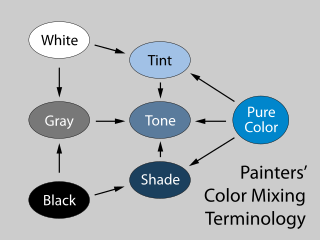
const color = colord("#ff0000");
color.tints(3).map((c) => c.toHex()); // ["#ff0000", "#ff9f80", "#ffffff"];
color.shades(3).map((c) => c.toHex()); // ["#ff0000", "#7a1b0b", "#000000"];
color.tones(3).map((c) => c.toHex()); // ["#ff0000", "#c86147", "#808080"];
names (CSS color keywords) 1.45 KB
Provides options to convert a color into a CSS color keyword and vice versa.
import { colord, extend } from "colord";
import namesPlugin from "colord/plugins/names";

extend([namesPlugin]);

colord("tomato").toHex(); // "#ff6347"
colord("#00ffff").toName(); // "cyan"
colord("rgba(0, 0, 0, 0)").toName(); // "transparent"
colord("#fe0000").toName(); // undefined (the color is not specified in CSS specs)
colord("#fe0000").toName({ closest: true }); // "red" (closest color)
xyz (CIE XYZ color space) 0.7 KB
Adds support of CIE XYZ color model. The conversion logic is ported from CSS Color Module Level 4 Specification.
import { colord, extend } from "colord";
import xyzPlugin from "colord/plugins/xyz";

extend([xyzPlugin]);

colord("#ffffff").toXyz(); // { x: 95.047, y: 100, z: 108.883, a: 1 }
colord({ x: 0, y: 0, z: 0 }).toHex(); // "#000000"Colord is written in strict TypeScript and ships with types in the library itself — no need for any other install. We provide everything you need in one tiny package.
While not only typing its own functions and variables, Colord can also help you type yours. Depending on the color space you are using, you can also import and use the type that is associated with it.
import { RgbColor, RgbaColor, HslColor, HslaColor, HsvColor, HsvaColor } from "colord";

const foo: HslColor = { h: 0, s: 0, l: 0 };
const bar: RgbColor = { r: 0, g: 0, v: 0 }; // ERROR