A fast, modern toolkit for Jupyter notebooks. Native desktop app with instant startup, realtime sync across windows and agents, and intelligent environment management.
Built on runtimelib and jupyter-protocol.
Download the latest release from GitHub Releases.
The desktop app bundles everything — runt CLI and runtimed daemon.
The runt CLI and runtimed Python bindings ship with the app and stay up to date automatically. For nightly builds, use runt-nightly instead.
| Component | Description |
|---|---|
nteract |
Desktop notebook editor (Tauri + React) |
runtimed |
Background daemon — environment pools, notebook sync, kernel execution |
runt |
CLI for managing kernels, notebooks, and the daemon |
runtimed (Python) |
Python bindings for the daemon (ships with the app) |
The nteract MCP server connects AI assistants to Jupyter notebooks through the daemon. Agents can run code, read and write cells, manage dependencies, and collaborate with humans in real-time — watching the notebook update live in the desktop app while the agent works.
/plugin marketplace add nteract/claude-plugin
/plugin install nteract@nteract
Pin a specific version:
/plugin install nteract@nteract --ref v2.3.0
The plugin ships the right nteract-mcp binary for your platform (macOS arm64/x64, Linux x64, Windows x64) — no separate install needed. main of nteract/claude-plugin always points at the latest stable release.
For pre-release builds (updated daily):
/plugin install nightly@nteract
If you use the nteract desktop app with Claude Desktop, there's a one-click install path. In the menu bar, choose nteract → Install Extension for Claude...
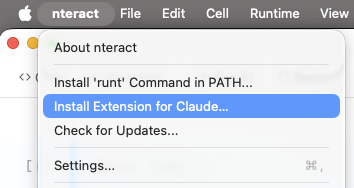

The desktop app builds a .mcpb bundle at runtime (manifest, icons, nteract-mcp binary) and hands it to Claude Desktop, which prompts you to confirm the install. Requires the nteract desktop app; Claude Desktop picks up the bundle from there.
# Open a notebook
runt notebook path/to/notebook.ipynb

# Interactive console
runt jupyter console

# Daemon management
runt daemon status
runt daemon logs -f
List open notebooks with kernel and environment info:
$ runt notebooks
╭──────────────────────────────────────┬────────┬──────────────┬────────┬───────╮
│ NOTEBOOK                             │ KERNEL │ ENV          │ STATUS │ PEERS │
├──────────────────────────────────────┼────────┼──────────────┼────────┼───────┤
│ ~/notebooks/blobstore.ipynb          │ python │ uv:inline    │ idle   │ 1     │
│ d4c441d3-d862-4ab0-afe6-ff9145cc2f3d │ python │ uv:prewarmed │ idle   │ 1     │
╰──────────────────────────────────────┴────────┴──────────────┴────────┴───────╯
nteract/desktop
├── src/                    # Shared UI code (React components, hooks, utilities)
│   ├── bindings/          # TypeScript types generated from Rust (ts-rs)
│   ├── components/
│   │   ├── ui/            # shadcn primitives (button, dialog, etc.)
│   │   ├── cell/          # Notebook cell components
│   │   ├── outputs/       # Output renderers (stream, error, display data)
│   │   ├── editor/        # CodeMirror editor
│   │   ├── isolated/      # Iframe security isolation (IsolatedFrame, CommBridgeManager)
│   │   └── widgets/       # ipywidgets controls
│   ├── hooks/             # Shared hooks (useSyncedSettings, useTheme)
│   ├── isolated-renderer/ # Code that runs inside isolated iframes
│   ├── lib/               # Shared utilities (cn(), dark-mode, error-boundary)
│   └── styles/            # Global stylesheets
├── apps/                   # App entry points
│   └── notebook/          # Notebook Tauri frontend
├── crates/                 # Rust code
│   ├── runt/              # CLI binary
│   ├── runtimed/          # Background daemon
│   ├── runtimed-py/       # Python bindings for the daemon
│   ├── runtimed-wasm/     # WASM Automerge bindings for frontend (same automerge crate as daemon)
│   ├── notebook/          # Notebook Tauri app
│   ├── notebook-doc/      # Shared Automerge document operations (cells, metadata, sync)
│   ├── notebook-protocol/ # Notebook wire protocol types
│   ├── notebook-sync/     # Notebook sync layer
│   ├── kernel-launch/     # Shared kernel launching API
│   ├── kernel-env/        # Environment progress reporting
│   ├── runt-mcp/          # Rust-native MCP server for notebook interaction
│   ├── runt-trust/        # HMAC trust verification
│   ├── runt-workspace/    # Workspace detection utilities
│   ├── runtimed-client/   # Shared client library for daemon communication
│   ├── repr-llm/          # LLM-friendly text summaries of visualization specs
│   ├── xtask/             # Build automation tasks
│   └── mcp-supervisor/    # nteract-dev MCP server (proxies runt mcp + adds dev tools)
├── python/                 # Python packages
│   ├── runtimed/          # PyPI: runtimed (Python bindings for daemon)
│   ├── nteract/           # PyPI: nteract (thin wrapper that launches `runt mcp`)
│   └── gremlin/           # Stress-testing agent for nteract notebooks (not published)
├── docs/                   # User-facing documentation
└── contributing/           # Developer guides
| Tool | Version | Install |
|---|---|---|
| Node.js | 20+ | https://nodejs.org |
| pnpm | 10.12+ | corepack enable |
| Rust | 1.94.0 | https://rustup.rs (version managed by rust-toolchain.toml) |
Linux only: Install GTK/WebKit dev libraries:
sudo apt-get install -y libgtk-3-dev libwebkit2gtk-4.1-dev libxdo-dev \
libssl-dev libayatana-appindicator3-dev librsvg2-devcargo xtask dev| Workflow | Command | Use when |
|---|---|---|
| One-shot setup + dev | cargo xtask dev |
First-time setup plus daemon + app in one command |
| Hot reload | cargo xtask notebook |
Iterating on React UI |
| Standalone Vite | cargo xtask vite |
Multi-window testing (Vite survives window closes) |
| Attach to Vite | cargo xtask notebook --attach |
Connect Tauri to already-running Vite |
| Debug build | cargo xtask build |
Full debug build (frontend + rust) |
| E2E debug build | cargo xtask e2e build |
Debug build with built-in WebDriver server |
| Rust-only build | cargo xtask build --rust-only |
Rebuild rust, reuse existing frontend |
| Run bundled | cargo xtask run notebook.ipynb |
Run standalone binary |
| Lint (check) | cargo xtask lint |
Check formatting and linting across Rust, JS/TS, Python |
| Lint (fix) | cargo xtask lint --fix |
Auto-fix formatting and linting |
| Dev daemon | cargo xtask dev-daemon |
Run per-worktree dev daemon |
| Install nightly (Linux/headless) | cargo xtask install-nightly |
Build + install runtimed + runt + nteract-mcp as the local nightly. Refuses on macOS and when an app bundle is installed. |
| Release .app | cargo xtask build-app |
Testing app bundle locally |
| Release DMG | cargo xtask build-dmg |
Distribution (usually CI) |
| Generate icons | cargo xtask icons [source.png] |
Generate icon variants from source image |
cargo xtask dev runs the first-time bootstrap (pnpm install + cargo xtask build),
starts the per-worktree dev daemon, waits for it to be ready, and then launches the
notebook app. For repeat launches, use cargo xtask dev --skip-install --skip-build.
The UI must be built before Rust because crates/notebook embeds assets from apps/notebook/dist/ via Tauri.
pnpm build                          # Build notebook UI
cargo test                          # Run Rust tests
pnpm test:run                       # Run JS tests
cargo fmt                           # Format Rust
vp check --fix                      # Lint + format JS/TS
cargo clippy --all-targets -- -D warnings # Lint RustThe underlying Rust libraries are published to crates.io:
jupyter-protocol— Jupyter messaging protocolruntimelib— Jupyter kernel interactions over ZeroMQnbformat— Notebook parsing
See the contributing/ directory for detailed guides:
- Development workflow — build commands, dev daemon, Zed tasks
- Architecture — runtime principles, daemon, state, sync
- Protocol — wire protocol, magic bytes preamble, version negotiation
- Releasing — versioning scheme, release procedures, tag conventions
- Testing — Vitest, Rust, Python, E2E
BSD-3-Clause