Visualize yMMSL workflow as Scalable Vector Graphics (SVG).
This tool takes a yMMSL model (from a v0.2 yMMSL file) and generates an SVG image to represent it.
- Visualize the coupling diagram for yMMSL (sub)models
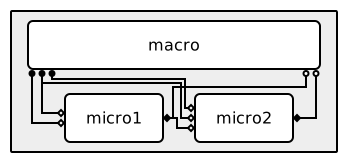
- Call/release (a.k.a. macro-micro) coupling
- Dispatch coupling
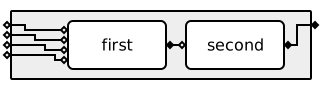
- Visualize component ports: F_INIT ports are drawn on the left side of a component as an open diamond, O_F ports on the right side as a closed diamond, and O_I and S ports on the bottom as respectively a closed and an open circle.
- Visualize model ports: F_INIT ports on the left side of the model, O_F ports on the right side. Model O_I and S ports are not (yet) supported.
- Visualize "multi-cast" conduits, where one output port sends to multiple input ports.
- Draw conduits with filters.
Note that not ymmsl2svg cannot visualize all valid yMMSL configurations, see
Roadmap for a brief overview of missing functionality.
Click to open the image in a new tab and enable interactive features, such as tooltips with the port name when hovering over a port.
ymmsl2svg depends on a development version of
ymmsl-python. Therefore we don't have a
package available on PyPI yet. Until the upstream functionality is available in a
ymmsl-python release, we recommend to run ymmsl2svg with uvx (see the uv
installation instructions):
# Create 'workflow.svg' image from the root model in 'workflow.ymmsl'
uvx --from git+https://github.com/multiscale/ymmsl2svg.git ymmsl2svg workflow.ymmsl -o workflow.svg

# Show supported options and settings
uvx --from git+https://github.com/multiscale/ymmsl2svg.git ymmsl2svg --helpymmsl2svg currently cannot visualize any valid yMMSL model yet, this section
provides a brief overview of missing features that we would like to implement in the
future:
- Missing yMMSL features
- Command Line Interface
- Allow selecting a specific model in the yMMSL configuration (currently only the root model is visualized).
- Allow changing settings / parameters from the Command Line interface.
- Additional features
- Interactive highlight of connected conduits when hovering over components or ports.
- Add an option to draw parallel components under eachother.
1: The SVG generation currently fails for models containing
this.
2: An SVG is generated for models containing this, but a warning
is logged and the visualization is not complete.
Copyright 2026 ITER Organization. The code in this repository is licensed under the Apache-2.0 license