compaRAG compares one YouTube Short and one Instagram Reel, extracts as much public video intelligence as possible, indexes it locally, and lets a creator ask cited RAG questions about performance, hooks, comments, audience reaction, metadata, and improvement ideas.
Demo walkthrough:
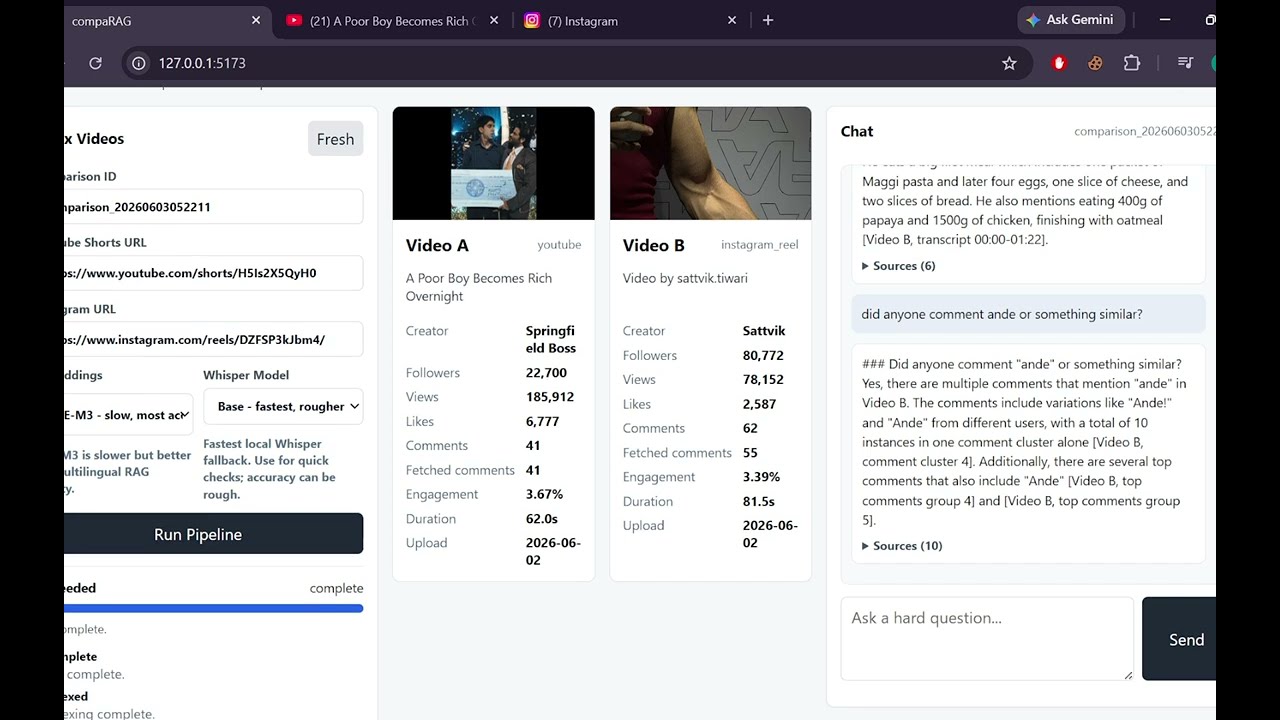
Example inputs used during development:
- YouTube: https://www.youtube.com/shorts/H5Is2X5QyH0
- Instagram: https://www.instagram.com/reels/DZFSP3kJbm4/
- Accepts exactly two URLs: one YouTube video/Short and one Instagram Reel/Post.
- Extracts transcript, metadata, creator name, creator follower/subscriber count when exposed, views, likes, comments, hashtags, upload date, duration, thumbnails, and media format metadata.
- Computes engagement rate as
(likes + comments) / views * 100. - Fetches top public comments with usernames, comment IDs, profile URLs when available, like counts, and reply counts.
- Falls back from platform captions to ASR when transcripts are missing. The UI exposes local Whisper quality choices:
base,small, andmedium. - Normalizes non-English or mixed-language transcripts into raw text, Latin/Hinglish text, and English-normalized text for better RAG retrieval.
- Builds local Chroma vector indexes plus BM25 lexical indexes, so semantic meaning and exact wording both matter.
- Uses LangGraph orchestration for evidence planning, retrieval, tool evidence, LLM answer generation, citation validation, and memory.
- Streams chat answers with source citations and keeps short-term plus optional Supabase-backed long-term memory.
- Ships with a FastAPI backend, Docker setup, and a lightweight React/Vite frontend.
URLs
  -> extractor: metadata, comments, thumbnails, captions, ASR fallback
  -> transcript normalizer: raw + Hinglish/Latin + English-normalized variants
  -> analysis layer: compressed comment intelligence + transcript creative features
  -> chunker: transcript windows, hook chunks, metric records, comment chunks
  -> indexes: Chroma vectors + BM25 lexical index + exact comment facts
  -> LangGraph chat: plan evidence, retrieve, call tools, answer, validate citations
  -> UI: side-by-side video cards + streaming chat
Core stack:
- Backend: FastAPI, LangGraph, ChromaDB, local BM25, yt-dlp, Instagrapi/Instaloader, faster-whisper
- Frontend: React, Vite
- Embeddings: local transformer models through
transformers - LLM routing: Gemini Flash Lite by default, OpenAI fallback, retrieval fallback for failure cases
- Memory: local in-process memory by default, optional Supabase persistence
Copy-Item .env.example .envFill only the values you need. Do not commit .env, cookies, session files, or cache directories.
Minimum useful local setup:
GEMINI_API_KEY=
OPENAI_API_KEY=
HF_TOKEN=

INSTAGRAM_SESSIONID=
INSTAGRAM_COOKIES=.cache/instagram-cookies.txt

COMPARAG_LLM_MODE=auto
COMPARAG_DISABLE_GEMINI=0
Notes:
OPENAI_API_KEYis used as an LLM fallback when Gemini fails or is disabled.HF_TOKENhelps hosted Whisper/ASR access when configured.- Instagram may require a real logged-in browser cookie/session for some public Reels.
- The Docker compose file currently disables Gemini for local testing with
COMPARAG_DISABLE_GEMINI=1; remove or override that when you want Gemini first.
docker compose build api
docker compose up -d --force-recreate api
Backend:
- Health: http://127.0.0.1:8001/health
- API docs: http://127.0.0.1:8001/docs
- Static fallback UI: http://127.0.0.1:8001/ui/static/index.html
The container mounts local .cache into /app/.cache, so Chroma data, model caches, Instagram session settings, and extractor outputs survive container restarts.
cd frontend
npm install
npm run dev
Open:
For local Docker backend testing, frontend/.env.local should contain:
VITE_API_BASE_URL=http://127.0.0.1:8001The frontend starts fresh by default. Paste one YouTube URL and one Instagram URL, choose the embedding and Whisper presets, run the pipeline, then ask questions in the chat panel.
This repo is a monorepo. Deploy only the Vite app inside frontend.
In the Vercel dashboard:
- Import the GitHub repo.
- Set Root Directory to
frontend. - Set Framework Preset to
Vite. - Set Install Command to
npm install. - Set Build Command to
npm run build. - Set Output Directory to
dist. - Add environment variable
VITE_API_BASE_URL=https://YOUR_BACKEND_DOMAIN.
The frontend already includes frontend/vercel.json for SPA fallback routing and the dist output directory.
Important production note: a Vercel-hosted frontend cannot call http://127.0.0.1:8001 for real users. 127.0.0.1 means the visitor's own machine, not your laptop. For production, host the FastAPI backend on a public HTTPS URL and set VITE_API_BASE_URL to that URL. For temporary demos, a tunnel such as ngrok or Cloudflare Tunnel can expose your local backend.
CLI deploy option:
cd frontend
npm install
npx vercel
npx vercel --prodUseful endpoints:
GET /healthGET /comparisonsGET /comparisons/{comparison_id}POST /jobs/extract-indexPOST /jobs/indexGET /jobs/{job_id}POST /chatPOST /chat/stream
POST /jobs/extract-index is the main UI path. It extracts both videos, normalizes transcripts, analyzes comments/features, chunks, embeds, writes Chroma/BM25 indexes, and stores the comparison record.
Example payload:
{
  "comparison_id": "demo_pair",
  "youtube_url": "https://www.youtube.com/shorts/VIDEO_ID",
  "instagram_url": "https://www.instagram.com/reel/REEL_ID/",
  "extraction": {
    "fetch_comments": true,
    "max_comments": 100,
    "comment_time_budget_seconds": 60,
    "asr_provider": "auto",
    "asr_model": "base",
    "require_transcripts": true
  },
  "index": {
    "embedding_model": "quality",
    "allow_embedding_download": true,
    "comment_intelligence": "evidence",
    "creative_features": "evidence"
  }
}
Job status responses include progress and progress_events, so the UI can show stages such as extracting, transcribing, analysis, chunking, embedding, lexical_index, and complete.
The backend has lightweight local protection:
- rate limits per client/path
- idempotent duplicate job submissions by payload or
Idempotency-Key - duplicate chat request caching
- safe replay behavior for completed streaming responses
Install Python dependencies:
pip install -r requirements.txtExtract both videos:
python social_video_extractor.py `
  --youtube-url "https://www.youtube.com/shorts/VIDEO_ID" `
  --instagram-url "https://www.instagram.com/reel/REEL_ID/" `
  --fetch-comments `
  --max-comments 100 `
  --asr-provider auto `
  --asr-model base `
  --output result.json
Normalize transcripts:
python transcript_normalizer.py `
  --input result.json `
  --output result.normalized.json `
  --model gemini-2.5-flash-lite
Build the local RAG index:
python -m comparag index `
  --input result.normalized.json `
  --comparison-id demo_pair `
  --embedding-model quality `
  --comment-intelligence evidence `
  --creative-features evidence `
  --chroma-dir .cache\chroma `
  --app-dir .cache\comparag `
  --allow-embedding-download
Ask a cited RAG question:
python -m comparag chat `
  --comparison-id demo_pair `
  --question "Compare the hooks and tell me why Video A got more engagement" `
  --retrieval-mode hybrid `
  --llm auto
Embedding presets:
fast:sentence-transformers/all-MiniLM-L6-v2balanced:intfloat/multilingual-e5-basequality:BAAI/bge-m3
Retrieval modes:
semantic: Chroma vector retrievallexical: BM25 exact-word retrievalhybrid: semantic + lexical reciprocal-rank fusion
Instagram often blocks anonymous metadata, thumbnails, captions, or comments even for public content. Supported auth paths:
python social_video_extractor.py `
  --youtube-url "https://www.youtube.com/shorts/VIDEO_ID" `
  --instagram-url "https://www.instagram.com/reel/REEL_ID/" `
  --cookies-from-browser chrome
or:
python social_video_extractor.py `
  --youtube-url "https://www.youtube.com/shorts/VIDEO_ID" `
  --instagram-url "https://www.instagram.com/reel/REEL_ID/" `
  --cookies ".cache/instagram-cookies.txt"
or reuse an Instagrapi settings file:
python social_video_extractor.py `
  --youtube-url "https://www.youtube.com/shorts/VIDEO_ID" `
  --instagram-url "https://www.instagram.com/reel/REEL_ID/" `
  --fetch-comments `
  --instagrapi-settings ".cache/instagrapi-session.json"
If Instagram returns challenge_required, approve the login/checkpoint in Instagram first, then retry. The app will report that as an extraction/auth issue instead of pretending the post has no data.
Backend variables:
| Variable | Purpose |
|---|---|
GEMINI_API_KEY |
Gemini model calls for normalization, analysis, and chat |
OPENAI_API_KEY |
OpenAI fallback model calls |
HF_TOKEN |
Hugging Face-hosted ASR/model access |
INSTAGRAM_USERNAME / INSTAGRAM_PASSWORD |
Optional Instagrapi login |
INSTAGRAM_SESSIONID |
Optional logged-in Instagram session ID |
INSTAGRAM_COOKIES |
Optional cookie file path |
COMPARAG_LLM_MODE |
auto, gemini, openai, fallback, or codex_testing |
COMPARAG_DISABLE_GEMINI |
Set 1 to skip Gemini during local testing |
SUPABASE_URL |
Optional Supabase project URL for persistent memory |
SUPABASE_SERVICE_ROLE_KEY |
Optional Supabase service role key |
SUPABASE_DB_URL |
Optional direct Postgres URL |
Frontend variables:
| Variable | Purpose |
|---|---|
VITE_API_BASE_URL |
Public base URL for the FastAPI backend |
Only variables prefixed with VITE_ are exposed to the Vite browser bundle. Keep backend secrets out of frontend/.env.local and Vercel frontend env unless they are meant to be public.
Local memory works out of the box for a running process. To persist chat memory in Supabase, set:
SUPABASE_URL=https://YOUR_PROJECT.supabase.co
SUPABASE_SERVICE_ROLE_KEY=YOUR_SERVICE_ROLE_KEY
Then run supabase/migrations/001_comparag_memory.sql in the Supabase SQL editor.
The app only reads, writes, and upserts records in the tables it owns. It does not drop or delete your existing tables.
Long chats use recent messages plus a rolling summary. If no LLM provider is available, the summary is not guessed.
Python test suite:
python -m unittest discover -s testsFrontend build:
cd frontend
npm run buildcomparag/
api/ FastAPI app, schemas, job registry, rate limits, runtime wiring
chat/ LangGraph orchestration, planning, retrieval routing, prompts
chunks/ Transcript, comment, metric, and analysis chunk builders
comment_tools/ Exact comment facts, phrase lookup, user/profile evidence
memory/ Local and Supabase memory backends
frontend/
src/ React/Vite frontend
static/ Static UI served directly by FastAPI
scripts/ Utility scripts
supabase/ SQL migrations
tests/ Unit tests
Top-level entry points:
- social_video_extractor.py: extractor CLI
- transcript_normalizer.py: transcript variant generation
- comparag/cli.py: index/chat CLI
- comparag/api/app.py: FastAPI app
- frontend/src/App.jsx: Vite app shell
- Instagram can require a valid logged-in session even for public Reels.
- Comment pagination speed depends on platform throttling and auth state.
- Local Whisper
mediumis noticeably slower on CPU. - First embedding run can be slow because the model has to download and warm up.
- If evidence is missing or retrieval cannot support a question, the chat should say there is not enough context instead of fabricating.