








A high-performance, full-stack web application template built with the modern Bun runtime. This project leverages ElysiaJS for a blazing fast backend and React (via Vite) for a responsive frontend, all integrated within a Bun Workspace monorepo structure.
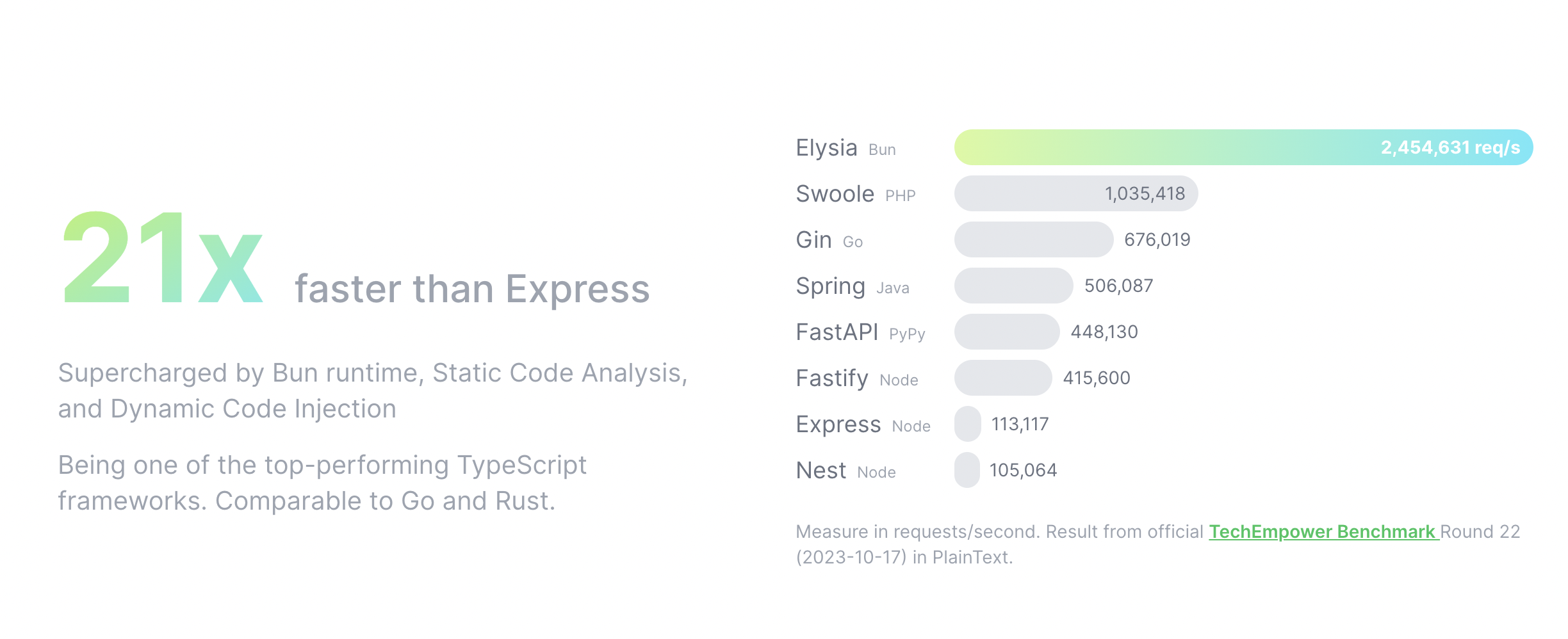
Building on Bun and extensive optimization like Static Code Analysis allows Elysia to generate optimized code on the fly. Elysia can outperform most of the web frameworks available today, and even match the performance of Golang and Rust frameworks.
| Framework | Runtime | Average | Plain Text | Dynamic Parameters | JSON Body |
|---|---|---|---|---|---|
| bun | bun | 262,660.433 | 326,375.76 | 237,083.18 | 224,522.36 |
| elysia | bun | 255,574.717 | 313,073.64 | 241,891.57 | 211,758.94 |
| hyper-express | node | 234,395.837 | 311,775.43 | 249,675 | 141,737.08 |
| hono | bun | 203,937.883 | 239,229.82 | 201,663.43 | 170,920.4 |
| h3 | node | 96,515.027 | 114,971.87 | 87,935.94 | 86,637.27 |
| oak | deno | 46,569.853 | 55,174.24 | 48,260.36 | 36,274.96 |
| fastify | bun | 65,897.043 | 92,856.71 | 81,604.66 | 23,229.76 |
| fastify | node | 60,322.413 | 71,150.57 | 62,060.26 | 47,756.41 |
| koa | node | 39,594.14 | 46,219.64 | 40,961.72 | 31,601.06 |
| express | bun | 29,715.537 | 39,455.46 | 34,700.85 | 14,990.3 |
| express | node | 15,913.153 | 17,736.92 | 17,128.7 | 12,873.84 |


- Runtime: Bun
- Backend Framework: ElysiaJS
- Frontend Framework: React + Vite
- Database: PostgreSQL + Prisma
- Caching: Redis
- Styling: Tailwind CSS
This project uses Bun Workspaces to manage the monorepo.
.
├── apps
│   ├── backend     # ElysiaJS API Server
│   └── frontend    # React + Vite Client
├── docker-compose.yml
├── package.json
└── README.md
The backend follows a Controller-Service-Model architecture:
- Model (
model.ts): Defines data structure, validation schemas (Elysiat), and response types. - Service (
service.ts): Business logic and database interactions (Prisma). - Controller (
index.ts): API routes and handlers.
Use the generator script to create boilerplate code for Prisma models:
bun run scripts/generate-crud.ts <ModelName> [OtherModelName ...]Example:
bun run scripts/generate-crud.ts PostThis creates src/modules/post with model.ts, service.ts, and index.ts.
Run these commands from the root directory:
| Command | Description |
|---|---|
bun run dev |
Start both frontend and backend in development mode (concurrently) |
bun run build |
Build both frontend and backend for production |
bun run lint |
Run linting for all packages |
| Command | Description |
|---|---|
bun run frontend |
Target the frontend workspace (helper for running commands) |
bun run frontend:build |
Build only the frontend |
| Command | Description |
|---|---|
bun run backend |
Target the backend workspace (helper for running commands) |
bun run backend:docker-build |
Build the backend Docker image |
bun run crud |
Run the CRUD generator script (alias for generate-crud.ts) |
| Command | Description |
|---|---|
bun run prisma:push |
Push the Prisma schema state to the database (prototyping) |
bun run prisma:pull |
Pull the schema from an existing database |
bun run prisma:generate |
Generate the Prisma Client based on your schema |
bun run prisma:migrate |
Create a migration from changes in Prisma schema, apply it to the database, trigger generators |
bun run prisma:deploy |
Apply pending migrations to the database (production) |
bun run prisma:new |
Create a new migration file without applying it |
| Command | Description |
|---|---|
bun run docker:dev |
Start development infrastructure (PostgreSQL, Redis) using Docker Compose |
bun run docker:deploy |
Deploy the full stack application using Docker Compose |
The frontend uses Eden Treaty for end-to-end type safety.
Setup (lib/server.ts):
import { treaty } from '@elysiajs/eden'
import type { App } from 'backend'
import { toast } from 'sonner'

const server = treaty<App>(import.meta.env.VITE_API_BASE_URL, {
  // headers: [() => ({ authorization: `Bearer ${localStorage.getItem('token')}` })],
  headers: [], // better-auth auto use cookie for auth
  onResponse: async (res) => {
    if (!res.ok) {
      const text = await res.text()
      const status = res.status.toString()
      toast.error(status, {
        description: text,
        position: 'top-center',
      })
    }
  },
})
export { server }
Usage:
import { server } from '@/lib/server'
// ... inside component
const { data, error } = await server.user.profile.get()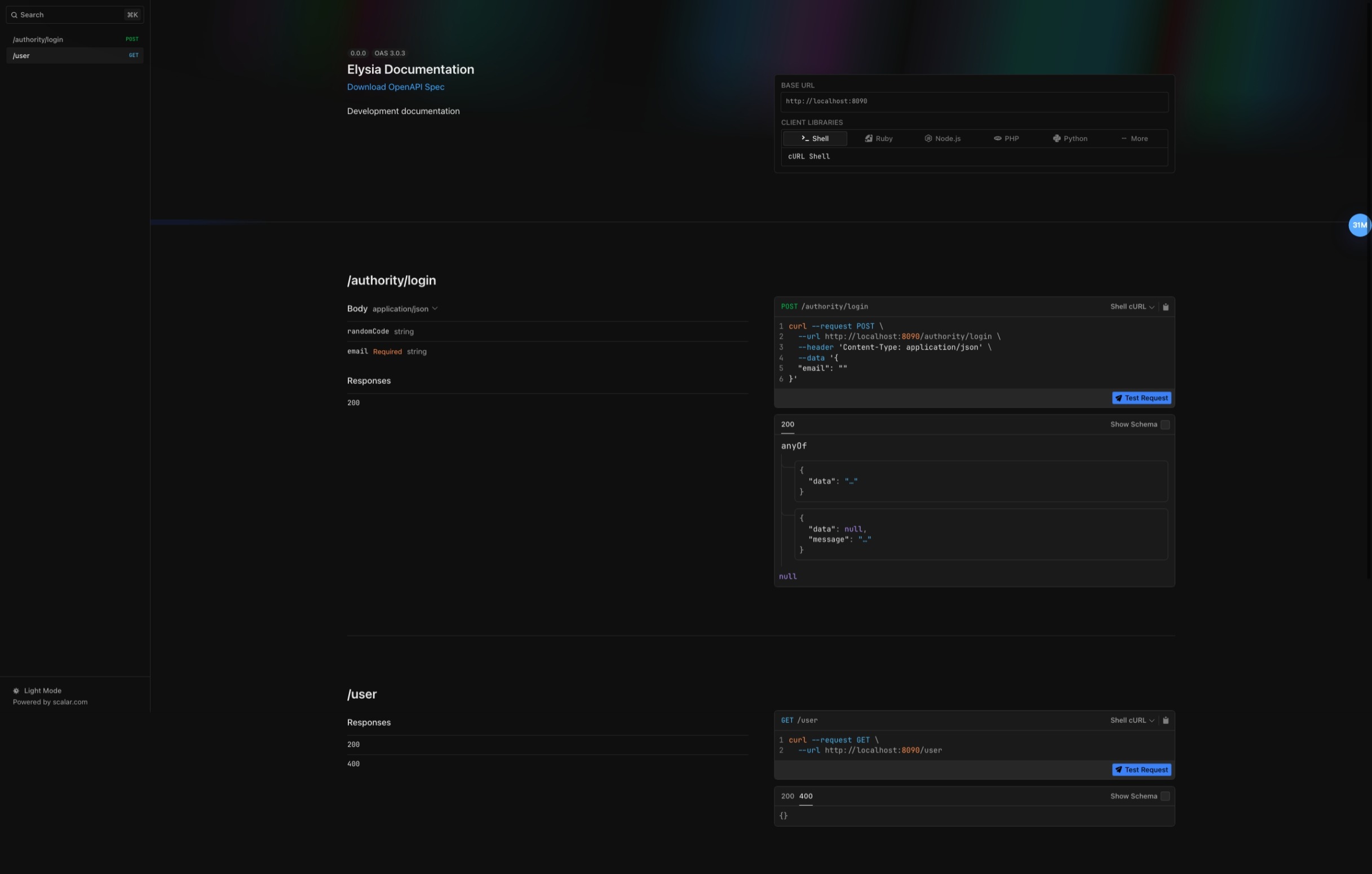

-
Clone & Install
git clone https://github.com/laoer536/bun-api cd bun-api bun install -
Environment Setup Copy
.env.exampleto.envinapps/backendandapps/frontend..env.dockerConfiguration (Production/Docker)# common NODE_ENV='production' # back-end DATABASE_URL=postgresql://postgres:password123@postgres:5432/bun_app REDIS_HOST=redis REDIS_PORT=6379 FRONTEND_URL=http://localhost:5173 # front-end # nginx work VITE_API_BASE_URL='http://localhost:5173/api' VITE_PUBLIC_PATH='/'
-
Start Infrastructure
docker-compose up -d
bun run prisma:push
Start both frontend and backend:
bun run dev- Frontend: http://localhost:5173
- Backend: http://localhost:8090
- API Docs: http://localhost:8090/v1-openapi
Deploy using Docker Compose:
bun run docker:deploy
# OR
sh ./deploy.sh .env.dockerMIT License