Containers
Containers let several processes to share the same kernel and some of the packages and commands without knowing the existence of each other.
With etcd we can build a cluster. As for the installation of etcd, we can refer to https://ywnz.com/linuxyffq/2262.html
$ sudo apt -y install wget
$ wget https://github.com/etcd-io/etcd/releases/download/v3.3.10/etcd-v3.3.10-linux-amd64.tar.gz
$ tar xvf etcd-v3.3.10-linux-amd64.tar.gz
$ cd etcd-v3.3.10-linux-amd64
$ sudo mv etcd etcdctl /usr/local/bin
$ sudo mkdir -p /var/lib/etcd/
$ sudo mkdir /etc/etcd
$ sudo groupadd --system etcd
$ sudo useradd -s /sbin/nologin --system -g etcd etcd
$ sudo chown -R etcd:etcd /var/lib/etcd/
$ sudo vim /etc/systemd/system/etcd.service
[Unit]
Description=etcd key-value store
Documentation=https://github.com/etcd-io/etcd
After=network.target
[Service]
User=etcd
Type=notify
Environment=ETCD_DATA_DIR=/var/lib/etcd
Environment=ETCD_NAME=%m
ExecStart=/usr/local/bin/etcd
Restart=always
RestartSec=10s
LimitNOFILE=40000
[Install]
WantedBy=multi-user.target
$ sudo systemctl  daemon-reload
$ sudo systemctl  start etcd.service
$ ss -tunelp | grep 2379
$ etcdctl member list

$ sudo apt-get update

$ sudo apt-get install \
    apt-transport-https \
    ca-certificates \
    curl \
    software-properties-common
$ curl -fsSL https://mirrors.ustc.edu.cn/docker-ce/linux/ubuntu/gpg | sudo apt-key add -
$ sudo add-apt-repository \
    "deb [arch=amd64] https://mirrors.ustc.edu.cn/docker-ce/linux/ubuntu \
    $(lsb_release -cs) \
    stable"
Here,
stable'' can be changed intotest'' or ``nightly'' if needed.
$ sudo apt-get update
$ sudo apt-get install docker-ce
$ sudo systemctl enable docker
$ sudo systemctl start docker
"sudo" is already added in the group, and we can add "ve450" in the group by:
$ sudo usermod -aG docker ve450
We need to exit from our system and return to it to test whether the docker-CE runs well. We need to refer to the following command:
$ docker run hello-world
$ docker pull [option] [Docker Registry address[:port]/]repository[:tag]

The default repository address is Docker Hub. For example, we can test:
$ docker pull ubuntu:18.04
$ docker run -it --rm \
    ubuntu:18.04 \
    bash
The command starts an interactive shell under the image ubuntu:18.04.
Here, we can use the command cat /etc/os-release to check the properties of our image which is running. To exit the container, type exit.
$ docker image ls
$ docker image rm [options] <image1> [<image2> ...]
Use mynginx as an example:
$ mkdir mynginx
$ cd mynginx
$ touch Dockerfile
After opening Dockerfile, we can revise it by adding lines.
Here we use the existing image nginx as an example:
FROM nginx
We can treat the file as a shell when we use the command RUN. For example:
RUN apt-get update
However, if you want to avoid adding two much layers (here, one RUN command means one new layer), you can use && to avoid building new layers over and over again. Like:
FROM debian:stretch

RUN buildDeps='gcc libc6-dev make wget' \
    && apt-get update \
    && apt-get install -y $buildDeps \
    && wget -O redis.tar.gz "http://download.redis.io/releases/redis-5.0.3.tar.gz" \
    && ....
In the documentary where the Dockerfile is newed, we use the command
$ docker build [option] <context path/URL/-> .
Kubernetes can assign the containers that are submitted by users to one of its nodes. It has a structure like
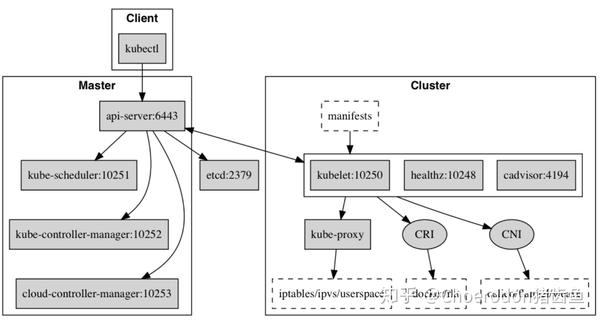
Since we need to use Kubernetes in mainland China and the gcr.io is blocked, we can make use of https://dockerhub.azk8s.cn, a docker hub that is accessible in China.
We use vim to add the following json text in /etc/docker/daemon.json:
{
  "registry-mirrors": [
    "https://dockerhub.azk8s.cn",
    "https://reg-mirror.qiniu.com"
  ]
}
Then we restart the docker:
$ sudo systemctl daemon-reload
$ sudo systemctl restart docker
To check whether the configuration process succeeds, we use $ docker info. If the following texts appear, the process succeeds.
Registry Mirrors:
 https://dockerhub.azk8s.cn/
To use the images, we replace the normal gcd.io with gcr.azk8s.cn.
Here, all gcr.io have been replaced into gcr.azk8s.cn.
Reference: https://blog.inkubate.io/deploy-kubernetes-1-9-from-scratch-on-vmware-vsphere/