
Connect your Spooky Pinball machine to the Internet and join the online leaderboards.
Spooky Scoreboard consists of both a web platform and this small, lightweight daemon.
The daemon runs in the background on your Spooky pinball machine, periodically sending data to the web server. This data includes highscores and game audit information. The server processes this data to display in a variety of formats. This includes showcasing top scores specific to each machine and leaderboards spanning all supported games.
On the website you can register as a Player or an Operator or both.
Operators can register and administer their respective machines. They have the option to make their machines publicly visible, thereby showcasing highscores and participating in leaderboards, or a private setting where only the operator has access to top scores.
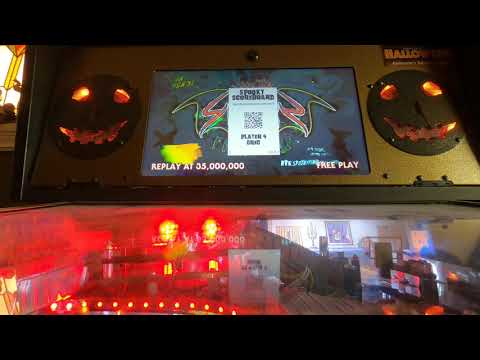
Players can log into a machine via their player profile QR code; select your position (player 1-4) and scan the code. Scan the on-screen QR code to easily access machine leaderboards. Player scores are saved and displayed, with the exception being if a player profile is set to private. All players are automatically logged out after each game. Players can manually logout via the web app.
Refer to INSTALL.md for instructions on installing the Spooky Scoreboard daemon on your machine.
Visit spookyscoreboard.com to register your player or operator account.
-
"UP"-supported games:
- Halloween
- Ultraman
- Texas Chainsaw Massacre
- Alice Cooper Nightmare Castle
- Total Nuclear Annihilation (preliminary support)
-
"miniPC"-supported games:
- Evil Dead
UP games require an ethernet connection.
miniPC games use the integrated wifi adapter.
You will need a USB QR code scanner/ reader. The following have been tested and work:
Ensure the QR reader interface settings are set to USB-COM mode. Check the manual for configuration codes.
*Linux fails to recognize the device when connected via the USB extension cable that is accessible inside the coin door. It does work however when connected directly to the UP board, or when using a USB hub connected to the port inside the coin door; plug QR scanner into hub, and hub into USB port.
Shoutout to Ben Heck for taking code requests.