This project demonstrates the Opsero RPi Camera FMC (OP068) used to connect up to 4x Raspberry Pi cameras (or compatible cameras) to one of the target FPGA/MPSoC boards listed below. The designs contain:
- 4x MIPI CSI-2 capture pipelines
- Video Mixer IP based display pipeline to DisplayPort/HDMI output
- Video Codec Unit (VCU)
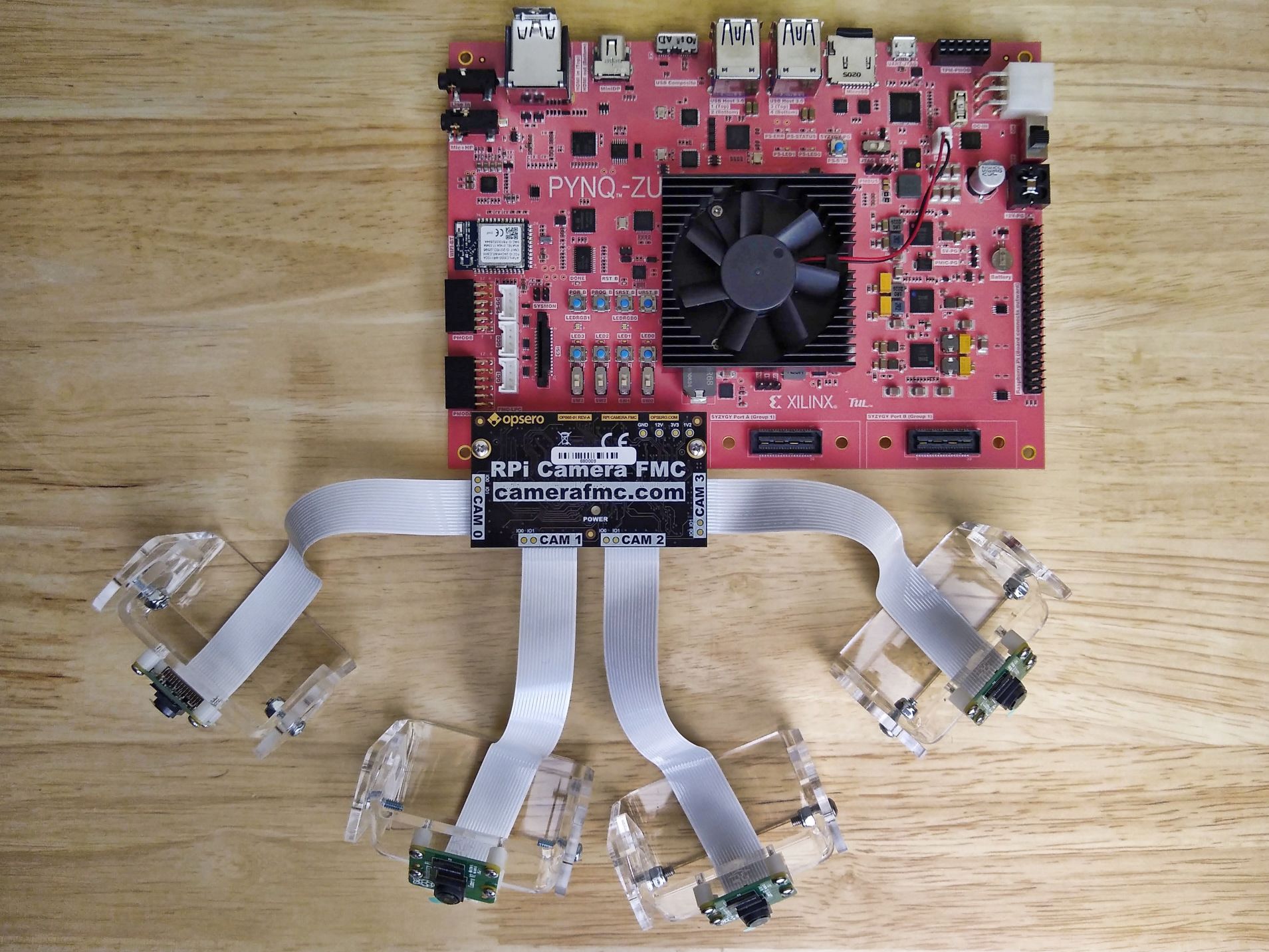
Important links:
- The RPi Camera FMC datasheet
- The user guide for these reference designs
- To report an issue
- For technical support: Contact Opsero
The designs in this repository fall into two main architectural categories:
- Zynq UltraScale+ designs – These designs integrate the ISP Pipeline IP, run within a PetaLinux environment, and output video to a DisplayPort monitor.
- FPGA designs – These designs implement a simpler video pipeline, are controlled by a bare-metal application, and output video to an HDMI monitor.
The high level block diagram below illustrates the design:

The video pipe sub-blocks are illustrated below:

Display pipeline of the FPGA designs:

The video pipeline of the FPGA designs:

This project is designed for version 2025.2 of the Xilinx tools (Vivado/Vitis/PetaLinux). If you are using an older version of the Xilinx tools, then refer to the release tags to find the version of this repository that matches your version of the tools.
In order to test this design on hardware, you will need the following:
- Vivado 2025.2
- Vitis 2025.2
- One or more Raspberry Pi Camera Module 2 and/or Digilent Pcam 5C cameras
- 1x RPi Camera FMC
- One of the supported target boards listed below
-
Zynq UltraScale+ designs:
- PetaLinux Tools 2025.2
- 1x DisplayPort monitor that supports 1080p video
- Linux build PC (or virtual machine)
-
FPGA designs:
- 1x HDMI monitor that supports 1080p video
- License for the HDMI IP (evaluation license available)
| Target board | Target design | FMC Slot | Cameras | VCU | Baremetal App |
PetaLinux Build |
Vivado Edition |
IP License |
|---|---|---|---|---|---|---|---|---|
| AUBoard 15P | auboard |
HPC | 2 | ❌ | ✅ | ❌ | Standard 🆓 | - |
| Target board | Target design | FMC Slot | Cameras | VCU | Baremetal App |
PetaLinux Build |
Vivado Edition |
IP License |
|---|---|---|---|---|---|---|---|---|
| ZCU104 | zcu104 |
LPC | 4 | ✅ | ❌ | ✅ | Standard 🆓 | - |
| ZCU102 | zcu102_hpc0 |
HPC0 | 4 | ❌ | ❌ | ✅ | Standard 🆓 | - |
| ZCU102 | zcu102_hpc1 |
HPC1 | 2 | ❌ | ❌ | ✅ | Standard 🆓 | - |
| ZCU106 | zcu106_hpc0 |
HPC0 | 4 | ✅ | ❌ | ✅ | Standard 🆓 | - |
| PYNQ-ZU | pynqzu |
LPC | 2 | ❌ | ❌ | ✅ | Standard 🆓 | - |
| UltraZed-EV Carrier | uzev |
HPC | 4 | ✅ | ❌ | ✅ | Standard 🆓 | - |
Notes:
- The Vivado Edition column indicates which designs are supported by the Vivado Standard Edition, the FREE edition which can be used without a license. Vivado Enterprise Edition requires a license however a 30-day evaluation license is available from the AMD Xilinx Licensing site.
- The HPC1 connector of the ZCU102 board can only support 2 cameras due to it's pin assignment. This design
supports the
CAM0andCAM1slots as labelled on the RPi Camera FMC. - The
pynqzutarget design has video pipelines for only 2 cameras:CAM1andCAM2as labelled on the RPi Camera FMC. This is due to the resource limitations of the devices on this board. - The
auboardtarget design has video pipelines for only 2 cameras:CAM0andCAM2as labelled on the RPi Camera FMC. This is due to the resource limitations of the Artix UltraScale+ device on this board.
Some of these designs can be driven by a baremetal application that will configure the connected cameras and combine their video outputs into a single 1080p stream.
The Zynq UltraScale+ based reference designs can be driven within a PetaLinux environment. The repository includes all necessary scripts and code to build the PetaLinux environment. The table below outlines the corresponding applications available:
| Environment | Available Applications |
|---|---|
| PetaLinux | Built-in Linux commands Additional tools: GStreamer |
Clone the repo and change into its directory:
git clone --recursive https://github.com/fpgadeveloper/rpi-camera-fmc.git
cd rpi-camera-fmc
All builds are driven by build.py at the repo root, on both Windows
(git bash) and Linux. The build.sh / build.bat shim finds a suitable
Python 3 automatically (including the one bundled with the AMD tools).
Pick a target design label from the tables above (or run ./build.sh list), then run the build command for the stage(s) you want — each
command builds whatever it depends on automatically and skips anything
already built. On Windows without git bash, run the same commands from
Command Prompt or PowerShell using build.bat (e.g. build.bat xsa --target <target>).
You don't need to source the AMD tools first — the build runner finds Vivado, Vitis and PetaLinux automatically in their standard install locations and sets up the environment each stage needs. If your tools are installed somewhere non-standard and the runner can't find them, source the tool settings yourself before running the build.
./build.sh xsa --target <target>
Builds the Vitis workspace and the baremetal boot file (BOOT.BIN or
bit file, depending on the device family):
./build.sh standalone --target <target>
./build.sh petalinux --target <target>
Builds all of the above that the target supports, then gathers the boot
images into bootimages/*.zip:
./build.sh all --target <target>
./build.sh all --target all          # every target in the repo
Also available: status, clean, project — see
./build.sh --help. On Windows, the PetaLinux and Yocto stages require a
Linux machine; the runner says so and prints the hand-off command. The
legacy make interface still works on Linux (each Makefile now wraps
build.sh) but is deprecated and will be removed at the next version
update.
Launch Vitis, open the workspace that was generated using the make command. Select the test application and run it on the target board.
From the PetaLinux command line, run the following command to stream video from all connected cameras to the 4 quadrants of the 1080p DisplayPort monitor:
sudo displaycams.sh
If less than 4 cameras are physically connected, the unused quadrants of the monitor will be blue.
We strongly encourage community contribution to these projects. Please make a pull request if you would like to share your work:
- if you've spotted and fixed any issues
- if you've added designs for other target platforms
- if you've added software support for other cameras
Thank you to everyone who supports us!
- Develop PYNQ support
- Add a standalone application for the Zynq and ZynqMP designs
- Add support for some Versal boards
- Add VCU example scripts
- Get a Genesys-ZU board and test the design on hardware.
- Software support for more cameras (this will be an ongoing task due to the number of cameras available).
Opsero Inc. is a team of FPGA developers delivering FPGA products and design services to start-ups and tech companies. Follow our blog, FPGA Developer, for news, tutorials and updates on the awesome projects we work on.