In this Repo I added some gadgets and goodies to the original OpenCNCPilot (OCP) of Martin Pittermann.
- Show a View Cube (switched on/off in the Debug Tab)
- Show Camera Info (switched on/off in the Debug Tab)
- Joystick jogging. See here for additional information on how to use.
- Superimpose several files, can be viewed in the GUI and may be machined together (provided the same tool is used). The files may be switched on/off via check boxes.
- Get rid of several GCodes, can be checked on/off via "Settings - GCode".
- Filter "ignoring zero-length move from line number xxx" messages, filter fires on every load of a file.
- Added a "reload" feature for one or all loaded files. This is extremely useful when iterating a design with text on the solder side. Background: With pcb-gcode.ulp there is always the risk that the text is hampered or even removed by the tracks around traces. So one has to change and judge the result in OCP. Together with the new layer feature (load etch-layer and text-layer and view both superimposed) the check is done in no time and even quicker with the "reload" feature.
- Added a means of measuring the distance between two points in the viewport. This feature is restricted to designs layed flat on the X/Y plane. This in turn is realized by a feature I implemented back in 2021 or so, a button named "Lay flat 3D Viewport", located in the Debug box. Zooming and panning the design afterwards is ok, tilting or rotating should be omitted when trying to measure distances or finding the g-code line in the viewport. But it works even then - only the aiming is more difficult.
- Moved the new features from "Debug" to "Inspection & Measurement" (just below "About").
- The g-code line is highlighted and moved into view in the file listbox when clicking on a line (or a drill or an arc) in the viewport .
- The click point in the viewport is marked with a red ball. The ball is placed on the end of the current line.
- The coords of the click point can be transferred to the "manual input" to make the machine move to this point. When issuing "send" the tool is first raised to Z=5 for security. Background: This feature is helpful when you have to adjust the machine to the design after a broken job. Perhaps you have already drilled the holes? Then you can select one of the holes, get its coordinates (from the file listbox), move the machine to that point and manually adjust the machine or the board to match the given hole. Back in the game :)
- When measuring distances, two markers are placed in the viewport, blue for the first, red for the second clickpoint.
- Holding SHIFT when clicking the second point in measuring mode nails the X or the Y coordinate to match the first point. Weighted decision for which axis is retained (the bigger distance determines the fixed axis).
- The size of the markers (blue and red) is adjustable via "Settings - Viewport - Marker diameter".
- Adapted marker size to layout size
- Changed Tooltip for RO (rotate origin) button
- Nailed the viewport orientation to the saved settings for RO ("rotate origin" in Debug box) and RotateCW ("rotate clockwise" in Edit box)
- Replaced the original communication implementation to/from GRBL from event driven readline() to polling byte-by-byte to get rid of the problems, established by installing the actual CH340 driver over Microsoft update mechanism.
Some of the new features are under construction still.
There may be errors and flaws, use at your own risk in productive environment!
I signed my modifications via "Mod: Vx.y, deHarro" in the About Box, leaving the original versioning of Martin alone. Hovering the mouse over the blue "Mod.: deHarro" in the About box displays the versions I implemented till now. Clicking the blue text opens my OCP repository on Github.
To use this pimped version of OCP, just copy the "OpenCNCPilot.exe" from the ZIP (see Releases section for the latest version) over the existing EXE from Martin (if you used OCP before).
If you are new to OCP, extract the ZIP to a folder of your choice (e.g. name it OpenCNCPilot) and start OCP by double clicking the EXE. Also see Martin's advises below.
The new features are described on my homepage. Use the translation feature accessible at the bottom of every page.
OpenCNCPilot is a GRBL compatible G-Code Sender.
Its main feature is its ability to probe user-defined areas for warpage and wrap the toolpath around the curved surface. This is especially useful for engraving metal surfaces with V-shaped cutters where any deviation in the Z-direction will result in wider or narrower traces, eg for isolation milling PCBs where warpage would result in broken or shorted traces.
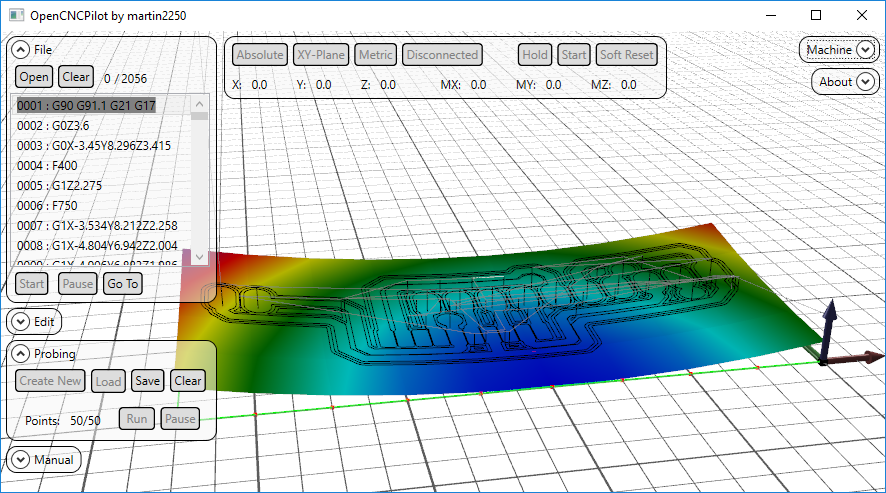
It is written in C# and uses WPF for its UI. Sadly this means that it will not run under linux as Mono does not support WPF. The 3D viewport is managed with HelixToolkit.
Here is a quick overview on YouTube https://www.youtube.com/watch?v=XDCu3cgOjCY
Install .NET 4.6, this has been the cause of at last 6 support requests so far.
Go to the Releases section and download the latest binaries (or compile it from source).
Unzip all files to your hard drive and run "OpenCNCPilot.exe"
Make sure to use GRBL version 1.1f (later versions may work but are yet untested). Earlier versions (0.8, 0.9, 1.0) will NOT work! There are no workarounds, so you need to update your controller to use OpenCNCPilot.
Before the first run, you have to select a Serial Port, the selector is hidden in the Settings menu that you can access in the "Machine" tab. Other than that you don't need to modify any settings.
Now you can connect to your machine.
Open gcode or height map files by dragging them into the window, or using the according buttons.
To create a new height map, open the "Probing" tab and click "Create New". You will be asked to enter the dimensions.
Be sure to enter the actual coordinates eg when your toolpath is in the negative X-direction, enter "-50" to "0" instead of "0" to "50". You can also use the "Size from GCode" button to fill in everything automatically.
You will see a preview of the area and the individual points in the main window
To probe the area, set up your work coordinate system by going to your selected origin and using the "Zero (G10)" in the "Manual" tab, remember that this doesn't actually send the line, you can review it must send it manually. You can also use G92, but remember that G92 isn't permanent and will be lost after a reset.
Make sure to connect A5 of your Arduino to the tool and GND to your surface, and hit "Run".
OpenCNCPilot will now probe your board at the locations marked with a red dot and build the map from that data.
Once it's done probing the surface, hit the "Apply HeightMap" button in the "Edit" tab. Now you can run the code with the "Start" button in the "File" tab.
The 1.5 update adds an interpreter for mathematical expressions to use with manual send and macros. To use it, enter your expression in parentheses, like so: "G0 X(2*MX - 1)".
Available variables are:
- MX, MY, MZ: machine position; WX, WY, WZ: work position
- PMX, PMY, PMZ, PWX, PWY, PWZ: last probed position in machine/work coordinates
- TLO: current tool length offset
the parentheses will be replaced with whatever the expression evaluates to. My Calculator library is used to evaluate the expressions.
The probing data is stored in an array of (double precision) floats, the intermediate values are obtained via bilinear interpolation between the four nearest points. All GCode commands whose length exceeds the GridSize are split up into sections smaller than the GridSize. This includes arcs.
In the input files, arcs can be defined via center (IJ) coordinates or by a radius (R). The output file will always use IJ notation, absolute coordinates and metric units. Both relative coordinates and imperial units are supported, but are converted to the aforementioned format.
- G0, G1 linear motion
- G2, G3 arc motion
- G4 dwell
- G20, G21 units
- G90, G91 distance mode
- S spindle speed
- M M-codes
Since this project did get some attention, I'll include a donation button. Getting this application to a point where it's 'production-ready' took many days of non-stop work before and during the fist three semesters of my physics studies.
Please note that my programs will always be (ad-)free
