



A Julia-idiomatic OpenType-aware LaTeX math typesetter, designed for use with Makie.jl. Full documentation available via the link above.
Full-sheet example outputs from the stress renderer:
- New Computer Modern maths and text
- TeX Gyre Bonum maths and text
- TeX Gyre Pagella maths and text
- TeX Gyre Schola maths and text
- TeX Gyre Termes maths and text
- Luciole maths and text
- STIX Two maths and text
- Fira Math + Fira Sans maths and text


Since a picture is worth a thousand words...
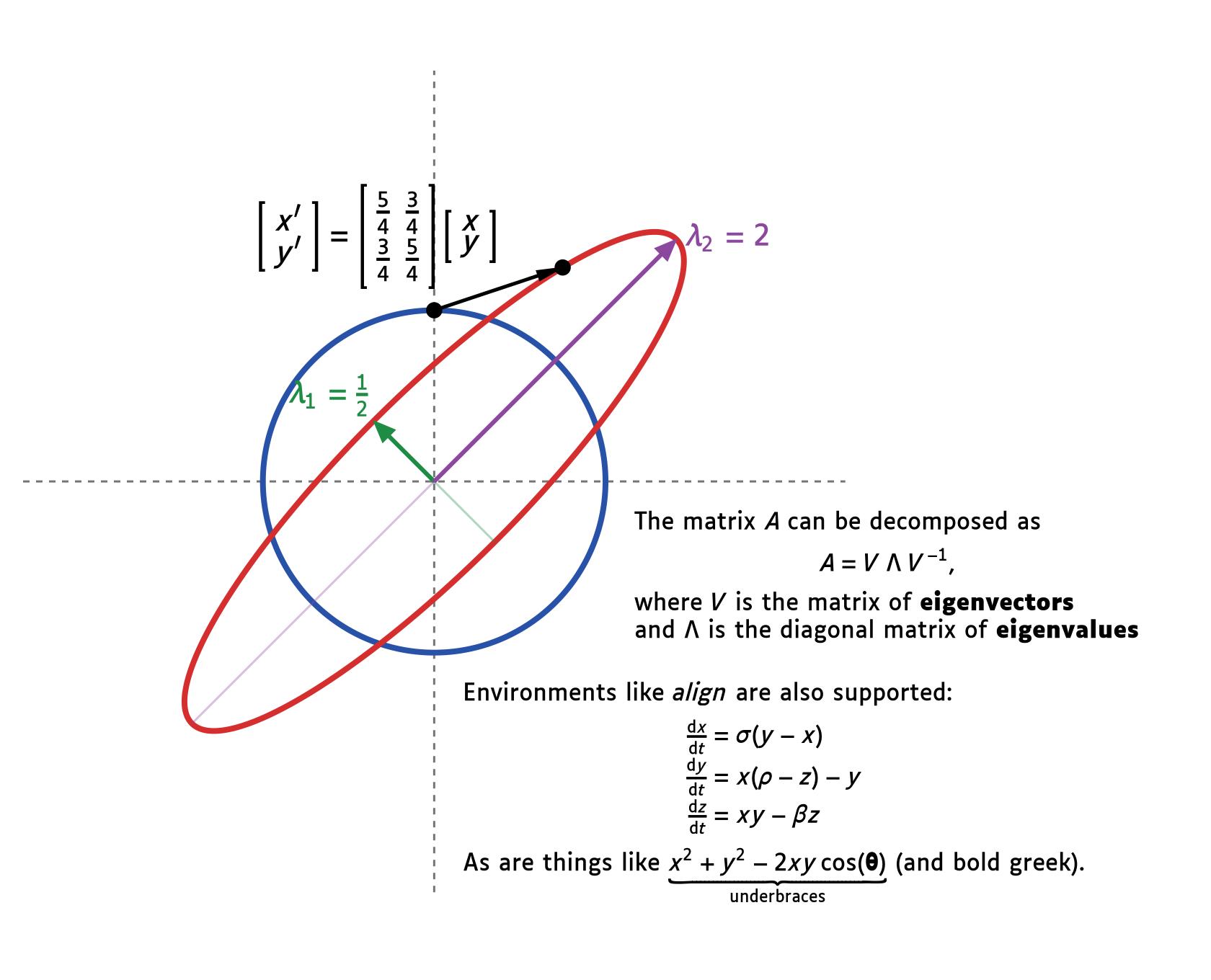
TeXLayout.jl converts LaTeX math strings into a flat list of positioned glyph elements that a renderer (e.g. CairoMakie or GLMakie) can consume directly. The pipeline is:
tokenize → parse_latex → layout → Vector{LayoutBox}
Each LayoutBox carries a TeXElement (glyph, glyph ID, rule, or space), a 2-D
position in em units relative to the formula baseline, and a scale factor.
Beyond single formulas, layout_document typesets mixed text-and-math input —
styled text, inline $…$ math, and display-math environments — into a measured
TeXBox of positioned elements ready for the same renderers.
MathTeXEngine.jl is Makie's current LaTeX engine, and TeXLayout.jl is intended as a drop-in replacement for it. The two take different approaches:
- Fonts available. MathTeXEngine renders in Computer Modern / New Computer Modern. TeXLayout bundles eight math font families (New Computer Modern, the TeX Gyre families, STIX Two, Fira Math, and Luciole) and can can use any other OpenType Math font. A notable difference is that TeXLayout takes metrics directly from the MATH table in the font (hence being usable with any OpenType Math font).
- Integration. TeXLayout plugs into Makie through the same
generate_tex_elementsentry point MathTeXEngine uses, so loading both packages switches Makie over without further changes (see Makie integration). - Scope and maturity. MathTeXEngine is an established, widely used package. TeXLayout is newer; it covers a broad LaTeX-math feature set plus mixed text/math document layout, but has seen less production use.
Both engines handle the common core: fractions (\frac), radicals (\sqrt),
sub/superscripts, auto-sized \left…\right delimiters, named operators
(\sin, \lim, …), font switches (\mathbf, \mathbb, \mathcal, …), space
commands, and a large symbol/accent set (including wide accents such as
\widehat). TeXLayout additionally supports a number of constructs that
MathTeXEngine does not currently parse:
- Environments.
\begin{matrix}/pmatrix/bmatrix/Bmatrix/vmatrix/Vmatrix/smallmatrix,cases, and\begin{array}{colspec}with per-columnl/c/ralignment and single/double vertical rules. (Note that some vertical rules do not render in Makie due to a bug in their implementation.) In document mode alsoalign,aligned,gather, andequation. - Binomials and generalised fractions.
\binom,\genfrac, and the display/text fraction variants\dfrac/\tfrac. - Explicit style overrides.
\displaystyle/\textstyle/\scriptstyle/\scriptscriptstyle, and\limits/\nolimitsplacement control on operators. - Over/under braces (
\overbrace,\underbrace) and the full style cascade driven by the font's MATH table. - Mixed text-and-math documents via
layout_document(styled text, inline$…$, display math, line and paragraph breaks) — MathTeXEngine targets single math formulas.
Conversely, MathTeXEngine is the more battle-tested parser on the shared core, and some symbols without a single Unicode codepoint (certain negated relations) currently render as blank space in TeXLayout. This is not an exhaustive list; coverage on both sides continues to change.
- Full TeX style cascade (Display / Text / Script / ScriptScript, each with a cramped variant), driven entirely by the font's OpenType MATH table — no hard-coded constants.
- Correct sub/superscript placement, fractions, radicals, and auto-sized delimiters.
Italic correction applied to subscripts on slanted bases (e.g.
\int) to track the stroke. - Named math operators (
\sin,\cos,\lim,\operatorname{…}, and 25 others) rendered upright using the companion regular font or the math font's codepoint mapping. - Inter-atom spacing (TeX atom-class table: ord/bin/rel/op/open/close/punct/inner).
\text{…}and\mbox{…}: upright (regular-font) glyphs with word spacing; classified as ordinary atoms for correct inter-atom spacing at the boundary with adjacent math.- Accents (
\hat,\bar,\vec,\widehat,\widetilde,\overline,\underbrace, …). - Font switching (
\mathbf,\mathrm,\mathbb,\mathcal,\mathfrak,\mathtt, …). - Array and matrix environments:
matrix,pmatrix,bmatrix,Bmatrix,vmatrix,Vmatrix,smallmatrix,cases, and\begin{array}{colspec}with per-columnl/c/ralignment and single/double vertical rules (|/||). - Mixed text-and-math document layout (
layout_document): styled text (\textbf,\textit,\emph,\textrm, …), inline$…$math, display-math environments (align,aligned,gather,equation), explicit line breaks (\\), and blank-line paragraph breaks, with configurable line and display spacing. - Eight bundled font families, downloaded lazily via Julia Artifacts on first use.
- Lenient parser: never throws on ill-formed input; unknown commands produce inert
NodeKind.Commandleaf nodes that are silently skipped by the layout engine. - Optional HarfBuzz-based text shaping (e.g., ligatures, character-pair spacing)
when
HarfBuzz_jllis loaded.
When both TeXLayout and MathTeXEngine are loaded in the same Julia session,
TeXLayout automatically activates a package extension (MathTeXEngineExt) that
replaces MathTeXEngine's layout engine with TeXLayout's. No other code changes
are required — LaTeX strings passed to text! in CairoMakie or GLMakie are
rendered using TeXLayout's OpenType-aware pipeline.
The extension routes each LaTeXString by shape: a single inline-math span
("$…$", the usual L"…" form) is laid out as one formula in Display style, as
before; anything else — surrounding text, several $…$ spans, \(…\) inline
math, or $$…$$ / \[…\] display math — goes through layout_document, so a
single text! call can render mixed text and math. Width and alignment for that
document path are controlled session-wide with set_default_layout_options!
(e.g. set_default_layout_options!(width = 40.0, align = :center)).
using TeXLayout       # activates MathTeXEngineExt automatically
using CairoMakie, LaTeXStrings

fig = Figure()
ax  = Axis(fig[1,1])
text!(ax, 0.5, 0.5; text=L"\int_0^\infty e^{-x^2}\,dx = \frac{\sqrt{\pi}}{2}",
      fontsize=32, align=(:center, :center))
save("output.png", fig)
To use a different font for all math rendering (including via Makie), call
set_default_font_family! before loading CairoMakie or GLMakie:
using TeXLayout
set_default_font_family!(:stix_two)   # or any other bundled symbol / FontFamily

using CairoMakie, LaTeXStrings
# All L"…" strings are now rendered with STIX Two Math.
For a consistent appearance, set Makie's text fonts to the same files that
TeXLayout uses for math. default_font_family() returns the font paths for
the active font family, so passing those paths to set_theme! makes axis
labels, tick labels, and titles share the same typeface as the math rendering:
using TeXLayout, CairoMakie, LaTeXStrings

ff = default_font_family()   # whichever family is currently active

set_theme!(fonts = (;
    regular    = ff.regular,
    bold       = ff.bold,
    italic     = ff.italic,
    bolditalic = ff.bolditalic,
))

fig = Figure(size = (800, 500))
ax  = Axis(fig[1, 1]; xlabel = L"x", ylabel = L"f(x)")
x   = LinRange(0, 2π, 400)
lines!(ax, x, sin.(x); label = L"\sin(x)")
lines!(ax, x, exp.(-x/4).*sin.(3x); label = L"e^{-x/4}\sin(3x)")
axislegend(ax)
save("output.png", fig)
Note: The extension works by adding a specialised
MathTeXEngine.generate_tex_elements(::LaTeXString)method from within a package that owns neither the function nor the argument type — a form of type piracy. This is pragmatic but not ideal. Alternative integration strategies that avoid type piracy (e.g. a dedicated Makie recipe or a proper upstream extension point) will be investigated in future.
using TeXLayout

# Lay out a formula with the default font (New Computer Modern Math).
boxes = generate_tex_elements(raw"\frac{1}{\sqrt{2}}")

# boxes is a Vector{LayoutBox}; each box carries:
#   .element  — a Glyph, GlyphID, HRule, VRule, or Space value
#   .x, .y    — baseline-relative position in em units
# .scale — font-size multiplier (1.0 for Display/Text, 0.7 for Script, …)Eight bundled font families are available, downloaded lazily via Julia Artifacts
on first use. Pass a FontFamily as the second argument to generate_tex_elements,
or call set_default_font_family! once at start-up to change the default used by
all subsequent calls (including the Makie extension):
# Select by symbol — font files are downloaded automatically on first use.
#   :new_cm    — New Computer Modern (default)
#   :pagella   — TeX Gyre Pagella (Palatino style)
#   :termes    — TeX Gyre Termes Math (Times style)
#   :schola    — TeX Gyre Schola Math (New Century Schoolbook style)
#   :bonum     — TeX Gyre Bonum Math (Bookman style)
#   :luciole   — Luciole Math (designed for low vision)
#   :stix_two  — STIX Two Math (Times style)
#   :fira_math — Fira Math + Fira Sans (sans-serif)

# Change the session-wide default (affects Makie integration too):
set_default_font_family!(:stix_two)

# Or pass a FontFamily explicitly for a single call:
family = font_family(:pagella)
boxes  = generate_tex_elements(raw"\int_0^\infty e^{-x}\,dx", family)

# Supply your own OpenType math font:
family = font_family("/path/to/MyMath.otf"; regular="/path/to/MyText.otf")generate_tex_elements is a convenience wrapper. The individual pipeline stages
are also exported for advanced use:
using TeXLayout

node  = parse_latex(raw"\sum_{k=0}^{n} k^2")  # → Node (AST)
boxes = layout(node, default_font_family(), TeXLayout.Display)  # → Vector{LayoutBox}
Pass shaper = HarfBuzzShaper() to layout or generate_tex_elements to shape
text inside math \text{…} / \mbox{…} nodes when HarfBuzz_jll is loaded.
For mixed text/math documents, pass the same shaper to layout_document:
using TeXLayout, HarfBuzz_jll

doc = layout_document("office \$x + \\text{affine}\$"; shaper = HarfBuzzShaper())layout_document accepts a string mixing styled text, inline $…$ math, and
display-math environments, and returns a TeXBox — a flat Vector{LayoutBox}
together with the laid-out width, ascent, and descent:
using TeXLayout

doc = layout_document(raw"""
The Gaussian integral is $\int_{-\infty}^\infty e^{-x^2}\,dx = \sqrt{\pi}$.
We can \textbf{align} a derivation:
\begin{align}
  (a+b)^2 &= a^2 + 2ab + b^2 \\
          &= a^2 + b^2 + 2ab
\end{align}
""")

# doc.boxes is a Vector{LayoutBox}; doc.width / doc.ascent / doc.descent are em extents.
Layout is controlled with keyword arguments (forwarded to LayoutOptions):
align, width, line_height, lineskip, display_align, abovedisplayskip,
belowdisplayskip, parskip, and shaper. For example, layout_document(text; family = font_family(:stix_two), align = :center, width = 30.0).
The public API is intentionally small. All other names (lexer tokens, parser node
kinds, style helpers, MATH-table types, glyph-metric functions) are accessible as
TeXLayout.Xxx or via explicit using TeXLayout: name imports but are not
exported.
| Name | Kind | Description |
|---|---|---|
FontFamily |
type | Holds file paths for the math, regular, italic, bold, and bold-italic font roles |
font_family |
function | Construct a FontFamily from a symbol (:new_cm, :stix_two, …) or an OTF path |
default_font_family |
function | Return the current session-wide default FontFamily |
set_default_font_family! |
function | Override the session-wide default; accepts a Symbol or a FontFamily |
TexStyle |
enum type | The eight TeX style levels (TeXLayout.Display, TeXLayout.Text, …) |
parse_latex |
function | Tokenise and parse a LaTeX math string into a Node AST |
layout |
function | Lay out a Node into a Vector{LayoutBox} given a FontFamily and TexStyle |
generate_tex_elements |
function | Convenience: parse_latex + layout in one call |
layout_document |
function | Lay out mixed text/math input into a TeXBox; keyword options control spacing, alignment, width, and shaping |
TeXBox |
struct | Document layout result: .boxes, .width, .ascent, .descent |
LayoutOptions |
struct | Keyword-configurable options for layout_document |
default_layout_options |
function | Return the session-wide default LayoutOptions used by layout_document and the Makie extension |
set_default_layout_options! |
function | Override the session-wide default options (keyword form merges; positional LayoutOptions replaces) |
TextShaper |
abstract type | Interface for text shaping; default implementation is MetricShaper |
MetricShaper |
struct | Default metric-only text shaper (no contextual shaping) |
HarfBuzzShaper |
struct | Optional HarfBuzz-backed text shaper, active when HarfBuzz_jll is loaded |
LayoutBox |
struct | A positioned element: .element, .x, .y, .scale |
TeXElement |
abstract type | Base for Glyph, GlyphID, HRule, VRule, and Space |
Glyph |
struct | A single rendered glyph, identified by PostScript name and font role |
GlyphID |
struct | A single rendered glyph, identified by exact font path and glyph ID |
HRule |
struct | A horizontal rule (fraction bar, radical bar, …) |
VRule |
struct | A vertical rule (array column separator) |
Space |
struct | Explicit horizontal white space |
TeXLayout typesets individual formulas and fixed text runs (with explicit line
breaks via \\). Layout is single-pass: each call produces a measured,
positioned result directly. The following are explicitly out of scope and
will not be implemented:
- Automatic line breaking — wrapping or filling text/math to a target width.
- Justification and glue setting — stretchable/shrinkable spacing and the associated break-point optimisation.
- Iterative or incremental relayout — multi-pass layout optimisation, or re-flowing/caching previously laid-out content.
- Page and column breaking.
- Microtypography (protrusion, font expansion).
TeXLayout.jl draws heavily on the following prior work:
- KaTeX (MIT licence) — the primary reference for algorithm
design, TeX style cascade rules, operator lists, and test cases. The screenshotter
expressions in
test/test_katex.jlare derived from KaTeX'sss_data.yaml,katex-spec.ts, anderrors-spec.ts. - MathTeXEngine.jl (MIT licence) — an
earlier Julia implementation of LaTeX rendering for Makie; informed the overall
architecture and the
LayoutBoxinterface consumed by Makie's glyph collection. - The TeXbook by Donald E. Knuth — the authoritative reference for TeX's box-and-glue model, style cascade, and atom spacing rules.
- OpenType MATH specification (part of the OpenType spec) — the source of truth for all metric constants (axis height, script shifts, fraction parameters, radical gaps, etc.).
All eight font families are redistributed under their respective open licences. Each tarball includes the relevant licence file.
| Symbol | Font | Authors | Licence |
|---|---|---|---|
:new_cm |
New Computer Modern | Antonis Tsolomitis (University of the Aegean) | GUST Font Licence (LPPL 1.3c) |
:pagella |
TeX Gyre Pagella Math | Bogusław Jackowski, Janusz M. Nowacki, Piotr Strzelczyk (GUST e-foundry) | GUST Font Licence (LPPL 1.3c) |
:luciole |
Luciole | Daniel Flipo and typographies.fr, in collaboration with Centre de Ressources Handicap Visuel de Lyon; with support from DIPHE/Université Lumière Lyon 2, GUTenberg, Swiss Ceres Foundation, PEP69 | Math font: SIL OFL 1.1; text fonts: CC-BY 4.0 |
:stix_two |
STIX Two Math v2.0.2 | The STIX Fonts Project Authors; STIX Fonts™ is a trademark of the Institute of Electrical and Electronics Engineers | SIL OFL 1.1 (Reserved Font Name "TM Math") |
:fira_math |
Fira Math v0.3.4 + Fira Sans | Fira Math: Xiangdong Zeng; Fira Sans: Mozilla and Telefonica S.A. | SIL OFL 1.1 |
:schola |
TeX Gyre Schola Math | Bogusław Jackowski, Janusz M. Nowacki, Piotr Strzelczyk (GUST e-foundry) | GUST Font Licence (LPPL 1.3c) |
:termes |
TeX Gyre Termes Math | Bogusław Jackowski, Janusz M. Nowacki, Piotr Strzelczyk (GUST e-foundry) | GUST Font Licence (LPPL 1.3c) |
:bonum |
TeX Gyre Bonum Math | Bogusław Jackowski, Janusz M. Nowacki, Piotr Strzelczyk (GUST e-foundry) | GUST Font Licence (LPPL 1.3c) |