A cross-platform desktop widget that displays your Claude Code usage limits in real time. Always-on-top OSD overlay showing session and weekly utilization — built with PySide6 (Qt), so a single pip install works on Linux, macOS, and Windows.



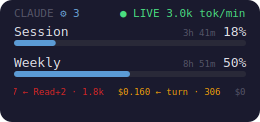
Always-on-top OSD: session + weekly utilisation, reset timers, live token-per-minute badge, subagent counter, and a scrolling per-turn cost ticker along the bottom.
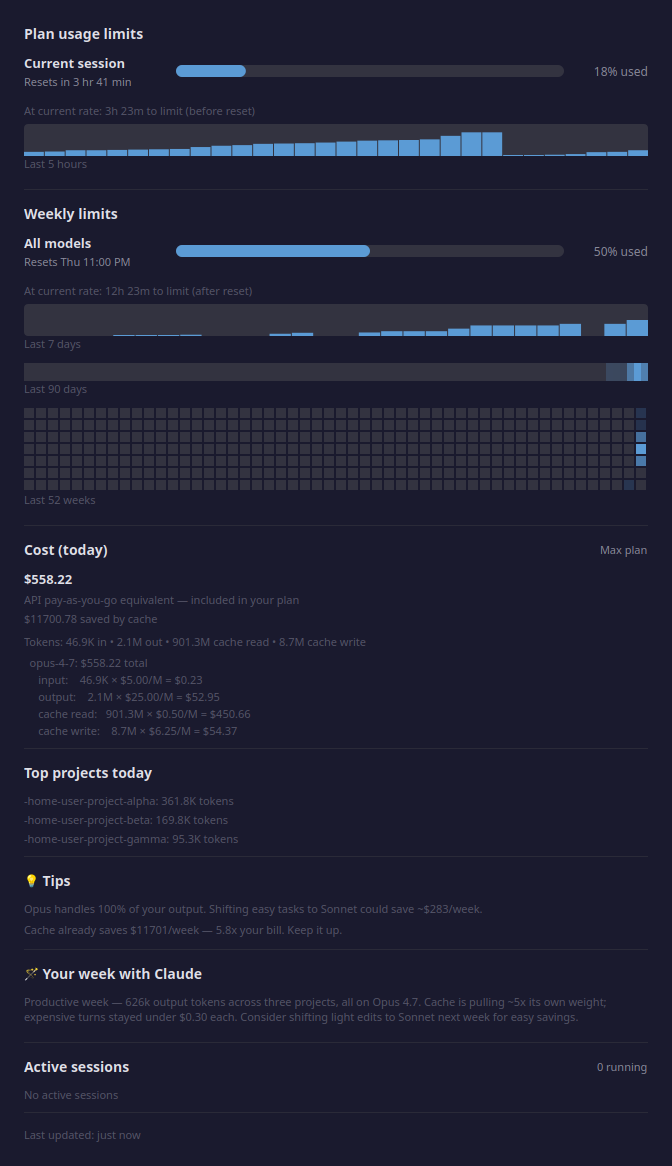
Click the OSD to open the detail popup: forecasts, 5h/7d sparklines, 90-day heatmap, 52-week GitHub-style calendar, per-model cost breakdown with Anthropic-published rates, top projects, tips, and a Claude-authored weekly summary.
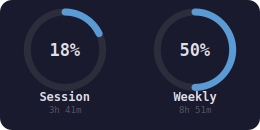
Two layouts, switch with right-click → OSD View ▸. Selection persists to ~/.config/claude-usage/config.json so a restart keeps it.
| Bars — default, includes the scrolling ticker | Gauge — circular rings, car-dashboard vibe |
|
 |
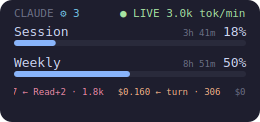
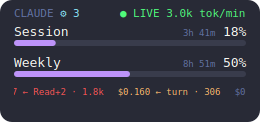
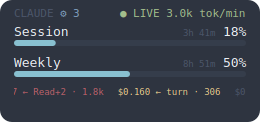
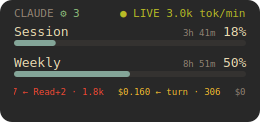
11 built-in palettes — 5 classics + 6 Claude-designed skins. Right-click the OSD → Theme ▸ to switch instantly; the choice persists to ~/.config/claude-usage/config.json.
Classics (dark):
| default | catppuccin-mocha | dracula |
|
 |
 |
| nord | gruvbox-dark | |
 |
 |
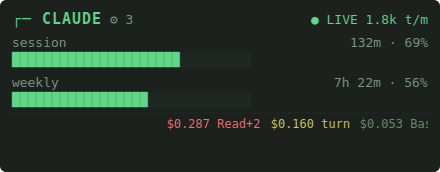
Claude-designed skins:
| terminal htop vibe, green-on-black |
dashboard Bloomberg-terminal cool blue |
hud car-dashboard amber |
 |
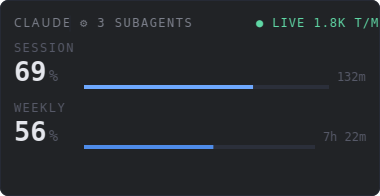 |
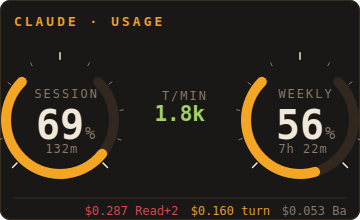 |
| receipt (light) thermal-paper cream + red |
strip cool mint on mono-gray |
brutalist (light) white, heavy rules, crimson |
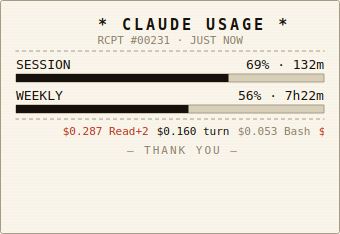 |
 |
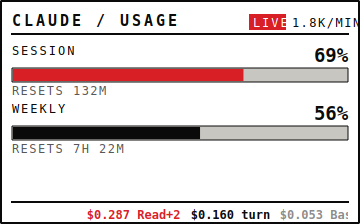 |
Gauge variants for every theme are available at screenshots/osd-gauge-<theme>.png.
- Single
pip install-- noapt/brew/system libraries required, Qt is bundled - Real API data -- 5h / 7d plan utilisation read from Claude Code's
/api/oauth/usageendpoint (the same data the Claude UI shows) - Model-scoped weekly bar -- when Anthropic reports a separate weekly cap for a specific model (e.g. Fable), a third bar appears automatically below Session and Weekly, labelled with the model name. It auto-hides when the API stops reporting it — works in bars, gauge, all 11 themes, and the detail popup.
- Second provider (opt-in) -- also track your local OpenAI Codex usage alongside Claude's: add
"codex"to theprovidersconfig and the widget shows Codex 5h/weekly rows beneath Claude's (extra bars in bars view, a 2×2 ring grid in gauge), rendered natively in all 11 themes. Auto-hides when the Codex CLI is missing or logged out; off by default. See Second provider: OpenAI Codex. - OSD overlay -- transparent, frameless; left-click opens the details popup, right-click shows a context menu. Stays on top by default — toggle it off to use it as a background desktop widget.
- Live token stream --
● LIVE 5.3k tok/minbadge on the OSD while a Claude Code session is actively writing, derived from the conversation JSONLs - Per-turn cost ticker -- a scrolling strip at the bottom of the OSD shows the USD cost of each assistant turn as it lands (
$0.156 ← Bash · 116), colour-coded by quartile within the visible window so the tape always stays visually varied. Toggle via right-click → "Show cost ticker" or set"show_ticker": falseinconfig.json. - Live news ticker (opt-in) -- a second scrolling strip shows the latest Anthropic/Claude headlines sourced from Hacker News (top stories with 50+ upvotes). Fetched lazily, cached locally for 1 hour. Click the strip to open the article in your browser. Off by default because it makes outbound calls to a 3rd-party feed; enable via right-click → "Show news ticker" or set
"show_news": trueinconfig.json. - Subagent rozet -- when you spawn parallel subagents via the Task tool, the
CLAUDEtitle gets a⚙ Ncounter next to it showing how many are currently writing. Hidden when zero so single-session use isn't cluttered. - Detail popup -- usage bars, forecast, 5h/7d sparklines, 90-day heatmap, 52-week GitHub-style calendar, per-model cost breakdown, top projects, active sessions (resizable)
- Auto-refresh -- every 60 seconds by default; the interval adapts automatically, backing off up to 300 s when the endpoint rate-limits and snapping back on the next clean refresh (
refresh_seconds/refresh_max_seconds) - Positioning -- snap the OSD to any screen corner via right-click → "OSD Position", or drag it anywhere; the spot is remembered (
osd_position,osd_x/osd_y) - Resizable -- scroll wheel on the OSD (0.6x -- 4.0x); drag the popup window edges to widen it
- Draggable -- left-click drag on the OSD
- Cost estimation -- USD equivalent per model, cache savings, pay-as-you-go comparison for flat-fee subscribers
- Usage forecasting -- burn-rate prediction: "At current rate: 2h 30m to limit"
- Per-project breakdown -- top 5 projects by token usage today
- Prompt-cache opportunities -- scans recent sessions for repeated prompt prefixes and suggests
cache_controlchanges with a concrete $ savings estimate - AI-generated weekly report -- Claude Haiku writes a 3-4 sentence summary of your past week of usage (cached 1h; never leaks prompt text)
- Anomaly detection -- flags days whose utilisation exceeds the 7/90-day baseline
- Cost optimisation tips -- suggests cache-hit-rate improvements and model-mix changes
- Real-time burn/spike alerts -- a bright OSD badge (
▲42%/▲SPIKE/▲STORM) plus a debounced, once-per-episode notification when your 5-hour window burns abnormally fast or a single turn / retry-loop spikes tokens - Peak-window awareness -- an unobtrusive popup hint during Anthropic's weekday reduced-limit window (default ~5–11 AM Pacific; fully configurable)
- Monthly budget -- optional spend cap: set
monthly_budget_usdto see month-to-date + projected end-of-month spend in the popup and get a once-per-month heads-up when you're on track to exceed it - Themes -- 11 in all: 5 classic palettes (default, catppuccin-mocha, dracula, nord, gruvbox-dark) plus 6 designed skins (terminal, dashboard, hud, receipt, strip, brutalist)
- Threshold notifications -- native desktop notifications on crossing 75% / 90%
- Webhooks -- optional POST to Slack / Discord / custom URLs on threshold, daily, or anomaly events
- Localhost JSON API -- optional
http://127.0.0.1:8765/usagefor tmux / polybar / waybar integrations (prompt previews redacted at the serialization boundary) - CLI mode --
--json,--once,--field,--export csvfor scripts and status bars, plus--statuslinefor Claude Code's built-in statusLine - Update notifications -- a daily background check against the GitHub Releases API; when a newer version is published you get one desktop notification and a banner in the right-click menu (notified once per version, never nagging). The running build's version is also shown at the foot of the menu.
- Single-instance guard -- a second
claude-usagelaunch (login item, script, double-click) detects the running one via a per-user lock file and exits cleanly instead of stacking a duplicate OSD; a lock left behind by a crashed instance is reclaimed automatically.
- Python 3.10+
- Claude Code CLI installed and authenticated (OAuth) — the widget reads the same token, checking the
CLAUDE_CODE_OAUTH_TOKENenvironment variable first, then~/.claude/.credentials.json, then the macOS Keychain
pip install --user --upgrade claude-usage-widget
claude-usage              # launches the OSD overlay (foreground)
claude-usage --detach     # …or run it in the background and free the shell
claude-usage --version    # 0.12.3
That's it — no apt, no brew, no PyGObject, no rumps. pip pulls in just two pure-Python wheels (PySide6-Essentials, which ships Qt, and certifi for HTTPS), so the widget is self-contained with zero system libraries.
If you prefer brew over pip:
brew tap bozdemir/tap
brew install claude-usage-widgetgit clone https://github.com/bozdemir/claude-usage-widget.git
cd claude-usage-widget
pip install -e .
python3 main.py| Action | Effect |
|---|---|
| Left-click | Open the details popup |
| Left-click drag | Move the OSD |
| Right-click | Open context menu (Details, Refresh, OSD Opacity, OSD View, OSD Position, Theme, Minimize/Restore, Show cost ticker, Show news ticker, Always on top, version, Quit) |
| Scroll up / down | Resize (0.6x -- 4.0x) |
- (usage summary) -- a dim, non-clickable header at the top showing your live session/weekly % (with the live token-per-minute rate while a session is writing)
- Details… -- open the detail popup
- Refresh -- force an immediate data refresh
- OSD Opacity -- 100% / 75% / 50% / 25%
- OSD View ▸ -- switch between Bars (default — progress bars + cost ticker) and Gauge (two circular rings); auto-persisted
- OSD Position ▸ -- snap the overlay to Top Left / Top Right / Bottom Left / Bottom Right, or drag it anywhere for a remembered Custom position; auto-persisted
- Theme ▸ -- pick one of the 11 themes (5 classic palettes plus 6 skins: terminal, dashboard, hud, receipt, strip, brutalist); the choice persists to
~/.config/claude-usage/config.jsonso a restart keeps it - Minimize / Restore -- collapse the OSD to a thin progress strip
- Show cost ticker -- toggle the scrolling per-turn cost strip on the OSD
- Show news ticker -- toggle the Anthropic/Claude news headline strip on the OSD
- Always on top -- keep the OSD pinned above other windows (default), or turn it off to let it sit as a normal background desktop widget the window manager stacks behind your focused windows; persisted
- claude-usage v
<version>-- a dim, disabled line showing the running build's version; when a newer release is published an ↑ Update available:<tag>item appears above it (click to copy thepip install --upgradecommand) - Updated
<time>ago -- a dim, non-clickable line showing how long since the last successful refresh - Quit -- exit the widget
If your Claude Code statusLine command dumps its rate-limit payload to a JSON file, the widget can use it as a zero-cost data source — Claude Code rewrites the statusline continuously during an active session, so the file carries the same numbers as /api/oauth/usage at seconds freshness and no API spend. Point statusline_cache_path at a file shaped like:
{
  "captured_at": "2026-07-11T22:52:05+09:00",
  "rate_limits": {
    "five_hour": {"used_percentage": 54, "resets_at": 1783795800},
    "seven_day": {"used_percentage": 46, "resets_at": 1784026800}
  }
}
With this configured the widget uses it two ways:
- Endpoint relief — while the dump is younger than
2 × refresh_seconds, the/api/oauth/usagecall is skipped and only forced through at most once perusage_endpoint_min_seconds. The endpoint is a low-budget resource shared with Claude Code itself; the forced calls keep the model-scoped/overage fields fresh and pick up consumption from headlessclaude -pruns, which never render a statusline. - Rate-limit fallback — when the endpoint throttles us, a dump younger than 20 minutes beats the last on-disk sample, which can lag a whole rate-limit window behind.
Producing the file is up to your statusline script (it receives the payload from Claude Code on stdin and can tee the relevant part out). Expired windows in a stale dump are clamped to zero, and a missing/garbled file just disables the feature for that refresh.
Run OpenAI Codex alongside Claude Code? The widget can show its usage too, right beneath Claude's — no separate menu-bar app. Add "codex" to providers in config.json:
{
    "providers": ["claude", "codex"]
}
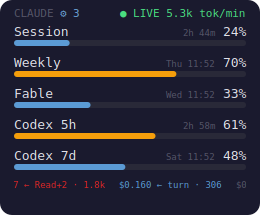
You get two extra rows in bars view — Codex 5h and Codex 7d — or a second pair of rings (a 2×2 grid) in gauge view, styled to match whichever of the 11 themes you're on.
- Data source — the widget speaks JSON-RPC over stdio to your local
codex app-server(account/rateLimits/read) — the same numberscodexreports itself. No scraping, no account data stored or logged. - Cheap — the RPC is spawned at most once per
codex_poll_seconds(default 300 s), with an on-disk cache served in between; the read is hard-bounded so a stalledcodexcan never hang a refresh. - Graceful — the Codex rows auto-hide when the
codexCLI is missing, logged out, or returns no rate-limit data. POSIX-only for now (Linux/macOS).
The default providers is ["claude"], so existing users see no change.
All settings are optional. Copy config.json.example to config.json and edit the values you want to change:
cp config.json.example config.json{
"daily_message_limit": 200,
"weekly_message_limit": 1000,
"daily_token_limit": 5000000,
"weekly_token_limit": 25000000,
"refresh_seconds": 60,
"refresh_max_seconds": 300,
"osd_opacity": 0.75,
"osd_scale": 1.0
}| Setting | Default | Description |
|---|---|---|
refresh_seconds |
60 |
Base poll interval — how often to fetch new data from the API (seconds) |
refresh_max_seconds |
300 |
Max poll interval when the API rate-limits/errors; the interval backs off exponentially toward this cap and snaps back to refresh_seconds on the next clean refresh |
statusline_cache_path |
"" |
Path to a statusLine-dumped rate-limit JSON file (see Statusline-fed rate limits). Empty = disabled. |
usage_endpoint_min_seconds |
300 |
With statusline_cache_path set: while the dump is seconds-fresh, /api/oauth/usage is called at most once per this many seconds. |
osd_opacity |
0.75 |
OSD background opacity (0.15--1.0) |
osd_scale |
1.0 |
OSD scale factor (0.6--4.0) |
providers |
["claude"] |
Add "codex" to also poll the local OpenAI Codex CLI (codex app-server) and show its 5h/weekly usage beneath Claude's — an extra ring row in gauge view, two extra bars in bars view. POSIX-only. |
codex_poll_seconds |
300 |
How often (seconds) to spawn the codex app-server RPC; an on-disk cache is served in between. |
daily_message_limit |
200 |
Daily message limit for local tracking in the popup |
weekly_message_limit |
1000 |
Weekly message limit for local tracking in the popup |
daily_token_limit |
5000000 |
Daily token limit for local tracking |
weekly_token_limit |
25000000 |
Weekly token limit for local tracking |
claude_dir |
~/.claude |
Path to the Claude Code data directory |
theme |
default |
Color theme for the OSD and popup. One of default, catppuccin-mocha, dracula, nord, gruvbox-dark, terminal, dashboard, hud, receipt, strip, brutalist |
show_ticker |
true |
Whether the scrolling per-turn cost ticker is painted at the bottom of the OSD. Toggle at runtime via right-click → "Show cost ticker". |
show_news |
false |
Whether the live Anthropic/Claude news headline strip is shown on the OSD. Off by default because it makes outbound calls to a 3rd-party feed. Toggle at runtime via right-click → "Show news ticker". |
osd_position |
top-right |
Where the OSD anchors: top-left, top-right, bottom-left, bottom-right, or custom. Set from right-click → "OSD Position", or automatically to custom when you drag the overlay. |
osd_x / osd_y |
null |
Exact screen coordinates used only when osd_position is custom. Written automatically on drag. |
osd_scale |
1.0 |
OSD zoom level (0.6–4.0). Updated automatically when you scroll the mouse wheel over the OSD, so it reopens at the same size. |
osd_minimized |
false |
Whether the OSD is in its collapsed thin-strip form. Written automatically via right-click → "Minimize / Restore". |
osd_visible |
true |
Whether the OSD overlay is shown. Written on quit so the widget reopens in the same visible/hidden state. |
osd_always_on_top |
true |
Keep the OSD pinned above other windows. Set to false (or right-click → "Always on top") to let it sit as a normal background desktop widget. |
osd_view_mode |
bars |
OSD layout: bars (progress bars + cost ticker) or gauge (circular rings). |
notifications_enabled |
true |
Whether desktop notifications fire when usage crosses a threshold. |
notify_thresholds |
[0.75, 0.90] |
Utilisation fractions that fire a notification when first crossed. |
api_server_enabled |
false |
Enable the opt-in localhost JSON API (/usage, /healthz). |
api_server_host / api_server_port |
127.0.0.1 / 8765 |
Bind address and port for the localhost API. |
webhooks |
{} |
Map of event → URL (threshold_crossed, daily_report, anomaly, budget_projection, burn_alert). |
peak_awareness_enabled |
true |
Show an unobtrusive "reduced 5h limit" hint in the popup during Anthropic's weekday peak window. Tune the window with peak_start_hour (5), peak_end_hour (11, exclusive), peak_timezone (America/Los_Angeles), peak_weekdays ([0,1,2,3,4], Mon–Fri). |
monthly_budget_usd |
0.0 |
Monthly spend cap (USD). Set > 0 to show month-to-date + projected spend in the popup and a once-per-month alert when projected to exceed it. 0 disables the feature (and its extra month-wide scan). |
budget_notify_enabled / budget_notify_ratio |
true / 1.0 |
Whether the budget projection notification fires, and at what fraction of the cap (0.9 warns at 90%). |
burn_alerts_enabled |
true |
Real-time OSD badge + debounced notification when the 5h window burns fast or a turn / retry-loop spikes tokens. Tune with burn_warn_pct_per_min (2.0), burn_crit_pct_per_min (5.0), burn_window_seconds (600), spike_token_multiplier (4.0), spike_min_tokens (20000), spike_baseline_min_turns (5), retry_storm_turns (3), retry_storm_window_seconds (120), burn_alert_cooldown_seconds (900). |
Keys omitted from config.json fall back to built-in defaults, so config.json.example is an intentionally minimal starter listing only the most commonly changed keys. Everything else in the table above — the opt-in providers (Codex), statusline/endpoint tuning, the burn / peak / budget alerts, the localhost API, webhooks, and the auto-persisted OSD state — simply uses its default until you add it.
The widget ships with 11 built-in color themes — 5 classics plus 6 Claude-designed skins. Select one by adding "theme": "<name>" to your config.json:
{
    "theme": "dracula"
}
Available themes (gallery above):
Classics (dark):
- default -- the original widget palette
- catppuccin-mocha -- soft pastel dark theme
- dracula -- classic purple-and-pink dark theme
- nord -- cool arctic blue palette
- gruvbox-dark -- warm retro-style dark theme
Claude-designed skins:
- terminal -- htop/btop vibe, green-on-black hacker aesthetic
- dashboard -- Bloomberg-terminal clean cool blue, near-zero chroma
- hud -- car-dashboard amber on warm black, mil-spec green live dot
- receipt -- cream thermal-paper + near-black ink + red accents (light)
- strip -- cool mint on mono-gray, ultra-compact menu-bar vibe
- brutalist -- white, heavy rules, one crimson accent (light)
The widget reads your Claude Code OAuth token using the same lookup order as Claude Code itself — the CLAUDE_CODE_OAUTH_TOKEN environment variable, then ~/.claude/.credentials.json, then (macOS only) the Keychain — and calls Claude Code's own /api/oauth/usage endpoint, the same one the Claude UI uses, to read your plan-level utilization:
{
  "five_hour": { "utilization": 58, "resets_at": "2026-04-14T10:00:00+00:00" },
  "seven_day": { "utilization": 10, "resets_at": "2026-04-20T03:00:00+00:00" }
}
These are the same values shown on the claude.ai usage page. (A tiny /v1/messages call that reads anthropic-ratelimit-* headers remains as a fallback if the OAuth endpoint is unreachable.) The widget also reads local data from ~/.claude/ for message counts, token usage per model, and active session tracking.
The response also carries a limits array with any model-scoped weekly caps (e.g. a separate "Fable" weekly limit). The widget surfaces the highest-utilised scoped cap as an auto-appearing third bar, labelled by the model's display name; when the API stops reporting it the bar disappears on its own.
Qt's QWidget with FramelessWindowHint | Tool | WindowStaysOnTopHint plus WA_TranslucentBackground gives us a transparent, borderless floating window that behaves identically on X11, XWayland, native Wayland, macOS, and Windows. All drawing goes through QPainter (drawRoundedRect, drawText), so there's a single code path with no platform shims.
Scale and opacity -- the overlay stores a scale (0.6 -- 4.0, default 1.0) and opacity (0.15 -- 1.0, default 0.75). Scale multiplies every pixel dimension before drawing, so the widget resizes proportionally. Opacity is the alpha channel of the background fill only; bar and text remain at full alpha so they stay legible at low opacity.
Refresh cycle -- a daemon thread wakes on the poll timer, performs the API call, and emits a Qt signal back to the GUI thread (Signal(object)). The GUI thread then updates the OSD and the popup together. The poll interval is adaptive: it runs at refresh_seconds (default 60) while refreshes succeed, and backs off exponentially toward refresh_max_seconds (default 300) whenever a poll is rate-limited or errors, snapping back to the base on the next clean refresh — Anthropic's /api/oauth/usage is a low-budget endpoint shared with Claude Code, so a fixed fast poll against it just prolongs throttling. User interactions (scroll, drag, right-click) update in place and request an immediate repaint.
The OSD renders a ● LIVE 5.3k tok/min badge when a Claude Code session is actively writing. The detector scans ~/.claude/projects/*/*.jsonl for assistant turns in the last 5 minutes (filtered cheaply by file mtime), sums their output_tokens, and divides by the window. The "live" dot only lights up when the newest turn is under 90 seconds old; the rate keeps showing for the full 5-minute window so bursts are visible in context.
A thin scrolling strip along the bottom of the OSD shows the USD cost of each assistant turn as it lands ($0.156 ← Bash · 116). The same JSONL scan that powers the live-tokens badge reads usage.{input, output, cache_read, cache_creation}_tokens from each unique message (dedup'd by Anthropic's message.id) and multiplies by the Anthropic-published rates in pricing.py. Multi-tool turns collapse to a compact Read+2 label. Items are colour-coded by quartile rank within the current 40-item buffer (dim → blue → amber → red), so you always see four tiers regardless of whether you're on Haiku, Sonnet, or Opus — the tape stays meaningful when every turn happens to land in a narrow dollar band. Disable with the right-click menu or show_ticker: false in config.json.
Right next to the CLAUDE title, a ⚙ N badge shows how many Task-tool subagents are actively writing. Detection is a stat-only glob of ~/.claude/projects/<proj>/<uuid>/subagents/agent-*.jsonl filtered to files whose mtime is within the last 60 s — no file contents opened, negligible cost on every refresh. The rozet is hidden when the count is zero so single-session users aren't nagged by a permanent ⚙ 0.
Scans your recent conversation history for repeated user-prompt prefixes (≥1024 tokens, ≥3 occurrences within the last 7 days) and estimates how much you'd save by enabling Anthropic's ephemeral prompt cache on them (cache_creation write once + cache_read for the rest). The top 5 are shown in the popup with a $ figure. Prompt previews stay local -- they're redacted from --json and the localhost API so raw prompt text never leaves your machine via those surfaces.
A 3-4 sentence natural-language summary of the past week (top projects, total volume, cost/model mix) is generated on demand by Claude Haiku 4.5 and cached at ~/.claude/widget-cache/weekly-report.json for one hour. The generator runs on a background thread so refresh stays synchronous. If the OAuth token is missing or Anthropic is unreachable, the section simply disappears -- no retries, no errors in your face.
GitHub-style yearly activity grid below the 90-day strip. Rows are weekdays (Sunday at the top), columns are ISO weeks with today anchored in the rightmost column at its real weekday. Cell alpha maps to per-day peak session utilisation.
- Check if the process is running:
ps aux | grep claude-usage(Linux/macOS) or the Task Manager (Windows). - Try launching from a terminal:
claude-usage— any startup error prints to stderr.
Qt 6.5+ needs one tiny system library that ships separately from the wheel:
sudo apt install -y libxcb-cursor0     # Ubuntu/Debian
sudo dnf install -y xcb-util-cursor    # Fedora
sudo pacman -S xcb-util-cursor # ArchThe widget shoots notifications via notify-send. Install it if missing:
sudo apt install libnotify-bin    # Ubuntu/Debian
sudo dnf install libnotify        # Fedora
sudo pacman -S libnotify # Arch- Make sure the Claude Code CLI is installed and you are logged in (the
claudecommand should work in a terminal). - The OAuth token is loaded in this order: the
CLAUDE_CODE_OAUTH_TOKENenvironment variable, then~/.claude/.credentials.json, then (macOS only) the login Keychain. - macOS — blank session/weekly with "No credentials": Claude Code often stores the token only in the Keychain, and a GUI launch (Finder / Homebrew / a login item) may not have access to it. Launch
claude-usageonce from a Terminal and click Always Allow on the Keychain prompt, or exportCLAUDE_CODE_OAUTH_TOKEN.
The usage figures come from Anthropic's /api/oauth/usage endpoint, a low-budget endpoint shared with Claude Code. Polling it too often can trip its rate limit; the widget handles this gracefully (it keeps showing your last-known numbers and backs the poll interval off automatically), so it's harmless. If you see it a lot, raise refresh_seconds in config.json.
Contributions are welcome. A few guidelines:
- Bug reports — open an issue with your OS, Python version, and the full error output.
- Pull requests — keep changes focused. One fix or feature per PR. Run the widget manually before submitting.
- Minimal runtime dependencies — just PySide6-Essentials (Qt) and certifi (HTTPS CA bundle). No system libraries, no PyGObject/rumps; everything else uses the Python stdlib and platform-native CLIs. PRs that add heavier deps will be asked to make them optional.
- Code style — follow the existing conventions. No formatter is enforced; just match the surrounding code.
MIT