
Import first. Cut over when ready.
Pull packages from the repos you already have, package new release artifacts when you need them, regenerate apt/yum metadata under your key, and serve the result from one static Rust binary.


ArtifactX (arx) is for teams that ship Linux packages but do not want to run
Nexus, aptly, Pulp, S3 glue scripts, custom signing jobs, and a web server just
so users can run apt install or dnf install.
# Path 1: migrate a slice of an existing repo, then serve it
arx init ./repo
arx import https://packages.example.com --apt --dist stable --component main --match-name myapp
arx publish --root ./repo
arx serve --root ./repo
# Path 2: start a new repo from packages you already built
arx init ./repo
arx add dist --root ./repo
arx publish --root ./repo
arx serve --root ./repo# Path 3: build Linux packages, then publish the .deb/.rpm outputs
cargo build --release
arx pack ./Cargo.toml --out dist
arx add dist --root ./repo
arx publish --root ./repoUsers get the boring install path they already know:
sudo apt-get update && sudo apt-get install myapp
# or
sudo dnf install myapp
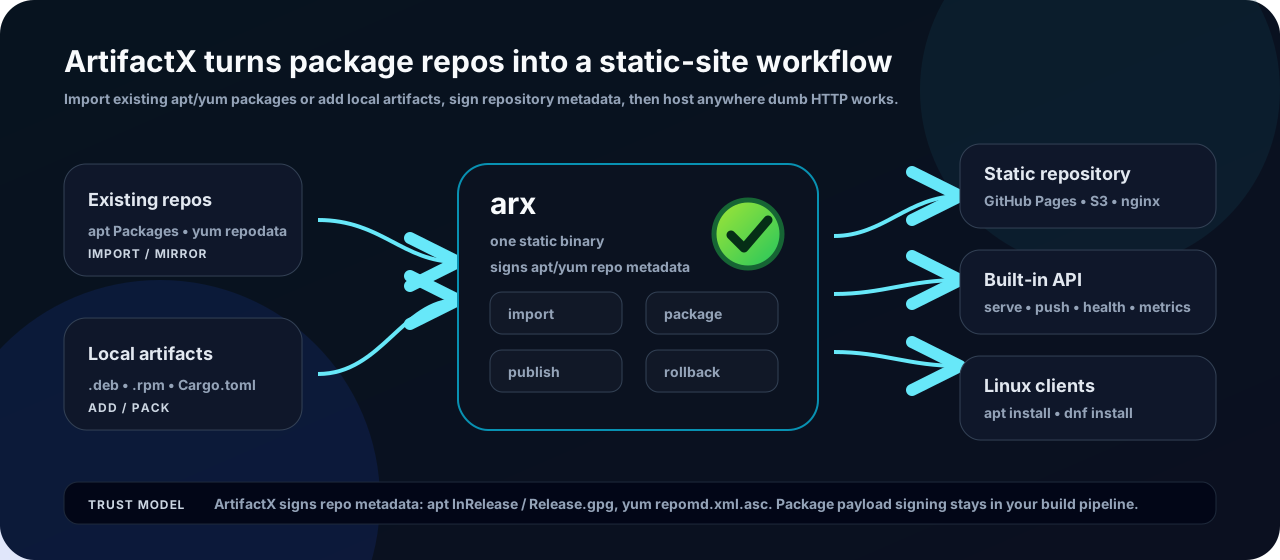
ArtifactX keeps the repository as inspectable static files: pack, import, or
add packages, sign regenerated metadata, publish atomically, and serve from
arx serve, GitHub Pages, nginx, or object storage.
- Import first — pull packages from existing apt or yum/dnf repositories into your own signed repo.
- One binary — pack, add, import, publish, publish-dir, serve, push, promote, search, GC, rollback.
- Native package output — build
.deb,.rpm,.apk, and Arch.pkg.tar.zstfrom a manifest or RustCargo.toml. - Signed repository metadata — apt
InRelease/Release.gpg, yumrepomd.xml.asc. Package signing stays in your build pipeline. - Atomic publish + rollback — build metadata in staging, flip the live state, and roll back when a bad release escapes.
- CI-friendly push — upload to
arx servewith a token or GitHub OIDC. - No daemon required — static binary, Docker image, or GitHub Pages-hosted repo.
| Pillar | Status | Highlights |
|---|---|---|
| Repository | ✅ Shipped | apt + yum/dnf metadata, signing, import, publish, rollback, GC, promote, watch, HTTP API. |
| Package | ✅ Shipped | Pure-Rust .deb, .rpm, .apk, .pkg.tar.zst; Cargo.toml-driven pack; Docker backend. |
| Operations | 🟢 Polishing | Adoption docs, trust path, Pages dogfood, systemd/Docker guidance. |
GitHub is the live source of truth for planning state. The org profile stays
version-neutral; milestones and issues update as work moves, and ROADMAP.md
keeps the product narrative.
Project board · Open milestones · Backlog · Roadmap narrative
artifactx— thearxCLI, packager, repository generator, server, and documentation.
Open-source · Rust · self-hosted · alpha