
A beautiful terminal code search tool powered by ripgrep



Browse matches with vim keys, preview files with syntax highlighting, and open directly in your editor — all from the terminal.
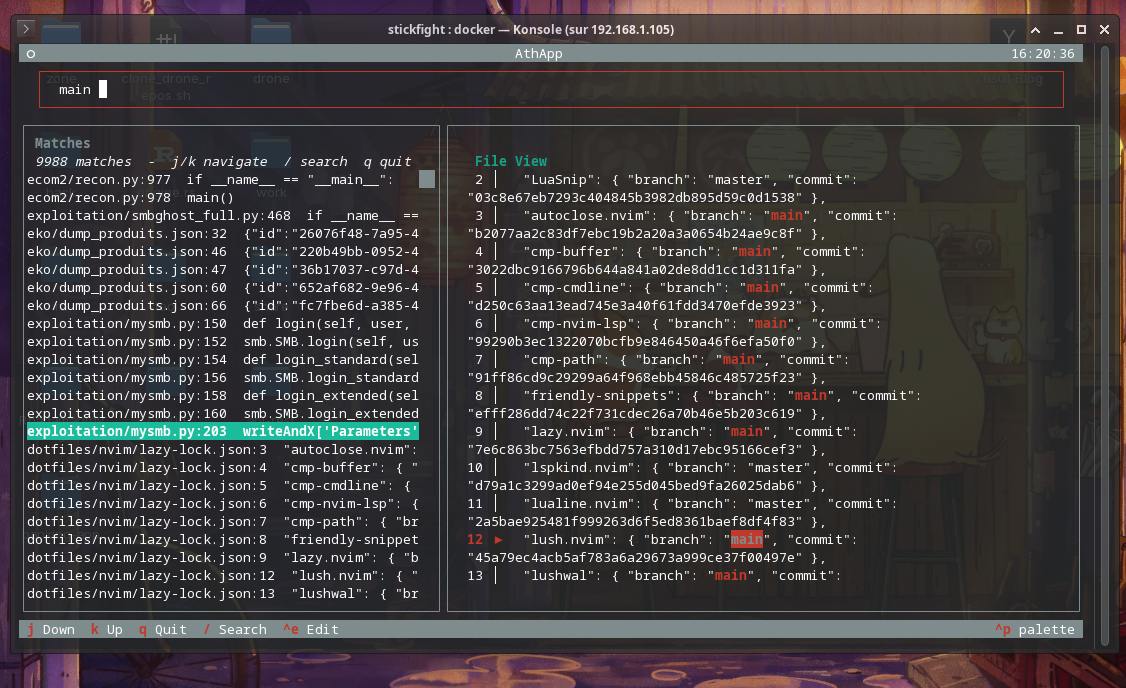
- Live search with ripgrep — fast, incremental, regex-powered
- Split-pane TUI — match list on the left, file preview with syntax highlighting on the right
- Vim keybindings —
j/kto navigate,/to focus search,qto quit - Editor integration —
Ctrl+Eopens the current match at the exact line in$EDITOR(defaults tonvim) - 30+ file type shortcuts —
--py,--rs,--go,--js,--ts,--sql,--nix, ... - Batteries included — no config files needed, just install and run
- Python 3.14+
- ripgrep (
rg) —sudo dnf install ripgrep
git clone https://github.com/Yusufibin/-ath.git
cd -ath
uv sync                                    # install deps + venv
uv tool install . --force --reinstall      # install `ath` globally
Or with pip:
pip install .ath <search-term> # search entire project
ath --py <search-term> # search only *.py files
ath -g py -g rs regex # multiple extension filters
ath --help # list all --ext flags| Flag | Extension | Flag | Extension | Flag | Extension |
|---|---|---|---|---|---|
--py |
.py |
--rs |
.rs |
--js |
.js |
--ts |
.ts |
--tsx |
.tsx |
--jsx |
.jsx |
--css |
.css |
--html |
.html |
--sql |
.sql |
--go |
.go |
--rb |
.rb |
--java |
.java |
--kt |
.kt |
--swift |
.swift |
--c |
.c |
--cpp |
.cpp |
--h |
.h |
--hpp |
.hpp |
--sh |
.sh |
--bash |
.bash |
--zsh |
.zsh |
--json |
.json |
--yaml |
.yaml |
--toml |
.toml |
--md |
.md |
--txt |
.txt |
--nix |
.nix |
--lua |
.lua |
--vim |
.vim |
--zig |
.zig |
--tf |
.tf |
--patch |
.patch |
--diff |
.diff |
--nim |
.nim |
Use raw -g for any other extension: ath -g fish -g conf my-pattern.
| Key | Action |
|---|---|
j / k |
Navigate matches up/down |
Enter |
Jump to match list |
/ |
Focus search input |
Ctrl+E |
Open file in $EDITOR at match line |
q |
Quit |
Set the EDITOR environment variable to choose your editor (defaults to nvim):
export EDITOR=vim
ath some-function
If your editor doesn't support the +<line> flag (e.g. ox, nano), ath falls back to nvim or vim automatically.
ath/
├── main.py          # CLI entry — argparse with 30+ extension shortcuts
├── searcher.py      # ripgrep integration — search() + load_context()
└── tui.py           # Textual 8.x TUI — match list + file preview + highlighting
MIT