
A modern, minimalist Markdown note-taking application built with Python and Flet framework. NoteDown provides a seamless experience for creating, editing, and organizing your notes with real-time Markdown preview.
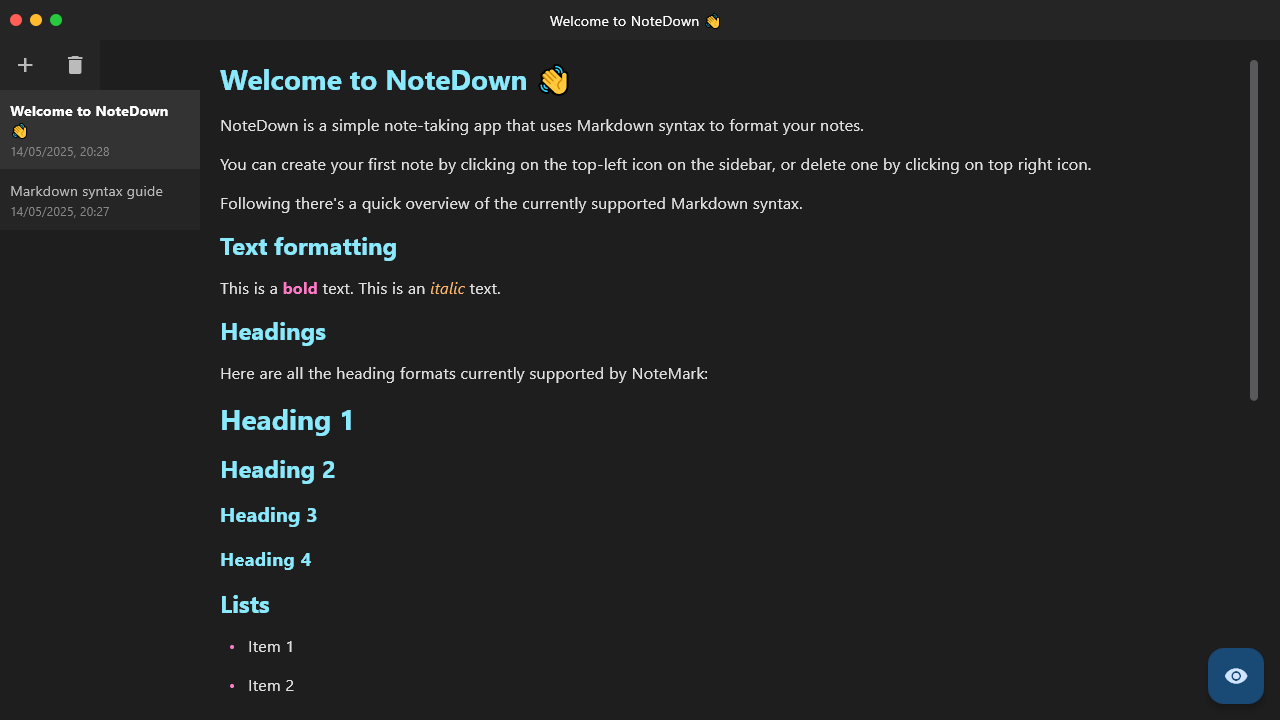
- 🎨 Beautiful dark theme UI with modern design
- ✨ Real-time Markdown preview
- 📝 Full Markdown support with GitHub-flavored syntax
- 🔄 Auto-save functionality
- 📂 Simple and efficient note organization
- 🎯 Frameless window design with traffic light controls
- 🖥️ Cross-platform support (Windows, macOS, Linux)
- 🎨 Syntax highlighting for code blocks
- 🔗 Clickable links in preview mode
- Python 3.7 or higher
- pip (Python package manager)
-
Clone this repository or download the source code:
git clone https://github.com/Shabari-K-S/NoteDown.git cd NoteDown -
Install the required dependencies:
pip install "flet[all]"
To run NoteDown, navigate to the project directory and run:
flet run- Click the eye icon (👁️) to toggle between edit and preview modes
- Use standard text editing shortcuts (Ctrl+C, Ctrl+V, etc.)
NoteDown supports standard Markdown syntax, including:
- Headers (# H1, ## H2, etc.)
- Bold and italic text (bold, italic)
- Lists (ordered and unordered)
- Code blocks with syntax highlighting
- Links and images
- Blockquotes
- Horizontal rules
notedown/
├── main.py          # Main application file
├── notes/           # Storage directory for notes
│   └── index.json   # Notes database
└── README.md        # Documentation
Contributions are welcome! Please feel free to submit a Pull Request.
This project is licensed under the MIT License - see the LICENSE file for details.
- Built with Flet - A Python framework for building interactive multi-platform applications
- Uses the Atom One Dark theme for code highlighting
- Inspired by modern note-taking applications
Made with ❤️ using Python and Flet