An Autonomous Mobile Robot (AMR) project designed for warehouse logistics. Built on ROS 2 Humble, utilizing a strictly containerized swarm architecture to guarantee reproducibility and scalability.


MONA (Modular Open Navigating AMR) is a scalable robot fleet management architecture. The primary focus is on safety-critical operations, hardware redundancy, and fault tolerance (FDIR concept) in compliance with industrial standards.
Within its microservice architecture, MONA functions as an Edge Agent in the distributed LISA (Logistics Intelligence & Swarm API) ecosystem. LISA acts as the central fleet orchestrator, while MONA provides hardware abstraction, local navigation, and sensory data processing.
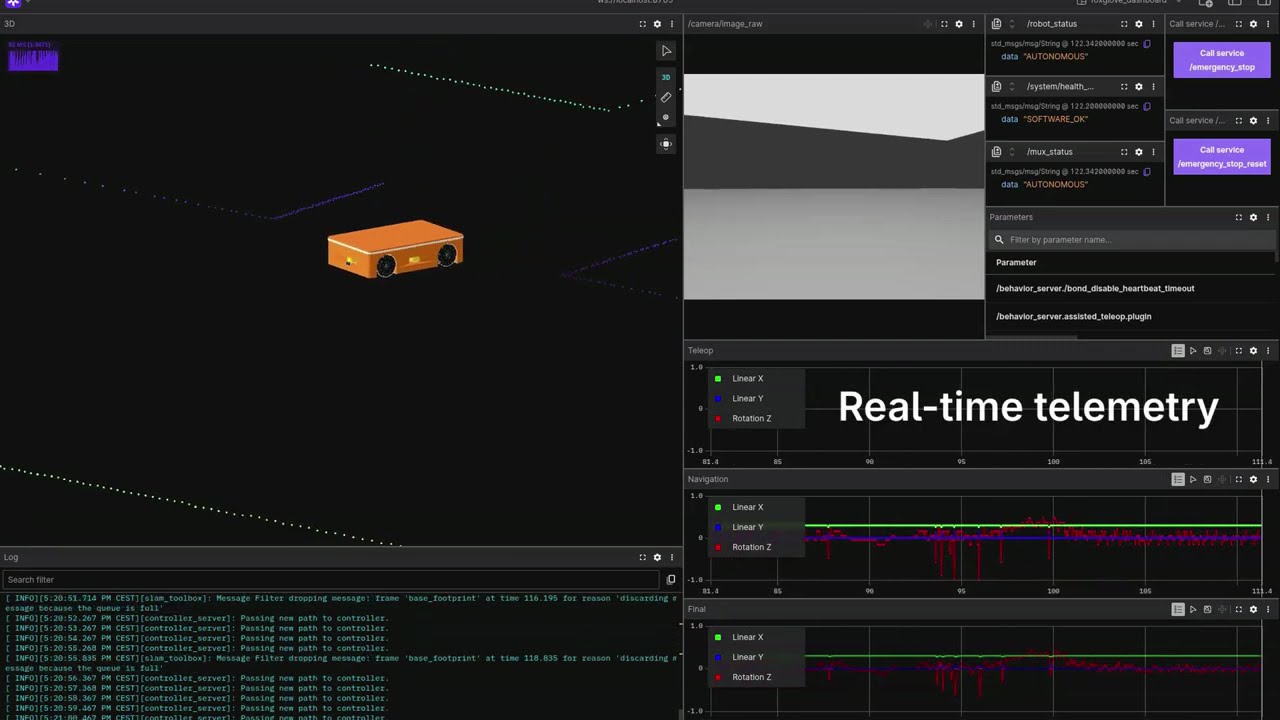
- Industrial Safety (ISO 13849-1 / IEC 61508): Hybrid FDIR (Fault Detection, Isolation, and Recovery) architecture. Includes Fate Isolation (independent OS processes), Zero Velocity Override, hardware redundancy for contactor cutoff circuits, Watchdog timers, and EMA (Exponential Moving Average) smoothing for heavy chassis peak loads during teleoperation.
- Network Stack and DDS: Direct host network access (
network_mode: host) with flexible visibility control (ROS_LOCALHOST_ONLY) and strict DDS implementation enforcement (rmw_fastrtps_cpp). - Fleet Management Ready: The architecture lays the foundation for future integration with VDA 5050 and Open-RMF fleet management standards (LISA).
- Strict CI/CD: Comprehensive code coverage utilizing static analyzers (Clang-Tidy, CPPCheck, Uncrustify, Black, Flake8) and unit testing (GTest).
The project is built upon the ROS 2 component architecture (Zero-copy IPC), divided into the following logical domains:
mona_core/— Main orchestrator package (Bringup). Contains unified.launch.pyfiles, global parameters (.yaml), maps, and the deterministic C++ FDIR Lifecycle Manager.mona_description/— Visual and physical robot representation (URDF, Xacro, 3D meshes).mona_safety/— Hardware sentinel (SafetyNode). Handles Emergency Stops (E-Stop), controls hardware contactors, limits velocities during system degradation, and escalates faults upon unauthorized movement via odometry validation.mona_control/— Dispatch module (Twist Mux). Responsible for routing commands from the gamepad and Nav2, EMA smoothing, velocity interpolation at 100 Hz, and preempting autonomous tasks during manual overrides.mona_perception/— Perception module. Contains theLidarMergerNodefor fusing data from multiple laser scanners into a single, unified point cloud.
The project utilizes strict environment isolation and a microservice architecture via Docker Compose.
# Clone the repository
git clone [email protected]:vladubase/mona_robot.git ~/MONA_ws
cd ~/MONA_ws

# Build the base image
make rebuild
The system supports multiple operational modes depending on your objective, utilizing our dedicated bash scripts:
Used for verifying collisions in Gazebo, wheel physics, and sensor outputs with full GUI support and gamepad teleoperation.
./scripts/bringup_1_robot.bashUsed for testing the DDS network, fleet planners, and telemetry via Foxglove Studio. Physics are simulated without the graphical overhead.
# 1. Start the simulation infrastructure in the background (World & Clock Bridge)
./scripts/start_world.bash

# 2. Deploy a swarm of robots (e.g., 5 agents) in a separate terminal.
# Each will receive a unique namespace (mona_001 ... mona_005)
./scripts/start_fleet.bash 5

# 3. Monitor the fleet through Foxglove Studio.The project provides a unified Makefile for rapid development, but also supports standard Docker Compose workflows for full control.
Option A: Makefile Shortcuts (Recommended)
# Enter the isolated environment
make shell

# Execute full CI pipeline (Linters + GTest)
make ci

# Format all C++/Python source code
make format

# Gracefully stop all robots, the simulation, and clean up networks
make down
Option B: Manual Docker Compose (Classic)
# Launch the development container
docker compose up -d dev

# Execute commands within the environment (e.g., CI checks)
docker compose exec -it dev bash
./scripts/run_ci_checks.bash

# Gracefully stop all containers and clean up virtual networks
docker compose downThe primary robot launch file (robot.launch.py) supports flexible configuration via ROS 2 command-line arguments. In the Docker infrastructure, these parameters are handled automatically by the launch scripts.
| Argument | Default Value | Description & System Impact |
|---|---|---|
namespace |
mona_001 |
Agent Isolation. Defines the prefix for all topics, nodes, and parameters (e.g., /mona_001/odom). Critically important for Swarm deployment. |
headless |
true |
Console Mode. When true, disables RViz2 and Gazebo GUI to conserve CPU/GPU resources. Used for server deployments and massive multi-agent simulations. |
use_sim_time |
true |
Time Synchronization. When true, nodes utilize the simulation clock (/clock topic). Must be true for Gazebo simulation and false for real hardware. |
use_gamepad |
false |
Teleoperation. When true, activates joy_node and teleop_twist_joy to process gamepad commands (DualSense/Xbox). This input has the highest multiplexer priority over Nav2. |
If you need to bypass the bash scripts and launch a robot manually with specific arguments (e.g., enabling the GUI and gamepad support):
docker compose run --rm mona-robot ros2 launch mona_core robot.launch.py headless:=false use_gamepad:=true use_sim_time:=trueAll technical documentation is located in the docs/ directory.
| Category | Document | Description |
|---|---|---|
| Getting Started | 01_SETUP | Instructions for Docker container deployment, hardware passthrough, and base simulation parameters. |
| 02_WORKFLOW | Describes the Git-flow branching strategy and local package build steps. | |
| CONTRIBUTING | Guidelines for contributing, naming conventions, and commit formatting standards. | |
| Architecture | networking_and_fleet | Docker host mode network configuration, DDS settings, and VDA 5050 architecture preparation. |
| mapping_and_odometry | Sensor fusion diagram (EKF), TF tree description, and base navigation stack nodes. | |
| nodes_and_topics | Documentation on node interfaces and topics, specifically detailing Lifecycle and FDIR routing. | |
| safety_and_fdir | Overview of the Fault Detection, Isolation, and Recovery system and hardware redundancy principles. | |
| Guides | cpp_guide | Automatic formatting rules (Uncrustify), linter settings, and ROS 2 Component development requirements. |
| foxglove_guide | Instructions for configuring the Foxglove WebSocket bridge, importing custom dashboard layouts, and monitoring real-time fleet telemetry and FDIR health. | |
| gamepad_setup | Principles for discovering and configuring input gamepads. | |
| teleoperation_guide | Deadman Switch operation, DualSense axis mapping, and velocity command routing logic. | |
| mapping_guide | Instructions for using slam_toolbox and differences between static maps and dynamic local costmaps. |
|
| testing_guide | Comprehensive guidelines for executing the local CI pipeline, writing C++ GTest suites for Lifecycle nodes, and adhering to strict static analysis standards. |