A plugin for Unraid that equalises disk usage percentage across mixed-capacity array drives by intelligently moving files from over-used to under-used disks.
If you have a mix of 4 TB and 2 TB drives in the same array, Unraid's default fill strategies leave disks at very different usage levels — one disk at 80% while another sits at 30%. ReBalance fixes this so every disk lands at roughly the same fill percentage, regardless of its size.
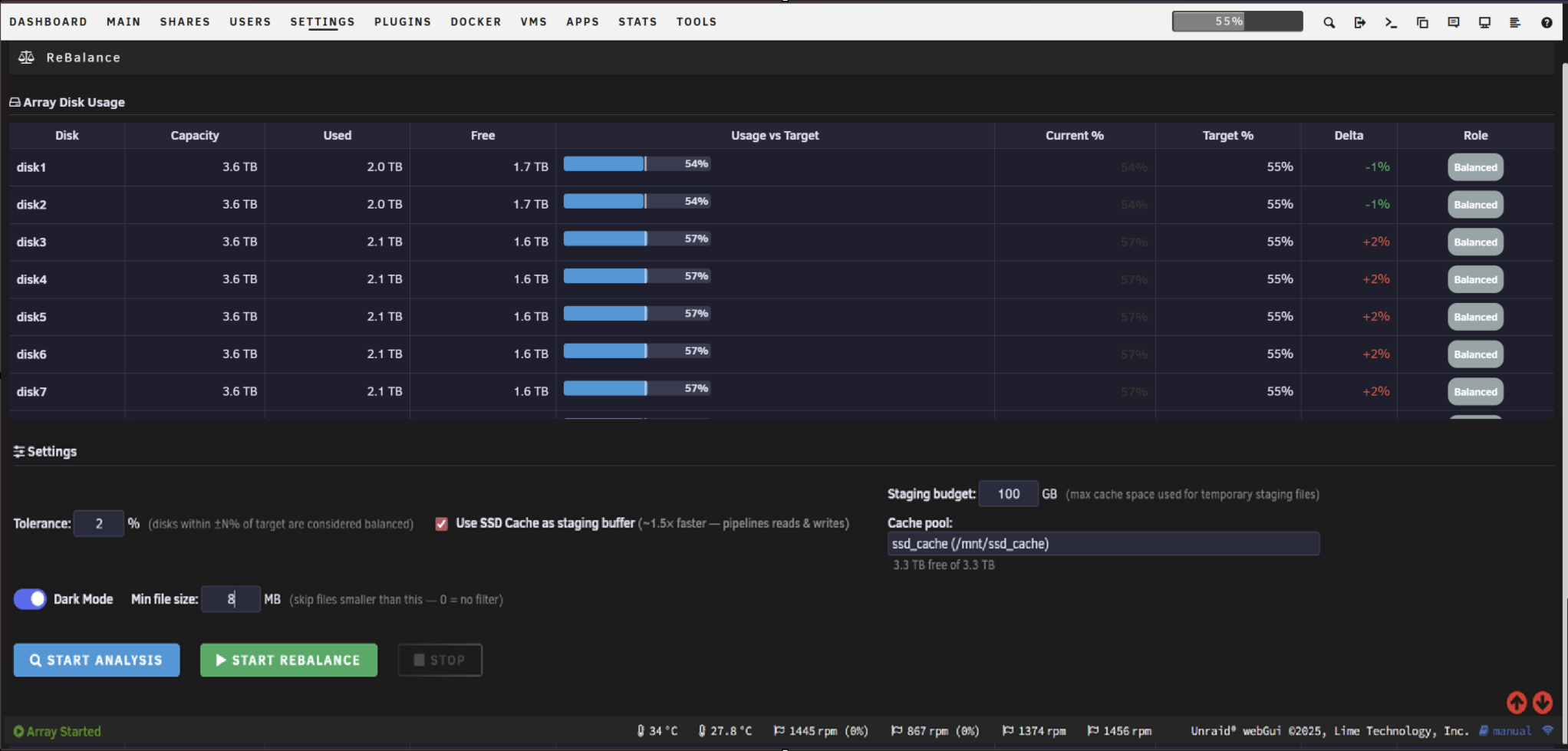
- Analysis mode — build and review a full move plan before touching any files
- Minimum file size filter — skip small files (subtitles, NFOs, thumbnails) and focus moves on content
- Optional SSD cache staging — pipelines source reads with destination writes for ~1.5× throughput
- Live progress bar — transfer rate, elapsed time, and estimated time remaining
- Planning progress — shows which source disk is being scanned (Disk X of Y) with ETA
- Configurable tolerance — disks within ±N% of target are left alone (default ±2%)
- Safe stop — interrupts a run at any point without leaving files in an inconsistent state
- Dark mode UI
- Unraid 6.12 or later
- Array disks mounted and accessible under
/mnt/disk*
- In the Unraid web UI go to Plugins → Install Plugin
- Paste the following URL and click Install:
https://raw.githubusercontent.com/Esteban4u/ReBalance/main/rebalance.plg
- The plugin appears under Tools → ReBalance
Click Start Analysis to build a move plan without touching any files. The plugin will scan each source disk, calculate how much needs to move, and show you the full plan — file count, total GB, and which disk each file moves to.
Use the Minimum File Size filter (e.g. 50 MB) to exclude small files from the plan. This dramatically reduces file count and focuses moves on content files like movies and TV episodes.
Once you're happy with the plan, click Start Rebalance. The plugin will execute the moves via rsync, updating parity normally as it goes.
For best performance, enable Use SSD Cache as staging buffer. This pre-stages the next file on the SSD while the current file is being written to its destination disk, giving ~1.5× throughput by keeping reads and writes on separate physical devices.
The progress bar shows:
- Planning phase — Disk X of Y being scanned, files planned so far, estimated time remaining
- Running phase — percentage complete, transfer rate, elapsed time, ETA
You can safely leave the page — the rebalance runs as a background process on the server and continues regardless of your browser.
Click Stop to safely interrupt the run. No files are left in an inconsistent state — any file either moved completely or wasn't touched.
| Setting | Default | Description |
|---|---|---|
| Tolerance | 2% | Disks within ±N% of the target are considered balanced and left alone |
| Dry Run | — | Start Analysis always performs a dry run; Start Rebalance moves files |
| Use SSD Cache | Off | Enables cache staging pipeline for ~1.5× faster throughput |
| Staging budget | 100 GB | Maximum cache space used for temporary staging files |
| Min file size | 0 MB | Skip files smaller than this (0 = no filter) |
- Scans all array disks and calculates the weighted average usage % across all drives
- Identifies source disks (above target + tolerance) and destination disks (below target − tolerance)
- Builds a move plan — largest files first — assigning each file to the best-fit destination
- Executes moves via
rsync -aX, preserving all extended attributes - Updates virtual disk state as each file is planned/moved to track remaining capacity
Status is written atomically to /tmp/rebalance_status.json every 5 seconds so the UI always reflects the current state.
- Parity is updated normally on every file move — this is safe to run on a live array
- The plugin does not touch parity disks, cache pools, or the flash drive
- Runtime state is stored in
/tmp/and cleared on reboot — a run in progress will not resume after a reboot - The "Fix Common Problems" plugin may warn about the staging directory in
/mntduring a run — this is harmless and the directory is cleaned up automatically when the run completes
- Forum thread: https://forums.unraid.net/topic/198334-rebalance-array-disk-usage-balancer/
- Bug reports & feature requests: https://github.com/Esteban4u/ReBalance/issues
MIT License — see LICENSE for details.