


- Best Expert, Development x Business
- In 1 Year, How Can We Make 1 Million Dollar?
- In 1 Year, Service 10 Million Dollar. How Can We Make It?
- This is the Log of Study, Apply, and Reflect. by Codin Go
-
- Getting Start with SwiftUI
- Learning More about SwiftUI
- MVVM
- More MVVM enum Optionals
- Properties Layout @ViewBuilder
- Protocol Shapes
- ViewModifier Animation
- Animation Demo
- EmojiArt Drag/Drop
- Gesture
- Persistence Error Handling
- Binding Sheet Navigation EditMode
- Publisher More Persistence
- Document Architecture
- UIKit Integration
- Multiplatform (macOS)
- (2020) Enroute Picker Codable REST API
- (2020) Core Data
- Best Expert in iOS App Developer
- Service.App
- SeeCode (Core: Language 10% understand and go)
- Stanford
- Index QA
- SeeCode
- ShareSummary
- SeeCode (Core: Language 10% understand and go)
- 1MHA, One Month Hundred App
- App
- Web
- Lecture
- Book
- Google Web, App
- Apple Web, App
- AMAZON Web, App
- TikTok App
- WeChat App, Web
- NAVER App, Web
- KAKAO App, Web
Description : Fast, Free, Frendly, and First.
- For: Fast Learner, Beginner.
- Fee: Free
- Active: Interactive @Twitter
- Contents: Making Swift Apps with UIKit and SwiftUI
- Inspired: Paul Hegarty, Paul Hudson
- 1MHA. One Month Hundred App.
- Examples and Modules for Main Service.
- Structure:
- Objective - Due - Materials - Required Test - Hint - Thinks to Learn - Evaluation - Extra Credit
- Community, Forum
- Blog
- Ubuntu
- Open Source
Basics (001-080)
- (View)
Advanced (081-100)
- Dice (View)
- Schedule (Table)
- Game (StriveUI)
Click to details
. Game . TapGesture . (RoundedRectangle, emoji)
. struct . (View, some, body, ZStack HStack, Bool, @State, Array, ForEach, .self, spacer, padding, systemName, LazyVGrid, GridItem, aspectRatio, ScrollView,
. meaning . (Option + Click, 0..<6
. word . (immutable, snippet, infer,
. whole . (readable, simple, short,
. Model . (MVVM Model-View-VieModel,
[View]:
. is: On Screen, Get Input and Return Output
. types: [simple view], [combine view], [bag view]
struct ContentView: View {
   var body: some View {
      Text("Hello World!")
   }
}[@State] :
. like Pointer. Pointing Memory (Same). even memory changes.
[#spacer()] :
. all the remains space
[_] :
. in function, underbar, don't have name
func multiply(_ operand: Int, by otherOperand: Int) -> Int {
    return operand*operOperand
}
multiply(5, by: 6)
[init] :
. struct and class
. initializers
struct RoundedRectangle {
  init(cornerRadius: CGFloat) {
}
struct x class :
. stract : value type, coppied, Functional programming, No inheritance, Free init All vars, Mutability on explicitly state, Seen so far is a struct (except view, protocol),
. class : reference type, pointer, Object-oriented programming, Inheritance, Free init No vars, Mutable, MVVM is a class (UIKit (old style iOS) is class-based)
Generics :
. "don't care" type
MVVM.component:
. Model: Data capsulation
. View : UI(Control..), Layout(Visual..)
. ViewModel: Model Data process to show on View
MVVM.proscons:
.pros: on View no UIKit, independent test on UI, less strees on Controller
.cons: binding library or lots of code.
static func:
. global function. share the variable with other all object
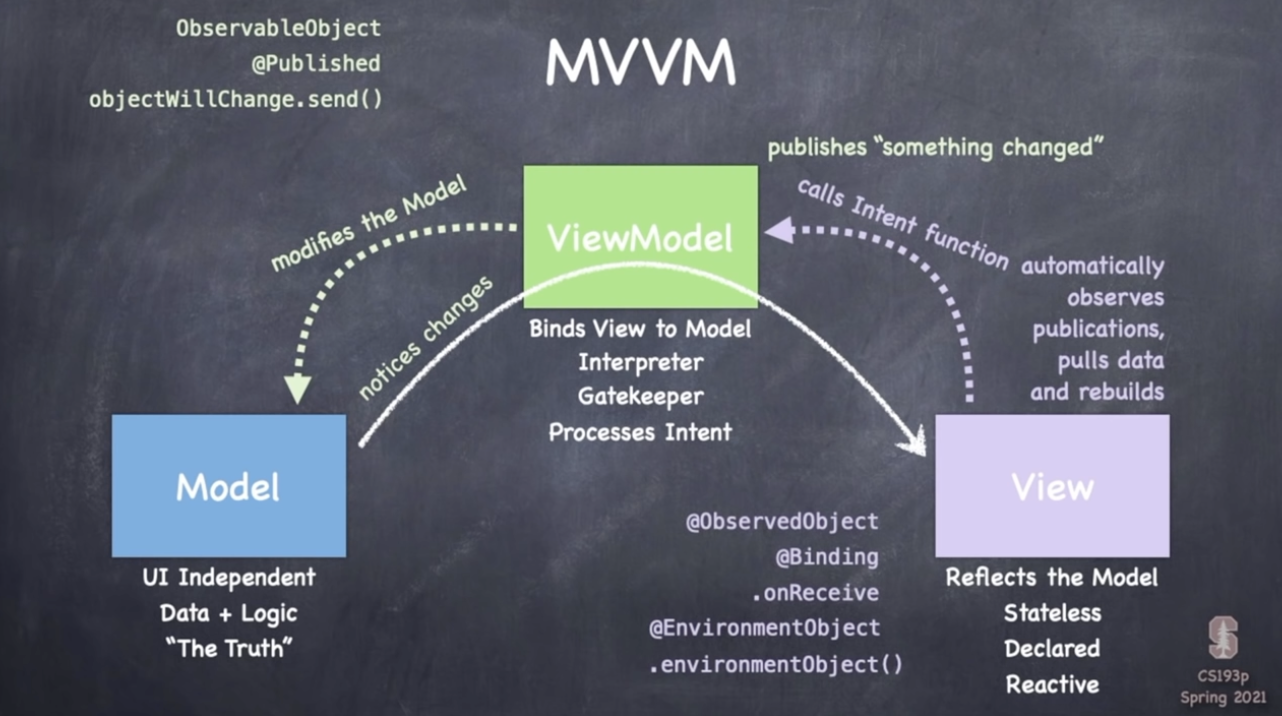
[ObservableObject] Protocol and [@Published]
.When Model Changed, Publish(return and fresh)
class EmojiMemoryGame: ObservableObject {
    ...

    @Published private var model = createMemoryGame()

    ...
}
@ObservedObject
.When [viewModel] is [published], rebuild [body]
struct ContentView: View {
    @ObservedObject var viewModel: EmojiMemoryGame

    var body: some View {
        ...
    }
}
enum (enumeration)
.overview : dont need value
.Sytax : Type and case
.Iterating enum cases (tea, water)
.Associated Values (upc, qr. can be changed)
.Raw Values (previous choosen. not like Associated Values)
..Implicitly Assigned Raw Values (mercury=1, venus.. , north, south)
..initializing from a Raw Value
..Recursive Enumerations (indirect enum)
Click to details
A Swift Tour
- Simple Value
- Control Flow
- Functions and Closures
- Objects and Classes
- Enumerations and Structures
- Protocols and Extensions
- Error Handling
- Generics
- https://docs.swift.org/swift-book/GuidedTour/GuidedTour.html
API Design Guidelines
- Fundamentals
- Naming
- Promote Clear Usage
- Strive for Fluent Usage
- Use Terminology Well
- Conventions
- General Conventions
- Parameters
- Argument Labels
- Special Instructions
- https://www.swift.org/documentation/api-design-guidelines/
The Basics
- Constants and Variables
- Comments
- Semicolons
- Integers
- Floating-Point Numbers
- Type Safety and Type Inference
- Numeric Literals
- Numeric Type Conversion
- Type Aliases
- Booleans
- Tuples
- Optionals
- Error Handling
- Assertions and Preconditions
- https://docs.swift.org/swift-book/LanguageGuide/TheBasics.html
Language Guide
- The Basics
- Basic Operators
- Strings and Characters
- Collection Types
- Control Flow
- Functions
- Closures
- Enumerations
- Structures and Classes
- Properties
- Methods
- Subscripts
- Inheritance
- Initialization
- Deinitialization
- Optional Chaining
- Error Handling
- Concurrency
- Type Casting
- Nested Types
- Extensions
- Protocols
- Generics
- Opaque Types
- Automatic Reference Counting
- Memory Safety
- Access Control
- Advanced Operators
- https://docs.swift.org/swift-book/LanguageGuide/TheBasics.html
Language Reference
- Lexical Structure
- Types
- Expressions
- Statements
- Declarations
- Attributes
- Patterns
- Generic Parameters and Arguments
- Summary of the Grammar
- https://docs.swift.org/swift-book/ReferenceManual/AboutTheLanguageReference.html
Welcome to Swift
-
About Swift
-
Version Compatibility
-
A Swift Tour
-
About Swift
- safe, fast, interactive programming lang
- writing swift code is a playground lets you experiment with code and see the result immediately.
- continues to evolve with new features and capabilities
- goal for Swift are ambitious.
-
Version Compatibility
- Swift 5.6, the default version of Swift included in Xcode 13.
- Swift 4 and Swift 4.2 functionality is available. (except, opaque type, try?, large integer)
-
A Swift Tour
- Simple Value
- Control Flow
- Functions and Closures
- Objects and Classes
- Enumerations and Structures
- Protocols and Extensions
- Error Handling
- Generics
-
A Swift Tour
-
Simple Value
- let, var
- ()
- Take up multiple lines : """, """
- array[], dictionaries [:]
-
Control Flow
- ..?
- if, switch, for-in, while
-
Functions and Closures
- declare and call
- _ : no argument
- can be nested. can be arguments.
- can write a clousre without a name by surrounding code with brace({}). ~= numbers.map({number in 3*number})
- when a closure is the only argument to a function, can omit parentheses entirely. ~= numbers.sorted{$0 > $1}
-
Details
-
Objects and Classes
- use 'class' followed by the class's name to create a class. == class Shae { }
- method and function declarations are written the same way.
- Use dot syntax to access the properties and methods of the instance == shape.numberOfSides = 8
- Subclasses include their superclasses name after their class name == class Square: NamedShape {}
- Overriding a method, without override, is detected by compiler as an error.
- properties can have a gertter and setter == get{} set{}
- dont need to compute and need to provide code : willSet and didSet == willSet { square.sideLength = newValue.sideLength}
- optional value considering nil == let optionalSquare: Square?
-
Enumerations and Structures
- use Enum
- By default, Swift assigns the raw values starting at zero.
- and incrementing by one each time. (you can change this explicitly)
- short form == case .ace: return "ace" case .queen
- structures support many of the same behaviors as classes. it always coppied but classes are passed by reference. == struct Card {}
-
Protocols and Extensions
- class, enum, and struct can all adopt protocol.
- mutating struct need mutating. but class don't need. Because method on a class always modify the class.
- extension to add protocol conformance
- Even though the variable protocolValue has a runtime type of SimpleClass, the compiler treats it as the given type of ExampleProtocol. == let protocolValue: ExampleClass = a
-
Error Handling
- Error protocol == enum PrinterError: Error {}
- throw == func send(job: Int, toPrinter printerName: String) throws -> String
- do-try-catch == let printerResponse = try send(job: 1000, toPrinter: "Godoqa")
- try? == let printerFailure = try? send(job: 998, toPrinter: "Never Has Toner")
- defer == defer {fridgeIsOpen = false}
- use defer to write a code that's executed after all other code in the function
-
Generics
- write a name inside angle bracket to make a generic type or function or type == func makeArray(repeating item: Item, numberOfTimes: Int) -> [Items] {}
- forms of method and function is as well as class, enum, struct. == enum OptionalValue {}
- writing <T: Equatable> is the same as writing ... where T: Equatble
Typealias
- Not create new types. But provide new name to an existing type
typealias name = existing typeShorthand Argument Names
- $0 and $1 refer to the closure’s first and second String arguments. Because $1 is the shorthand argument with highest number
reversedNames = names.sorted(by: { $0 > $1 } )Heap
- Area of preserved computer main memory that a program process can use to store data in some variable amount that won't be known until the program is running.
Generic
- Generic Functions can work with Any Type.
func swapTwoValues<T>(_ a: inout T, _ b: inout T) {
    let temporaryA = a
    a = b
    b = temporaryA
}
Protocol
- A protocol defines a blueprint of methods, properties, and other requirements
struct SomeStructure: FirstProtocol, AnotherProtocol {
    // structure definition goes here
}- SpriteKit
- UIKit
- Core Graphics
Quiz (1-30 o. 31-100 o)
- Metric: many views can use.
- iBeacon: notify around you.
- JSON: save and send data.
- Struct: default memberwise initializer.
- Activity view controller: by Airdrop
- View Conroller Calling: present()
- Codable: prefered written only in Swift
- Variadic: not zero but empty
- SpriteKit: 2D Game
- SKTexture: can change of SKSpriteNode ; Generate Texture dynamically.
- Trailing closure sytnax: only function and method, not lazy properties.
- Double: holds more than Float.
- nil coalescing: nil come together
- animate(withDuration:): This method of view measures time in second
- CGAffineTransform: create scaling
- Objective-C compatibility: use NSCoding, not Codable.
- QoS: Quality of Service
- Enum: can be strings, integers, and something else.
- Core Graphics: can render to PDFs or to screens. It is device-independent.
- Adding a path: just prepare to draw. not draw yet unitl request it.
- touchBegan(): is called with set, not array.
- SKNode: The base class of all SpriteKit nodes.
- NSValue: needed because Objective-C was not able to store CGRect.
- Bitmask: called "bitwise or" can combine two numbers. I want to store the schedule for a reminder in a single value
- Weak reference: must be unwrapped before use.
- Multi Button: can call the same method when tapped.
- Auto Layout: works perfectly alongside navigation bar.
- valueChanged: UISlider, everytime the slider is moved.
- CIContext: Core Image Context is expensive to create. so reuse.
- GCD background: It is higher priority than .utility and lower than .userInitiated.
- UIColor is different with CGColor. CGColor is Core Graphic to represent color. UIColor is represented internally as a CGColor in a CGColorSpace.
- UIKit: UIKit types like UIBeizerPath aren't available macOS. but SpriteKits can.
- non-repeat: non-repeating timer by setting the repeats properties to false.
- resignFirstResponder(): this method is used when the user to stop editting a text view and text field.
- navigationItem: Each view controller has own navigationItem
- inout: Changing inout parameters inside a function changes outside too.
- cells in grid: UICollectionView is better choice than UITableView
- UNUserNotificationCenter: This lets us control who gets told when notification are triggered.
- #selector: To point a method in any object, as long as that method is marked @objc.
- motionBegan: from view controller, not game center.
- SKShapeNode: stroke color and line width
- MKAnnotation: must be a class, not a struct.
- isDynamic: A SpriteKit physics body with isDynamic set to false will no longer be affected by gravity.
- Navigation controllers: are placed inside tab bar controllers.
- Parsing JSON: doesn't touch UI. good choice for background work.
- name: Apple recommends you include your company and app name to make sure the string is unique.
- Leading and Trailing: Leading constraint is on the right edge of the screen, and Trailing is on the left.
- AppDelegate: system notification.
- Assertion: can help catch error.
- Set: All items in a set must be unique.
- .replace: this blend mode ignore transparency, which make it faster to draw.
- GCD: Grand Central Dispatch. it works with SpriteKit, UIKit, and other frameworks.
- Empty: Some strings might be empty depending on what your data was.
- UIColor: You can use value higher than 1.0 for red, green, blue in UIColor. for deep colors
- ctm: return current transformation matrix
- UIView: doesn't have a zPosition property.
- Multipeer: come from Multipeer connectivity framework, not UIKit.
click here previous story
Base Book
- Do it, Making iPhone App using Swift
- Base Day1
- Base Day2
- Review Day1
- Review Day2
Practice 1MHA
-
Practice Day1 220510
-
Practice Day2 220511
-
Practice Day3 220512
-
Practice Day4 220513 Stanford Lecture 4 (o)
- Impressive 3: Structure Understanding, Making App One Step More, Amazing Structure Managing using Markdown.
- Core:
_,$0>$1, override func, enum (a given raw value, and rest in order), Class, Structure. - Q: More Fast Follower?
- Review: MVVM, Assignment1 on swiftorg (Object Class, Struct, Enum, )
- Reflect: Side -> Core
- Improve: 14min, 50min, Target Time, Dig in core first.
-
Practice Day5 220514 Stanford Lecture 5 (..)
-
P.D6.0515 CS193p Lec5~6
-
P.D7.0516 CS193p Assn, Lec6,7,8,9,10; 11,12,13 ;
Click to details
- JSON
- closure's first and second Shorthand Argument Names
 let coffee: [String] = ["Cappucinno","Esspresso","Latte","Ristretto"]

reverseOrder = coffee.sorted {$0 > $1}
// RESULT: ["Ristretto", "Latte", "Espresso", "Cappuccino"]
- Underscore Operator represents an unnamed parameter/label.
- JavaScript Object Notion (JSON) is text-based format for representing structured data. It is used for transmitting data in Web App.
- @ Things
- e.g. @State, @Published, @ObservedObject
- @Binding, $
struct OtherView: View {
  @Binding var sharedText: String {
    var body: View {
      Text(sharedText)
      TextField("shared", text: $sharedText)
    }
  }
}
- @EnvironmentObject: same as @ObservedObject
- @ObservedObject: A property wrapper type that subscribes to an observable object
@propertyWrapper @frozon struct ObservedObject<ObjectType> where ObjectType : ObservableObject
- Publisher, Sink
- SwiftUI (ViewModels)
Store structured app and user data in Cloud containers that all users of your app can share
- App icon
- PalletStore: multiple documents
- @SceneStorage
- @ScaleMetric size
- Undo: [<] mark
- Redo: undoManager?.redo()
- (v) FileWrapper: A representation of a node(a file, directory, or symbolic link) in the file system.
lec15.
- Integrating with UIKit.
- Delegation
- Wrap in NavigationView
- iPhone Camera, Paste.
- SwiftUI: Framework. Declare the user interface and behavior for your app on every platform.
- UIKit: Framwork. Construct and manage a graphical, event-driven UI for your iOS or tvOS app.
- UIImagePickerController: Controller. UIKit world, there is no MVVM. UIKit called MVC.
lec16.
- Multiplatform (macOS + iOS)
- NS
- utf8PlainText
- if os(iOS)
Wrap-up
- Impressive: idea realize
- Review: Multi platform, iOS to macOS, camera usage, integrate UIKit.
- Reflect: Focus Good for using emptyTime.
- Improv: evisualize and other time.
- P.D8.0517.2 CS193p 16, Review
- popoverPadding
- URL -> com.apple.security.network.client
- Flight Done and Cancel
- NavigationView
- Hashable ?
- Database
- SQL: Save data
- Map
- Enroute.xcdatamodeld
- import CoreData
- import Combine
- @FetchRequest
- Extension
- impressive: possible modules, 1 beautiful example, questions
- review: SwiftUI, MVVM, Data, Multiplatform
- reflect: focus on now, night story, Q&A
- improve: check status, better at night story, clear objective
Objective: 1M1H.app
Do:
- 100 Days of Swift ( )
- 100 Days of SwiftUI
- Stanford 2021 2nd: code understanding, searching, and making.
- SpriteKit
- UIKit
- Core Graphics
Quiz (1-30 o. 31-100 o)
- Metric: many views can use.
- iBeacon: notify around you.
- JSON: save and send data.
- Struct: default memberwise initializer.
- Activity view controller: by Airdrop
- View Conroller Calling: present()
- Codable: prefered written only in Swift
- Variadic: not zero but empty
- SpriteKit: 2D Game
- SKTexture: can change of SKSpriteNode ; Generate Texture dynamically.
- Trailing closure sytnax: only function and method, not lazy properties.
- Double: holds more than Float.
- nil coalescing: nil come together
- animate(withDuration:): This method of view measures time in second
- CGAffineTransform: create scaling
- Objective-C compatibility: use NSCoding, not Codable.
- QoS: Quality of Service
- Enum: can be strings, integers, and something else.
- Core Graphics: can render to PDFs or to screens. It is device-independent.
- Adding a path: just prepare to draw. not draw yet unitl request it.
- touchBegan(): is called with set, not array.
- SKNode: The base class of all SpriteKit nodes.
- NSValue: needed because Objective-C was not able to store CGRect.
- Bitmask: called "bitwise or" can combine two numbers. I want to store the schedule for a reminder in a single value
- Weak reference: must be unwrapped before use.
- Multi Button: can call the same method when tapped.
- Auto Layout: works perfectly alongside navigation bar.
- valueChanged: UISlider, everytime the slider is moved.
- CIContext: Core Image Context is expensive to create. so reuse.
- GCD background: It is higher priority than .utility and lower than .userInitiated.
- UIColor is different with CGColor. CGColor is Core Graphic to represent color. UIColor is represented internally as a CGColor in a CGColorSpace.
- UIKit: UIKit types like UIBeizerPath aren't available macOS. but SpriteKits can.
- non-repeat: non-repeating timer by setting the repeats properties to false.
- resignFirstResponder(): this method is used when the user to stop editting a text view and text field.
- navigationItem: Each view controller has own navigationItem
- inout: Changing inout parameters inside a function changes outside too.
- cells in grid: UICollectionView is better choice than UITableView
- UNUserNotificationCenter: This lets us control who gets told when notification are triggered.
- #selector: To point a method in any object, as long as that method is marked @objc.
- motionBegan: from view controller, not game center.
- SKShapeNode: stroke color and line width
- MKAnnotation: must be a class, not a struct.
- isDynamic: A SpriteKit physics body with isDynamic set to false will no longer be affected by gravity.
- Navigation controllers: are placed inside tab bar controllers.
- Parsing JSON: doesn't touch UI. good choice for background work.
- name: Apple recommends you include your company and app name to make sure the string is unique.
- Leading and Trailing: Leading constraint is on the right edge of the screen, and Trailing is on the left.
- AppDelegate: system notification.
- Assertion: can help catch error.
- Set: All items in a set must be unique.
- .replace: this blend mode ignore transparency, which make it faster to draw.
- GCD: Grand Central Dispatch. it works with SpriteKit, UIKit, and other frameworks.
- Empty: Some strings might be empty depending on what your data was.
- UIColor: You can use value higher than 1.0 for red, green, blue in UIColor. for deep colors
- ctm: return current transformation matrix
- UIView: doesn't have a zPosition property.
- Multipeer: come from Multipeer connectivity framework, not UIKit.
Wrap-up
-
Impressive: Structure of Site, Business Model, Contribute of Paul !
-
Review: 100 Question, Curriculm build, Swift vs SwiftUI
-
Reflect: 1min Important, Purpose, 100 Example Video Ripe
-
Improve: Make Code and Book Script and Video
-
Objective: Language Understanding to Making Apps
- 100 Days of Swift (storyboard)
Description : Fast, Free, Frendly, and First for Beginner.
-
For: Fast Learner, Beginner.
-
Fee: Free
-
Active: Interactive @Twitter
-
Contents: Making Swift Apps with UIKit and SwiftUI
-
Inspired: Paul Hegarty, Paul Hudson
-
Let's Google -- in Let's cg.
-
Community, Forum
-
Blog
-
Ubuntu
-
Open Source
-
Swift document epub 845 page see.
-
get Qs and finding As
-
Unbdr culture (nakimoto, )
Welcome to Swift
-
About Swift
-
Version Compatibility
-
A Swift Tour
-
About Swift
- safe, fast, interactive programming lang
- writing swift code is a playground lets you experiment with code and see the result immediately.
- continues to evolve with new features and capabilities
- goal for Swift are ambitious.
-
Version Compatibility
- Swift 5.6, the default version of Swift included in Xcode 13.
- Swift 4 and Swift 4.2 functionality is available. (except, opaque type, try?, large integer)
-
A Swift Tour
- Simple Value
- Control Flow
- Functions and Closures
- Objects and Classes
- Enumerations and Structures
- Protocols and Extensions
- Error Handling
- Generics
-
A Swift Tour
-
Simple Value
- let, var
- ()
- Take up multiple lines : """, """
- array[], dictionaries [:]
-
Control Flow
- ..?
- if, switch, for-in, while
-
Functions and Closures
- declare and call
- _ : no argument
- can be nested. can be arguments.
- can write a clousre without a name by surrounding code with brace({}). ~= numbers.map({number in 3*number})
- when a closure is the only argument to a function, can omit parentheses entirely. ~= numbers.sorted{$0 > $1}
-
Objects and Classes
-
Enumerations and Structures
-
Protocols and Extensions
-
Error Handling
-
Generics
-
(v)1-10 (v)code execute ~control flow (v)code execute ~Function and Clousres ()11-22 ()497 ()playground in macbook and ipad. and iphone? ()after basic, active. (1app 1read. or find read)
Objective
- 100 Apps for Swift.
- Review Yesterday. (o)
- Basics Study. (o)
- Making 1 App. ()
Details
-
Objects and Classes
- use 'class' followed by the class's name to create a class. == class Shae { }
- method and function declarations are written the same way.
- Use dot syntax to access the properties and methods of the instance == shape.numberOfSides = 8
- Subclasses include their superclasses name after their class name == class Square: NamedShape {}
- Overriding a method, without override, is detected by compiler as an error.
- properties can have a gertter and setter == get{} set{}
- dont need to compute and need to provide code : willSet and didSet == willSet { square.sideLength = newValue.sideLength}
- optional value considering nil == let optionalSquare: Square?
-
Enumerations and Structures
- use Enum
- By default, Swift assigns the raw values starting at zero.
- and incrementing by one each time. (you can change this explicitly)
- short form == case .ace: return "ace" case .queen
- structures support many of the same behaviors as classes. it always coppied but classes are passed by reference. == struct Card {}
-
Protocols and Extensions
- class, enum, and struct can all adopt protocol.
- mutating struct need mutating. but class don't need. Because method on a class always modify the class.
- extension to add protocol conformance
- Even though the variable protocolValue has a runtime type of SimpleClass, the compiler treats it as the given type of ExampleProtocol. == let protocolValue: ExampleClass = a
-
Error Handling
- Error protocol == enum PrinterError: Error {}
- throw == func send(job: Int, toPrinter printerName: String) throws -> String
- do-try-catch == let printerResponse = try send(job: 1000, toPrinter: "Godoqa")
- try? == let printerFailure = try? send(job: 998, toPrinter: "Never Has Toner")
- defer == defer {fridgeIsOpen = false}
- use defer to write a code that's executed after all other code in the function
-
Generics
- write a name inside angle bracket to make a generic type or function or type == func makeArray(repeating item: Item, numberOfTimes: Int) -> [Items] {}
- forms of method and function is as well as class, enum, struct. == enum OptionalValue {}
- writing <T: Equatable> is the same as writing ... where T: Equatble
Wrap-up
- Thank 3 : Wife Son Family, Country, Universe
- Impressive 3 : Basics Syntax, See the code, Understanding.
- Review : object and class, enum and struct, diff btw class and struct, protocol, Generic. (v Error Handling, Extensions)
- Reflect : How to more focus
- Improve : 24h 1y1mDollar 1m1hApp
- Generic? ; API? ; How to use Cardify? ; Equatable? ; self? ;
- Roles? Struct?
- Save File?
- Log in, Log out?
- BM
- today story sharing
- more, core, zero course.
- unbound with wings. (fastest learner, insight, inspire, )
- Best S/W Developer
- Fastest Learner, Fastest Follower
- App.Modules
- 100 Apps of Swift, 1MHA. (DRAW) ->
- 4Day HJ Song 1Book. (2)
- 1Day 100 Days of Swift +
- 100 Days of SwiftUI +
- 2021 Stanford (1) +
- 2020 Stanford
- Memorize Stanford (App, Say, Video)
- Local, Univ, School Teaching.
- soapyigu +
- epub, book, web, publishing ->
- raywenderlich +
- 100 Apps of Swift, 1MHA. (DRAW) ->
- Web.Modules
- Question 2 Short Lecture. Database.
- Study.Modules
- How to study fast? (Need Only, Quiz, First and End, )
- Learning means
- People (Bill Gates, Steve Jobs, xoul, Doit, hr. hackingwithswift)
- Boundary (Money, )
- CountDown
- AI.Modules
- BlockChain.Modules
- Link.Modules
- ZH, KR Contribute, Comment.
- AR.Modules
- App.Modules
- Only Need Series
- Go Do Qa Different
- zero course
- Fastest Learner, Fastest Follower
Map of Component
- log in: phone log in; facebook, google, kakao, apple log in
- info,ads: page view, style
- community: single id, database(JSON?)
- playground: ai, ml, picture, video, voice, draw ; video draw, video popular
- coin: link w coinbase
- target: global or KR or govern
- subscribe:
- pay: project,
Detail Side Project
- Split Contents
- CardGo1, CardGo2, CardGo3, AddDateChkList, Health
- EmojiArt > EmojiGo1, BuildGo(Lego), EmojiDiary
Site
- Apple, https://developer.apple.com ; https://developer.apple.com/sf-symbols
- Swift, https://swift.org
- Stanford, Paul Hegarty CS193p (Stanford, 2021, 2020), https://cs193p.sites.stanford.edu
- Paul Hudson, 100 days of swift, https://www.hackingwithswift.com/100 ; https://www.hackingwithswift.com/100/swiftui ; https://www.hackingwithswift.com/100 ;
- raywenderlich, https://www.raywenderlich.com/
- soapyigu, https://github.com/soapyigu/Swift-30-Projects
- eduwith, https://www.edwith.org/
App
- Swift Playgrounds, Learn Real Code Fun Way, https://www.apple.com/swift/playgrounds/
Community
Person
- devxoul, https://github.com/devxoul/
- Skkimeo, https://github.com/skkimeo/
- Sunny, Note of CS193p, https://velog.io/@sunnysideup/Stanford-CS193p-Spring-2021
- sh9404, MVVM, https://lsh424.tistory.com/68
- hz, https://blog.naver.com/1986hz
Book
- HJ Song BG Lee, Making iPhone using Swift (easyspub, 2022)
Above is under MIT license. See the LICENSE file for more info.
Made with ♥ from this universe