


A Fluent 2-inspired Avalonia theme with its own identity, adapting to your system accent color — read from Windows, with macOS and Linux fallbacks. Built on Avalonia 12 (.NET 8) and its FluentTheme with ported Fluent 2 design tokens, it brings authentic WinUI tokens and metrics — plus the translucent WinUI backdrop — Mica on Windows 11, a vibrancy blend on macOS, a KWin blur on KDE — and a cross-platform, software-rendered acrylic backdrop (via the companion Fluid.Avalonia.Acrylic package) that works anywhere, even where the OS has none.
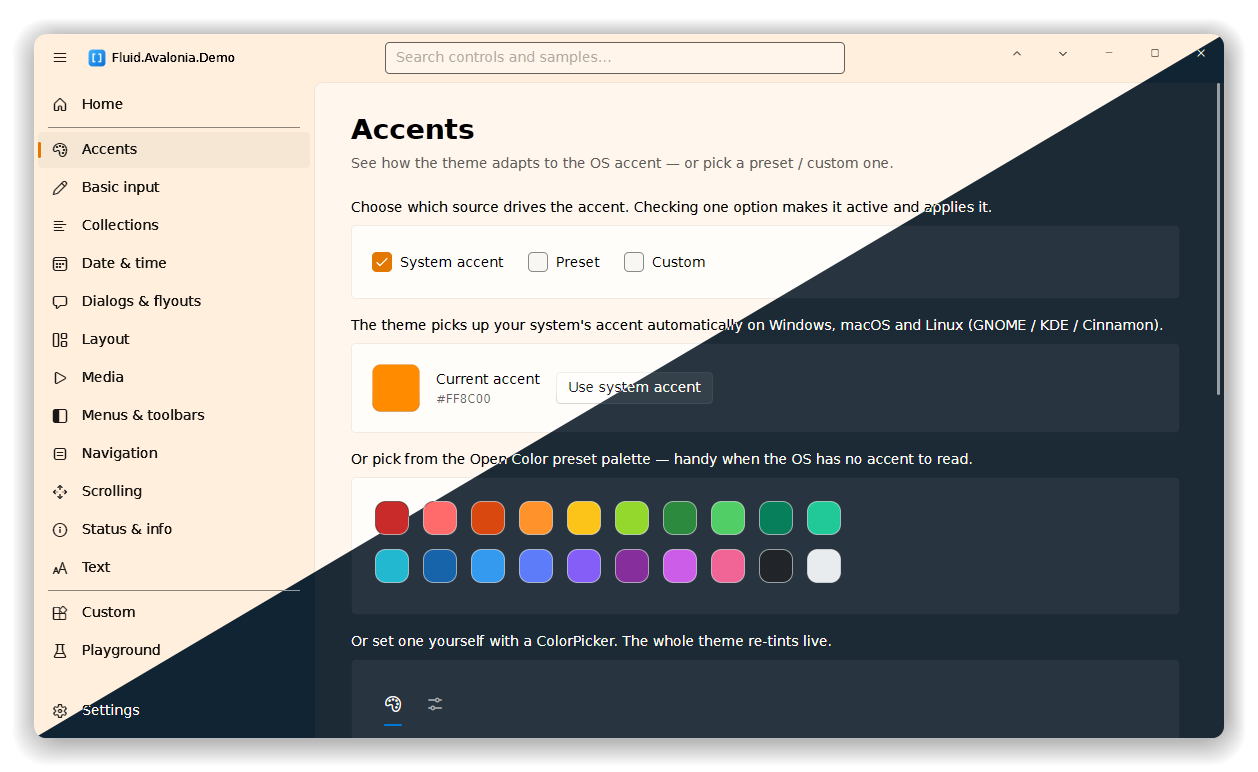
Try it right now in your browser — the demo runs on Avalonia's WebAssembly head, deployed to GitHub Pages:
Live demo → https://alpaq92.github.io/Fluid.Avalonia/ (redeployed from the WASM head on every push to
main)
Install from NuGet:
dotnet add package Fluid.Avalonia
It ships as a single Styles object you drop into your app:
<Application xmlns:fluid="clr-namespace:Fluid.Avalonia;assembly=Fluid.Avalonia">
  <Application.Styles>
    <fluid:FluidTheme />
  </Application.Styles>
</Application>
The accent adapts to the OS automatically, but you can also drive it from code — AccentService exposes the built-in preset palette plus a small apply / reset API:
using System.Linq;
using Fluid.Avalonia;

// the 20 built-in Open Color presets, each with a Name + Color
foreach (var p in AccentService.Preset)
    Console.WriteLine($"{p.Name}: {p.Color}");

// apply one as the app accent…
var teal = AccentService.Preset.First(p => p.Name == "Teal");
AccentService.SetAccent(teal.Color);

// …or hand back to the live OS accent. Overloads can throw PlatformNotSupportedException
// on an unsupported platform, or take your own fallback color.
AccentService.UseSystemAccent();

// observe accent changes — fires after every (re)publish, including live OS accent
// changes, with CurrentAccent already holding the fresh color.
AccentService.AccentChanged += (_, _) => Console.WriteLine(AccentService.CurrentAccent);
The repository also contains Fluid.Avalonia.Demo, a demo app that mirrors the structure of Microsoft's WinUI 3 Gallery (data-driven navigation, per-item pages, a Settings page) so you can compare the result side by side.
Deep dive: the architecture and how the resource layering works, the demo-app internals, and the full coverage / roadmap matrix all live in OVERVIEW.md.
The solution is split into a shared library plus per-platform heads:
| Project | Role |
|---|---|
Fluid.Avalonia.Demo |
Shared gallery library (App, Views, Controls, pages, assets). |
Fluid.Avalonia.Demo.Desktop |
Desktop head — the Mica window + custom title bar. |
Fluid.Avalonia.Demo.Browser |
WebAssembly head — hosts the shared MainView as the single top-level. |
The desktop window's content was factored into a shared MainView so both heads reuse the exact same shell; Windows-only bits (Mica, the WM_SETICON taskbar fix, the registry accent read) are guarded and simply don't run in the browser. .github/workflows/pages.yml publishes the Browser head and deploys it on every push to main — just set Settings → Pages → Source = "GitHub Actions" once. Build it locally with:
dotnet workload install wasm-tools
dotnet publish Fluid.Avalonia.Demo.Browser -c Release
- A WinUI 3 look for Avalonia. Fluent 2 color tokens, a WinUI type ramp (rendered in the bundled, cross-platform DejaVu Sans font), 4 px / 8 px corner radii, the "lit-edge" control border, drop-shadow elevation, and a translucent window backdrop (Mica on Windows, vibrancy on macOS, a KWin blur on KDE — solid elsewhere on Linux — toggleable, and following the OS transparency setting on Windows). Symbol glyphs come from the bundled Codicons icon font, so both text and icons render identically on desktop and in the browser.
- Live accent integration, on every OS. The accent is read from the host where possible — the full seven-shade Windows
AccentPalette, the macOSAppleAccentColor, and the Linux GNOME (accent-color) / KDE (kdeglobals) / Cinnamon (Mint theme name) accent — and flows into every accented control, updating instantly when the user changes it. Where no OS accent is available, apps can pick from the Open Color preset palette (20 swatches) or set any color manually (e.g. with aColorPicker) viaAccentService.SetAccent/UseSystemAccent. - Cross-platform & self-contained. One library (
Fluid.Avalonia) targetingnet8.0with no third-party theme dependencies — it layers on Avalonia's built-inFluentTheme. Platform specifics (registry /defaults/gsettingsaccent readers, Mica, dark title bar) are guarded and degrade gracefully everywhere.
This started as a quest to align Avalonia with WinUI 3 — and what began as migrating the visual tokens soon grew into something more, as enhancements and new controls were added along the way. It draws on Romzetron.Avalonia as a reference for solution structure and the semantic-brush styling architecture, with three deliberate differences from it:
- No baked-in accent — adapt to whatever accent the user has set in their OS (Windows, macOS or Linux). An Open Color preset palette and manual
ColorPickerselection are offered as options, not as a hard-coded default. - Avalonia 12 / .NET 8.
- As close to WinUI 3 as possible — no per-control "set the color explicitly" override mechanism; theming is purely token-driven, the way Fluent 2 works.
Rather than hand-porting ~70 control templates (and fighting Avalonia 12 template changes), the theme layers on Avalonia's FluentTheme and overrides the token/resource layer. This keeps it small, robust on Avalonia 12, and faithful to Fluent 2.
The demo isn't only re-themed stock controls. A number of composite controls and shell features were built specifically for this project, with no direct equivalent in vanilla Avalonia — the RadialTimePicker and its reusable RadialClock dial, the segmented DateTimePicker / DateTimeSpinners and AnalogDateTimePicker, RadialSlider, ProgressCircle, BinarySelector, FluidColorPicker, BreadcrumbBar, GroupBox, InfoBar, VisualRate, a Fluent-themed ContentDialog, the reusable FluidWindow shell, and more.
Each one is catalogued — with what it is and a live example — in CUSTOM.md, a detailed reference for every custom control and feature authored for Fluid.Avalonia (also rendered live on the demo's Custom page).
Requires the .NET 10 SDK (pinned via global.json; the library and desktop demo still target net8.0 — the SDK 10 requirement comes from the net10.0-browser WASM head).
dotnet build
dotnet run --project Fluid.Avalonia.Demo.Desktop
The accent is read natively on Windows, macOS and Linux (GNOME / KDE / Cinnamon), falling back to Avalonia's platform accent elsewhere — and can always be overridden with a preset or a picked color.
The translucent window backdrop is cross-platform via FluidWindow.TransparencyEnabled (and the shared TransparencyService): Mica on Windows, vibrancy on macOS, and blur on Linux where the compositor supports it (real blur on KDE / KWin; it degrades to a solid window elsewhere). On Windows it's seeded from the OS "Transparency effects" setting at startup; the demo's Settings → Window page adds an on/off switch to override it (disabled in the browser head, which has no window backdrop). The dark title-bar frame remains Windows-only.
- Fluent 2 Design System — type ramp, color tokens, elevation and materials guidance.
- microsoft-ui-xaml (MIT) — the canonical WinUI 3 control theme resources (
src/controls/dev/CommonStyles/*_themeresources.xaml) andCommon_themeresourcescolor values were ported from here. - WinUI 3 Gallery (MIT) — the structural reference for the demo app (data-driven catalog, NavigationView shell, ItemPage, ControlExample).
- Romzetron.Avalonia — solution structure and the file-per-control / semantic-brush styling architecture.
- FluentAvalonia — cross-checked our approach.
- SukiUI — reference for the custom window / title-bar technique, the thin overlay scrollbar look, and the Playground page concept.
- Semi.Avalonia — reference for the roomy circular-day Calendar styling.
- Markdown.Avalonia — renders the Home page.
- Material Design Icons (Apache-2.0) — the code-array glyph used in the app icon.
- Open Color (MIT) — the colors behind the 20 built-in accent presets.
- WPF-UI (MIT) — the demo's
BreadcrumbBarandInfoBarare reimplemented after its controls of the same name, and itsNotifyIconinspired the Fluent-themed system-tray menu. - Dirkster99/bm (MIT) — the breadcrumb's per-crumb chevron-dropdown navigation.
- DialogHost.Avalonia (MIT) — the Fluent-themed
ContentDialoghost (an in-window overlay, so it works on the browser head too). - Avalonia.Samples (MIT) — the
VisualRateis generalised from itsRatingControlSampleport. - android-signaturepad (MIT; based on gcacace/android-signaturepad, Apache-2.0) — the
SignaturePad's velocity-driven variable-width Bézier ink algorithm is ported from here. - Avalonia — the
FluentThemewe build on.
The full list of third-party projects this solution bundles, depends on, or references — each with what it's used for and its license — lives in CREDITS.md.
MIT. The Fluent 2 design-token values and WinUI resource structures are ported from the MIT-licensed microsoft-ui-xaml and WinUI 3 Gallery projects (© Microsoft Corporation); the built-in accent preset palette comes from the MIT-licensed Open Color. See CREDITS.md for the full attribution list.