AlayaLite – A Fast, Flexible Vector Database for Everyone.
Seamless Knowledge, Smarter Outcomes.





- High Performance: Modern vector techniques integrated into a well-designed architecture.
- Elastic Scalability: Seamlessly scale across multiple threads, which is optimized by C++20 coroutines.
- Adaptive Flexibility: Easy customization for quantization methods, metrics, and data types.
- Two index paths in one package: an in-memory graph + RaBitQ path for low-latency retrieval, and the LASER on-disk Quantized Graph index for billion-scale workloads that do not fit in RAM.
- Ease of Use: Intuitive APIs in Python.
Get started with just one command!
pip install alayalite             # with pip
# or
uv pip install alayalite          # with uv (standalone)
uv add alayalite # in a uv-managed projectimport numpy as np
from alayalite import Client
client = Client()
index = client.create_index("ann")
vectors = np.random.rand(1000, 128).astype(np.float32)
queries = np.random.rand(10, 128).astype(np.float32)
gt = calc_gt(vectors, queries, 10)
# Insert vectors to the index
index.fit(vectors)
# Perform batch search for the queries and retrieve top-10 results
result = index.batch_search(queries, 10)
# Compute the recall based on the search results and ground truth
recall = calc_recall(result, gt)
print(recall)Use Collection when you want ANN results together with document IDs,
documents, and metadata filters.
collection = client.create_collection("docs", indexed_fields=["category"])
collection.insert([
    ("doc-1", "Vector database overview", vectors[0], {"category": "database"}),
    ("doc-2", "Cooking notes", vectors[1], {"category": "life"}),
])

result = collection.hybrid_query(
    vectors=[vectors[0]],
    limit=1,
    metadata_filter={"category": "database"},
    ef_search=10,
)
print(result["id"][0])For datasets that exceed RAM, the LASER on-disk Quantized Graph index keeps
hot data on SSD and only the search-time working set in memory. Vectors must be
float32 with raw_dim >= 128; L2 is the only supported metric in v1.
LASER is available on Linux x86_64 (libaio backend, default), macOS (thread-pool backend), and Windows x64 (IOCP backend). Platform notes:
- Linux x86_64 builds need
libaioheaders, for examplesudo apt-get install libaio-devon Debian/Ubuntu. - macOS builds need OpenMP from Homebrew:
brew install libomp. - Windows x64 builds should run from a Visual Studio 2022 developer shell with the Desktop development with C++ workload installed; MSVC provides the OpenMP runtime used by LASER.
See LASER.md for build flags, tuning notes, and the TOML-driven CLI.
LASER Index.fit pulls in PCA / k-means / progress-bar helpers (scikit-learn,
faiss-cpu, tqdm), which are declared as the [laser] extra so the base
install stays lean. Install them on top of the base wheel:
pip install "alayalite[laser]"
# or, with uv:
uv pip install "alayalite[laser]"
import shutil
import time
import numpy as np
from sklearn.datasets import make_blobs
from alayalite.laser import BuildParams, Index
from alayalite.utils import calc_gt, calc_recall
# Smoke-scale demo (~10-20s end-to-end on a modern laptop). Tuning details,
# paper-aligned configs and the on-disk layout are covered in the LASER guide above.
output_dir = "/tmp/alaya_laser"
shutil.rmtree(output_dir, ignore_errors=True)
# Synthetic GMM clusters so ANN has structure to find; uniform-random vectors
# in 768-D would collapse recall (high-D distance concentration).
pts, _ = make_blobs(n_samples=10_100, n_features=768, centers=64,
cluster_std=0.35, random_state=42)
vectors = pts[:10_000].astype(np.float32)
queries = pts[10_000:].astype(np.float32)
gt = calc_gt(vectors, queries, 10)
idx = Index.fit(
vectors,
output_dir=output_dir,
name="demo",
build_params=BuildParams(main_dim=256, ep_num=20),
seed=42,
num_threads=0,
dram_budget_gb=2.0,
)
idx.set_params(ef_search=200, num_threads=1, beam_width=16)
idx.batch_search(queries, 10) # warmup
t0 = time.perf_counter()
ids = idx.batch_search(queries, 10)
elapsed = time.perf_counter() - t0
print(f"Recall@10: {calc_recall(ids, gt):.3f}")
print(f"QPS: {len(queries) / elapsed:.1f} ({len(queries)} queries in {elapsed*1000:.1f} ms)")
# Reopen later without rebuilding:
# idx = Index.from_prefix("/tmp/alaya_laser/demo", dram_budget_gb=2.0)LASER requires a LASER-enabled build. See the LASER Guide for platform requirements and build options.
AlayaLite ships two complementary index paths. The benchmarks below cover both.
We evaluate the in-memory path against other vector database systems using
ANN-Benchmark (compile locally and
open -march=native in your CMakeLists.txt to reproduce the results).
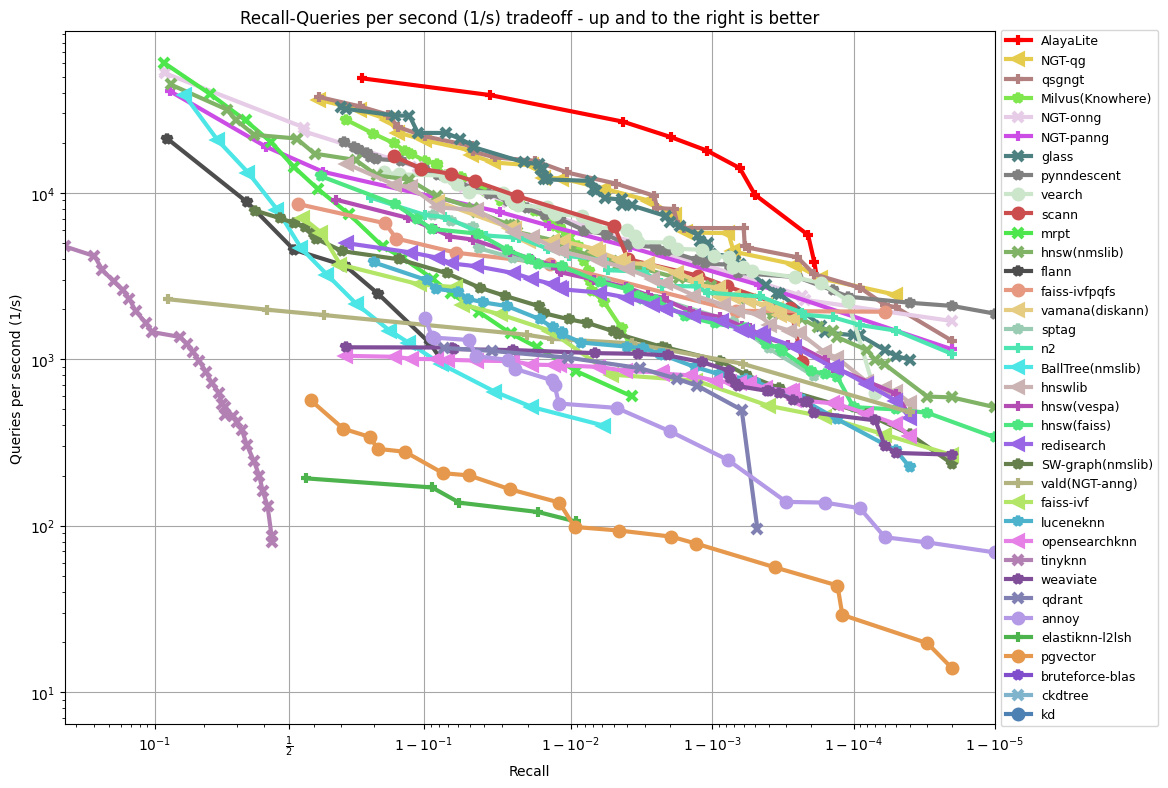 |
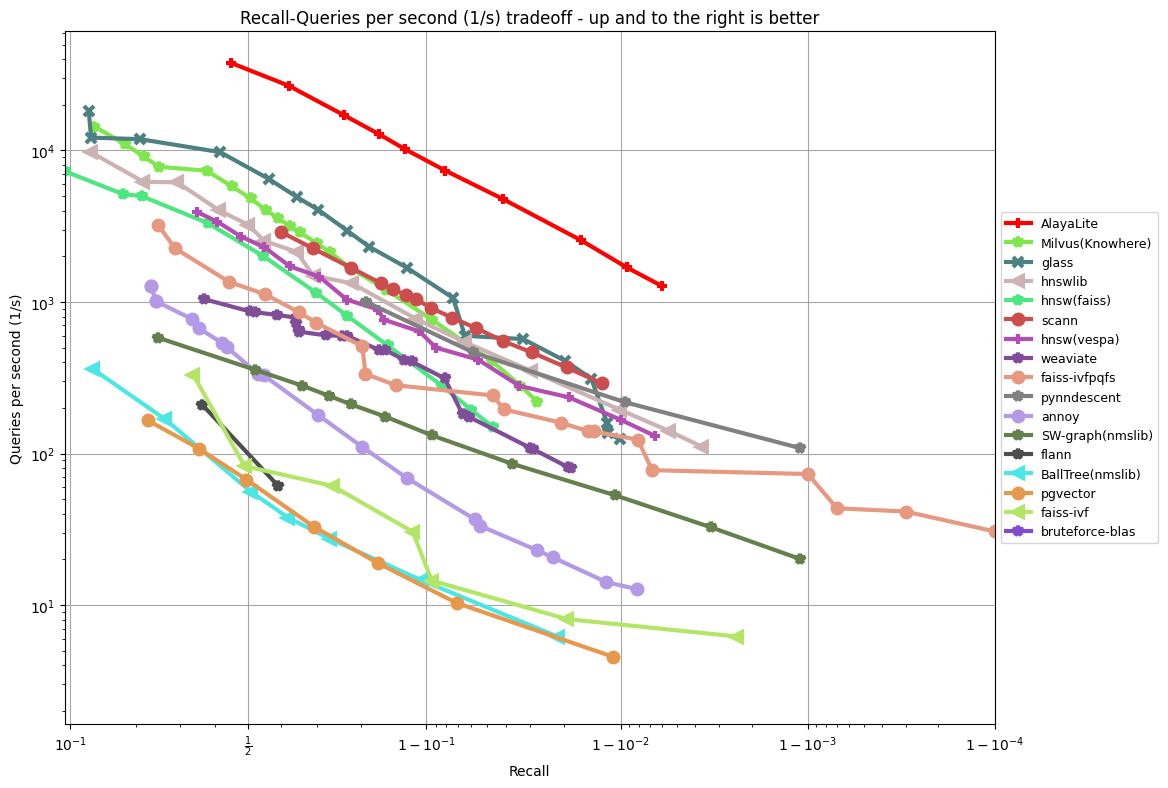 |
|---|---|
Fashion-MNIST 784 Euclidean |
Gist 960 Euclidean |
The same in-memory path powers Collection hybrid search when metadata filters
are involved. We evaluate this filtered retrieval workflow using
VectorDBBench on the
Medium Cohere dataset (1M vectors, 768 dimensions). The following results
report QPS under 0.1% selectivity filters at concurrency 1 and 80.
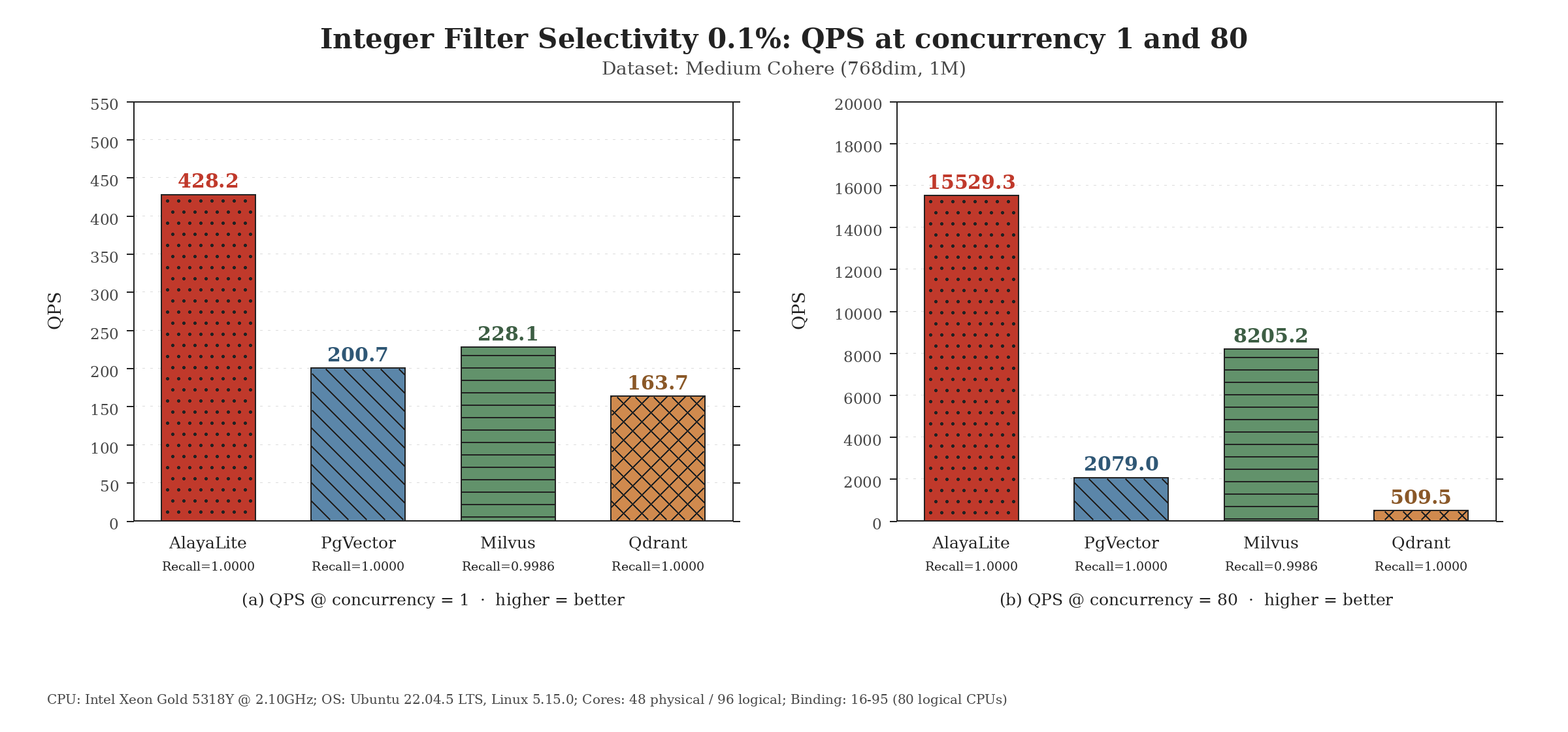
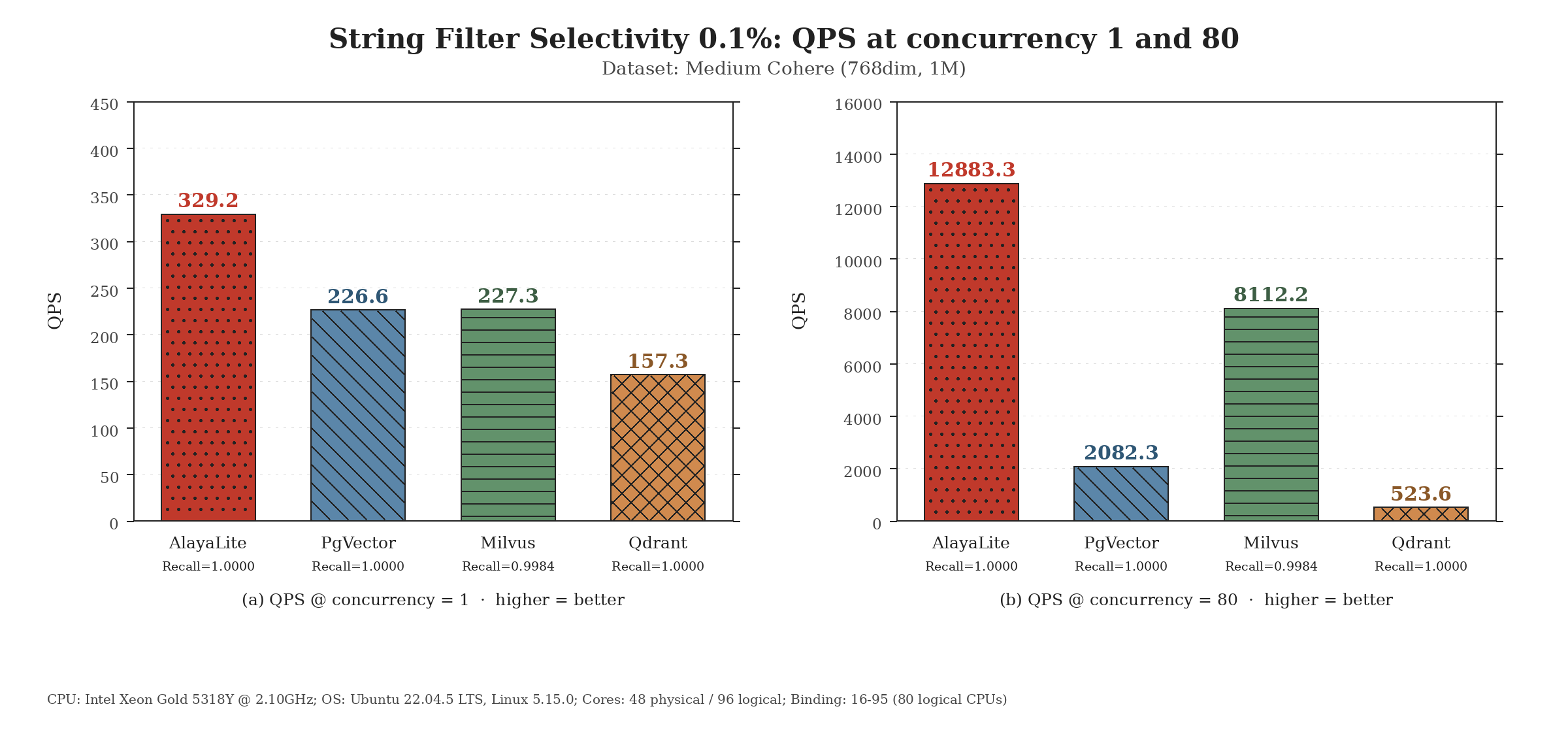
For the on-disk path, we compare LASER against other disk-resident vector systems on DPR100M (101M vectors × 768 dimensions, L2). Numbers are read directly from the benchmark output — see the AlayaLaser paper (SIGMOD 2026) for the algorithm details.
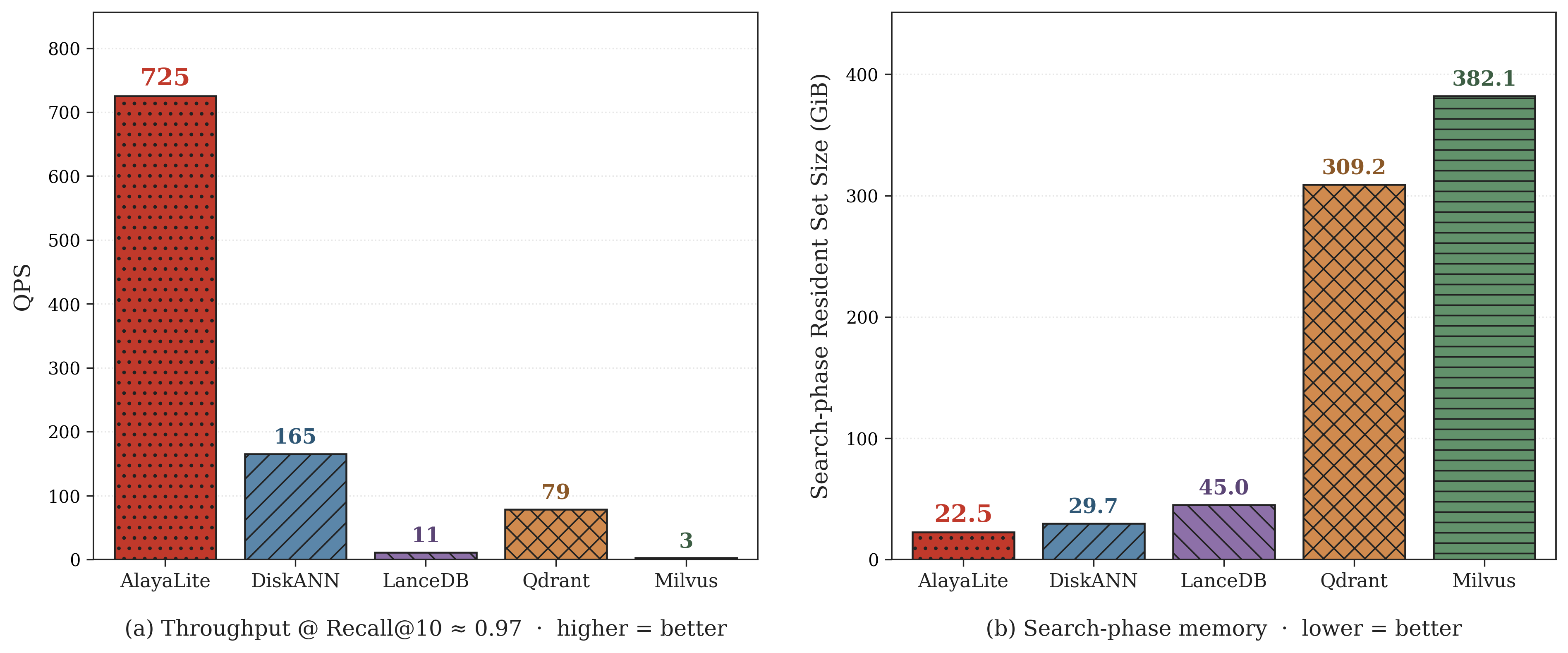
At Recall@10 ≈ 0.97, LASER serves about 725 QPS — roughly 4.4× DiskANN (165), 9.2× Qdrant (79), and 66× LanceDB (11) on this dataset, while Milvus (3) does not reach this recall band reliably. The search-phase resident set is 22.5 GiB, an order of magnitude below Qdrant (309.2 GiB) and Milvus (382.1 GiB) on the same workload.
We welcome contributions to AlayaLite! If you would like to contribute, please follow these steps:
- Start by creating an issue outlining the feature or bug you plan to work on.
- We will collaborate on the best approach to move forward based on your issue.
- Fork the repository, implement your changes, and commit them with a clear message.
- Push your changes to your forked repository.
- Submit a pull request to the main repository.
Please ensure that your code follows the coding standards of the project and includes appropriate tests.
We would like to thank all the contributors and users of AlayaLite for their support and feedback.
If you have any questions or suggestions, please feel free to open an issue or contact us at [email protected].
For Chinese-speaking users, you can join our WeChat discussion group by scanning the QR code below: