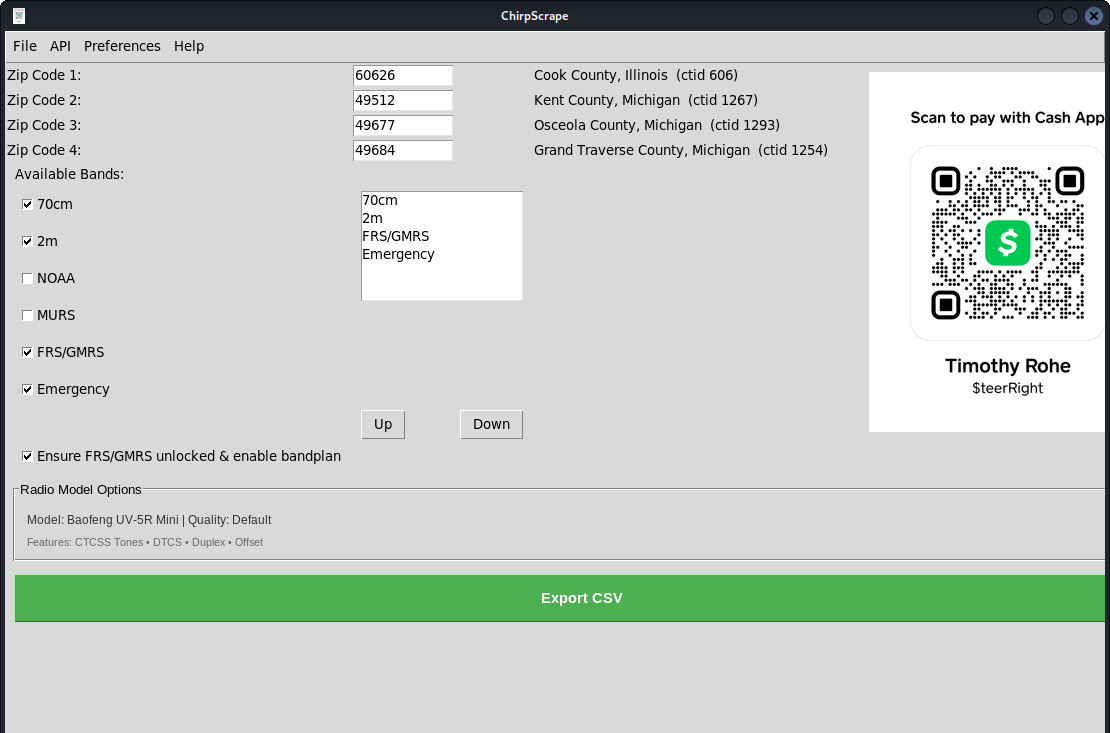
This project uses a small index file, radioref.csv, to map RadioReference CTID pages (county/city titles) to their numeric CTID IDs. This file is required for ZIP-to-CTID mapping in the GUI and for accurate RadioReference lookups.
If radioref.csv is missing or outdated, please see the Troubleshooting section below.
📚 Documentation: See docs/README_ENHANCEMENTS.md for complete feature documentation, and docs/CHANGELOG.md for version history and updates.
ChirpScrape is a technical-business utility for radio data operations with a local-first workflow, packaging support, and practical automation for field and office teams.
- 🔐 Reliability-focused data collection and export workflows
- ⚙️ Automation-friendly CLI and GUI runtime
- 🖥️ Cross-platform packaging support for deployment
- 📊 CSV-first outputs for downstream operational pipelines
-
One-step runtime (recommended)
Run the
ChirpScrapelauncher to create/repair the virtual environment, install dependencies, and launch the app in GUI mode by default (no switches):Linux / macOS:
./ChirpScrape
# or: python3 ChirpScrape
Windows (PowerShell):
python ChirpScrape
Windows (cmd.exe):
python ChirpScrape
-
Manual setup (alternative)
If you prefer to create the venv yourself, follow the platform-specific steps below.
Linux / macOS (bash/zsh):
python3 -m venv .venv
source .venv/bin/activate
pip install -r requirements.txt
python3 chirp_scraper.py --gui
Windows (PowerShell):
python -m venv .venv
.\.venv\Scripts\Activate.ps1
pip install -r requirements.txt
python chirp_scraper.py --gui
Windows (cmd.exe):
python -m venv .venv
.\.venv\Scripts\activate.bat
pip install -r requirements.txt
python chirp_scraper.py --gui
-
Check output:
- Output files are generated in the project directory by default (e.g.,
chirp_output.csv). - Sample output in this repository is stored at
outputs/chirp_output.csv.
- Output files are generated in the project directory by default (e.g.,
Primary runtime command (GUI default, no switches):
./ChirpScrapeRuntime launchers are kept in the main project directory for easy discovery:
ChirpScrapebootstrap.py
Use bootstrap.py as the single runtime entrypoint for install/run/test/security:
python3 bootstrap.py run        # install deps, then run app
python3 bootstrap.py install    # install deps only
python3 bootstrap.py test       # syntax + unittest smoke tests
python3 bootstrap.py security   # lightweight static security scan
python3 bootstrap.py package    # build one-time distributable for this OS
python3 bootstrap.py all        # install + security + test + run
Legacy flags still work (--install-only, --test, --security-check, --gui).
Packaging is platform-native. Build on the target OS:
./scripts/build_linux_onefile.shOutput:
dist/ChirpScrape
./scripts/build_macos_app_dmg.shOutputs:
dist/ChirpScrape.appdist/ChirpScrape.dmg
Run in PowerShell:
./scripts/build_windows_exe.ps1Output:
dist/ChirpScrape.exe
Notes:
.app/.dmgmust be built on macOS..exemust be built on Windows.- A Linux build was generated in this workspace and verified with
--helpatdist/ChirpScrape.
Developing and maintaining open source software takes significant time and resources. Your support helps cover development, testing, and hosting costs. Every contribution makes a difference!
🎁 Donation Portal: A professional donation page appears on first launch. You can dismiss it and access it anytime via Help → Contact → Donations in the app menu.
Thank you for considering a donation!
- Open source software fosters innovation and collaboration.
- Supports learning and skill development for programmers.
- Provides cost-effective solutions for everyone.
- Drives technological advancement and builds strong communities.
If you encounter numpy/pandas import errors:
ChirpScrape now supports Python 3.13 with properly compatible dependencies:
- numpy 2.4.2+ - Required for Python 3.13 compatibility
- pandas 3.0.0+ - Updated for latest numpy and Python versions
Solution: If you already have an old venv, start fresh:
# Remove old environment
rm -rf .venv

# Create new environment and install dependencies
python3 -m venv .venv
source .venv/bin/activate  # (or .\.venv\Scripts\Activate.ps1 on Windows)
pip install -r requirements.txt
The bootstrap.py script handles this automatically, so using it is recommended for a clean installation.
If you see errors or missing data related to RadioReference lookups, or if radioref.csv is missing or outdated, you need to (re)generate the index file. Use the helper script below:
Run this command to crawl RadioReference and build or refresh the index:
./.venv/bin/python make_radioref_list.py --start-id 1 --max-id 3000 --appendNotes:
- The crawl can take a long time; use
--delayto be polite and--stop-after-missingto stop after many consecutive misses. chirp_rr_zip_scraper.pywill still run withoutradioref.csv, but ZIP lookups that depend on the index may show "(no ctid)" and fall back to ZIP-level RadioReference pages.
See README.txt for additional project notes.
Help → Firmware submenu: New firmware unlock resources (Baofeng unlock guides and firmware links) are available in the app under the Help → Firmware menu. See the in-app Help for step-by-step links and resources.
Advertising & Media: Advertising copy and media (including the Facebook advert) are available in the Advert/ folder. See Advert/Facebook.md for Facebook-specific ad content.
This software is provided as-is. When scraping websites, ensure you follow the target site's terms of service and robots.txt. The author is not responsible for misuse.
- WhatsApp: https://wa.me/13127235816
Use this script when connecting to a remote host via SSH to run the local project path.
./scripts/rssh-run.sh user@remotehost /home/user/code/Chirp_ScrapeThis will:
- enter the remote project directory
- ensure
gradlewis executable - run
./gradlew --no-daemon --stacktrace --info clean build
neofetch is optional (Linux convenience):
ssh user@remotehost 'neofetch --ascii_distro Ubuntu'