In this simple example, we will use some basic actions and conditions from the BehaviorTree.CPP to design a simple robot behavior. We will then see how to improve it.
The robot has the following task: The robot has to visit two points on the map, whenever the robot's battery is below 10% of its capacity, it goes to a charging station until the battery is fully charged
Let's consider the BT below:
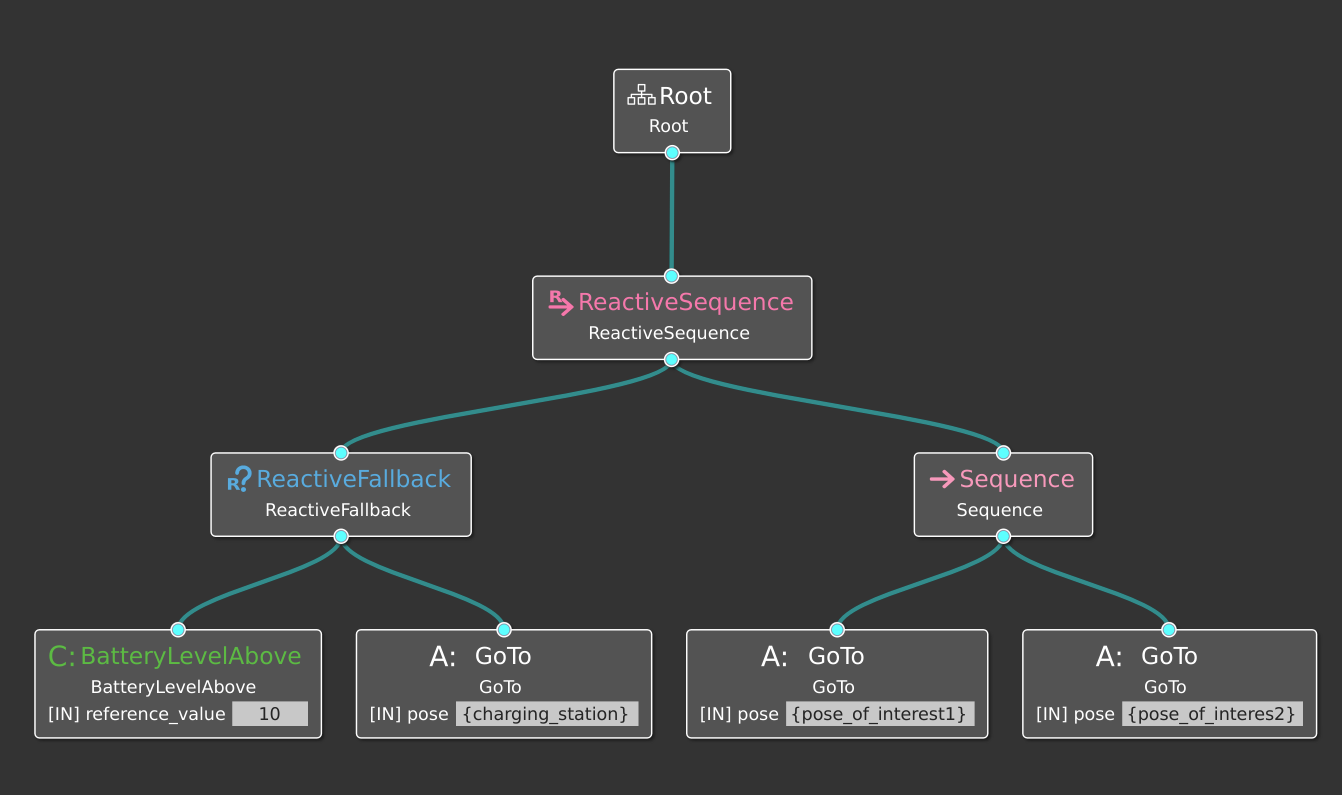
Where we assume that the poses charging_station, pose_of_interest1, and pose_of_interest2 are present in the Blackboard. In this example, we add them in them the bt executable.
Let's first analyze the architecture of this use case:
- leaf nodes:
- IsBatteryLevelAbove {
reference_value} that reads the battery value from a topic and compares it with the reference value -GoTo {pose} that sends the pose to a navigation stack via ROS Actions
- IsBatteryLevelAbove {
- components:
- Nav2 as navigation stack.
- fakeBatteryReader to simulate a battery reading. In publishes the BatteryState message on the topic
/fake_battery_reader/battery_statewith the battery value. It also can receive the following commands through ROS services for debugging:SetBatteryValue,GetBatteryValue, andChargeBattery.
- Interfaces:
- we interface the GoTo action in the BT with the Nav2 via the NavigateToPose.action
- we interface the IsBatteryLevelAbove with the battery reader component via the BatteryState message.
Warning In this BT we trust the success conditions of Nav2 Action for the BT Actions Goto. In general, it is better to follow the design principle Improving Readability using Explicit Success Conditions from Chapter 3.1 of the book Behavior Trees in Robotics and AI
However, the BT above has some issues:
- While charging, as soon as the battery reach aches above 10% the robot will leave the charging station.
- Once at the charging station, the BT will keep ticking the action
GoTo{charging_station}. - The more waypoints you have, the larger the tree (this is arguable, but still).
- The sequence of the waypoint is strict. In some applications, the number and order of waypoints may change at runtime. As is an interactive tour guide robot, where we have a scheduler that skips some less interesting waypoints if the tour takes too long.
So, we don't bother trying to run that BT.
We now address the first two issues above, we will address the other two in the next use case Tour Robot.
Consider the modified BT below:
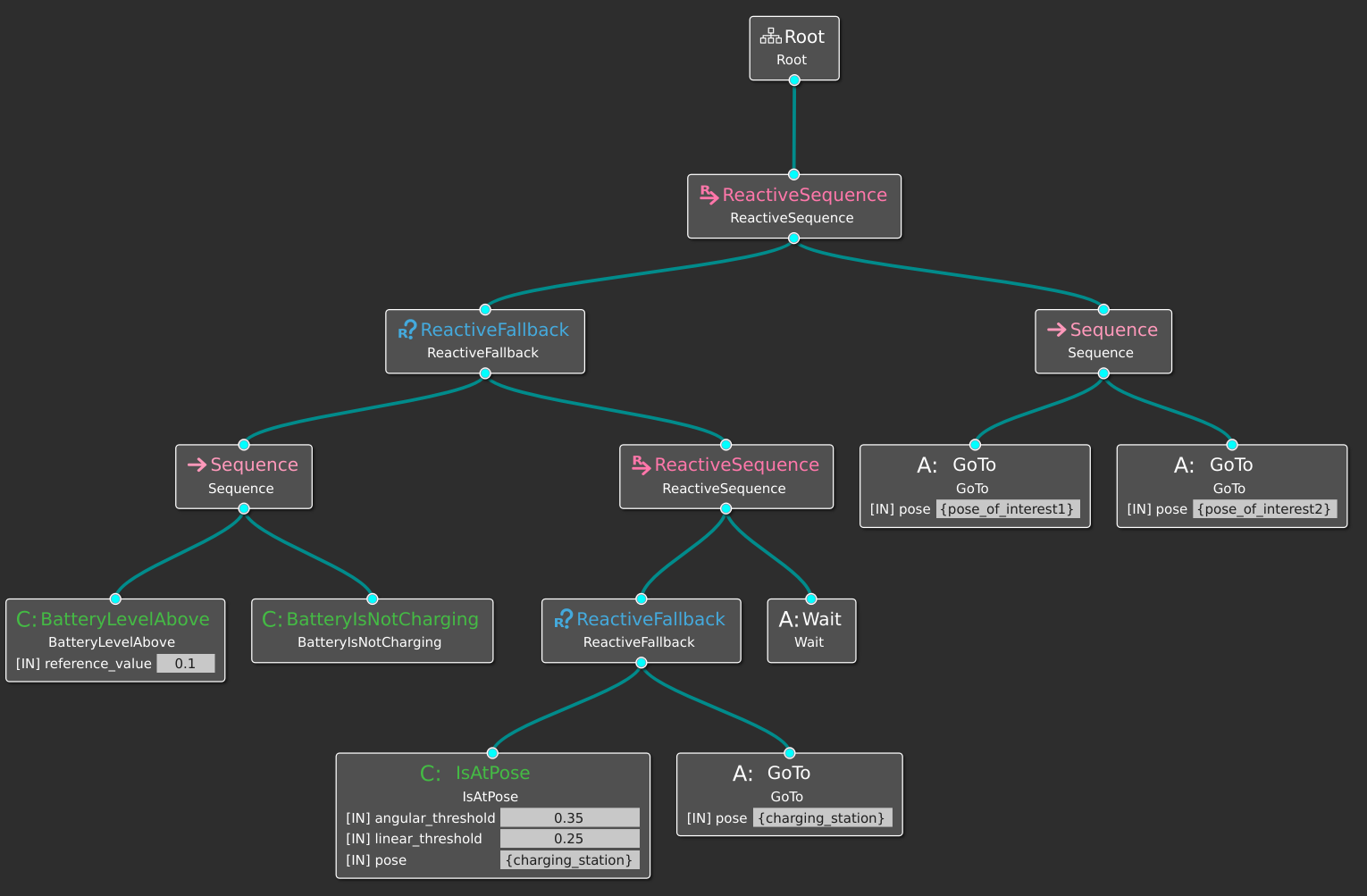
Where:
- the BT Action Wait returns only the status of BT::Running
- the BT Condition BatterIsCharging checks if the status of the battery is POWER_SUPPLY_STATUS_CHARING, reading from the topic
/fake_battery_reader/battery_state - the BT Condition IsAt{
pose}, {linear_threshold} , {angular_threshold} checks if the current pose of the robot is close topose, within the related thresholds.
Let's run this BT and play with the battery value.
We first run the simulation environment:
ros2 launch bt_uc_sim simple_simulation_launch.pyNote If the simulation is too heavy for your computer, run the command above with the option
headless:=True(i.e.,ros2 launch bt_uc_sim simple_simulation_launch.py headless:=True. That will not launch the Gazebo Client.
We then run all the components (the launch file runs the custom-made fakeBatteryReader and Nav2).
ros2 launch simple_components all_components_launch.pyAt this point windows should appear as below:


And finally, run the BT
ros2 run simple_bts run_btThe robot should happily roam between two poses, until the battery goes below 10%. When that happens, the goes to the another pose (the charging station) and wait for manual recharge.
If you are eager to let the robot go to the charging station, open RQt
rqtand call the service fake_battery_reader/set_battery_level with a value of 0.1 (or a lower one).

Once it reaches the charging station should stay there until we charge the battery. We do that by calling the service fake_battery_reader/charge_battery. The robot will leave the charging station when the battery is full.
Check the battery level still with RQt:

Note If you have ZeroMQ installed you can visualize the BT while it runs via Groot
Now take a look at the next use case Tour Robot