We use GitHub issues for tracking requests and bugs.
** Please stay tuned for the alpha version which will be needing testers and feedback **
Here are a few tutorials to get you started!
- Genotype Analysis with Samtools: Learn how to call genome sequence polymorphisms against a reference genome sequence.
- Metabolome analysis with XCMS3: Learn how to use XCMS3 to quantify the levels of metabolites in a sample of interest.
- Transcriptome analysis with the Tuxedo suite: Learn how to quantify and compare gene expression levels across samples.
Each of the above tutorials shows you how to submit workflows form the iqtk command line utility as well as an aspirational demo of the DataFlow UI for submitting these as templates.
In addition to the above, workflow runs can be initiated from the command line allowing among other things programmatic integration with other parts of an organization's infrastructure.
For this purpose, the toolkit can be installed (which we suggest doing within a virtual environment like conda or virtualenv) with the following command.
pip install iqtkAlternatively, the latest iqtk docker image can be obtained as follows:
docker pull quay.io/iqtk/iqtkThe core workflows can be run as simply as the following,
iqtk run expression --config=[path to your JSON config e.g. ~/diffex.json]provided a config file with the necessary input files. The following is an example of this for the RNA-seq analysis workflow:
# diffex.json
{
  "cloud": true,
  "local": false,
  "ref_fasta": "gs://iqtk/dmel/bt2/genome.fa",
  "genes_gtf": "gs://iqtk/dmel/annotation/genes.gtf",
  "cond_a_pairs": [
      ["gs://iqtk/rnaseq/GSM794483_C1_R1_1_small.fq",
       "gs://iqtk/rnaseq/GSM794483_C1_R1_2_small.fq"]
      ],
  "cond_b_pairs": [
       ["gs://iqtk/rnaseq/GSM794486_C2_R1_1_small.fq",
        "gs://iqtk/rnaseq/GSM794486_C2_R1_2_small.fq"]
       ]
}
New workflows can be developed in an environment where iqtk has been pip installed by, at the top level, subclassing the core iqtk.Workflow object along with making use of the core util.fc_create, util.match, and util.combine operations to express how file objects resulting from an operation should be mapped to a downstream operation.
To illustrate the structure (and hopefully simplicity) of building new workflows, per one of the core objectives of the project, the following example (a simplified version of the full RNA-seq workflow) is provided. As you can see a Workflow subclass define method specifies a mapping of input and intermediate file collections through a series of operations, providing a file property query syntax to express abstract notions of workflow structure (e.g. "the files that should be processed by cufflinks are all of the files of type bam produced from the alignment steps").
class TranscriptomicsWorkflow(Workflow):
    def __init__(self):
        """Initialize a workflow."""
        self.tag = 'tuxedo-transcriptomics'
        self.arg_template = [details omitted]
        super(TranscriptomicsWorkflow, self).__init__()

    def define(self):
        p, args = self.p, self.args

        # For each condition, create a PCollection to store the input read pairs.
        reads_a = util.fc_create(p, args.cond_a_pairs)
        reads_b = util.fc_create(p, args.cond_b_pairs)

        # For each pair of reads, use tophat to perform split-read alignment.
        # Condition A.
        th_a = (reads_a | task.ContainerTaskRunner(
            ops.TopHat(args=args,
                       ref_fasta=args.ref_fasta,
                       genes_gtf=args.genes_gtf,
                       tag='cond_a')
            ))

        th_b = (reads_b | task.ContainerTaskRunner(
            ops.TopHat(args=args,
                       ref_fasta=args.ref_fasta,
                       genes_gtf=args.genes_gtf,
                       tag='cond_b')
            ))

        # Subset the outputs of the tophat steps to obtain only the bam (alignment)
        # files. Then combine the collections.
        align_a = util.match(th_a, {'file_type': 'bam'})
        align_b = util.match(th_b, {'file_type': 'bam'})
        align = util.combine(p, (align_a, align_b))

        # For each set of reads, perform a transcriptome assembly with cufflinks,
        # yielding one gtf feature annotation for each input read set.
        cl = (align | task.ContainerTaskRunner(
            ops.Cufflinks(args=args)
            ))

        # Perform a single `cuffmerge` operation to merge all of the gene
        # annotations into a single annotation.
        cm = (util.union(util.match(cl, {'file_type': 'transcripts.gtf'}))
              | task.ContainerTaskRunner(
                  ops.CuffMerge(args=args,
                                ref_fasta=args.ref_fasta,
                                genes_gtf=args.genes_gtf)
                  ))

        # Run a single cuffdiff operation comparing the prevalence of features in
        # the input annotatio across conditions using reads obtained for those
        # conditions.
        cd = ops.cuffdiff(util.match(cm, {'file_type': 'gtf'}),
                          ref_fasta=args.ref_fasta,
                          args=args,
                          cond_a_bams=AsList(align_a),
                          cond_b_bams=AsList(align_b))

        (util.match(cd, {'file_type': 'differentialExpressionCSV'})
        | 'bq-upload' >> beam.ParDo(
             ops.DiffExBQUpload(args.bq_dataset_name, args.bq_table_name)
             ))

        return cd
Instances of ContainerTask, such as TopHat, can easily be shared among a community of developers and remixed to quickly prototype new workflows. The following simple example illustrates how developers can subclass ContainerTask to create new containerized operations.
class TopHat(task.ContainerTask):

    def __init__(self, args, tag=None):
        container = task.ContainerTaskResources(
            disk=60, cpu_cores=4, ram=8,
            image='gcr.io/jbei-cloud/tophat:0.0.1')
        super(TopHat, self).__init__(task_label='dummy', args=args,
                                     container=container)

    def process(self, input_file):

        cmd = util.Command(['cat', localize(input_file), '>',
                            self.out_path + '/file.txt'])

        yield self.submit(cmd.txt, inputs=[input_file],
                          expected_outputs=[{'txt': 'file.txt'}])
Here one can see that the platform and environment in which a task runs is abstracted permitting it to be parameterized at runtime and simplifying the operational considerations for workflow developers.
For more detailed examples of workflows and operations check out any of those provided as part of the core toolkit, e.g. the one for RNA-seq analysis.
A key objective of the project is to provide consistent delivery of the data resulting from workflow runs to databases according to a controlled and standardized schemas. Significant effort on the part of the Global Alliance for Genomics and Health (GA4GH) is underway in this area. Here we make use of lightly adapted versions of those schemas. The following is an example of the schema used by the RNA-seq analysis workflow above:
message DiffExpressionLevel {
  option (gen_bq_schema.table_name) = "differential_expression";
  string id = 1;
  string geneid = 2;
  string gene = 3;
  string locus = 4;
  string sample1 = 5;
  string sample2 = 6;
  string status = 7;
  float expression1 = 8;
  float expression2 = 9;
  float lnFoldChange = 10;
  float testStatistic = 11;
  float pValue = 12;
  float qValue = 13;
  bool significant = 14;
}
For more details you can browse the full schema or check out a BigQuery table with RNA-seq data using this schema.
Included in the toolkit we have a sync daemon that currently is a simple wrapper of the gcloud rsync ... utility. The plan is to extend this utility to be a more generalized intermediate capable of syncing only subsets of data and compressing data prior to sync.
The uplink daemon can be initiated as follows:
iqtk uplink --local_path=/my/source/dir \
            --remote_path=/my/target/uri \
            --service_account=[your service account address] \
            --service_account_key_path=[your sa key path] \
            --sleep_time=600
Make sure the service account you create has read and write access to the target bucket and logs; documentation here.
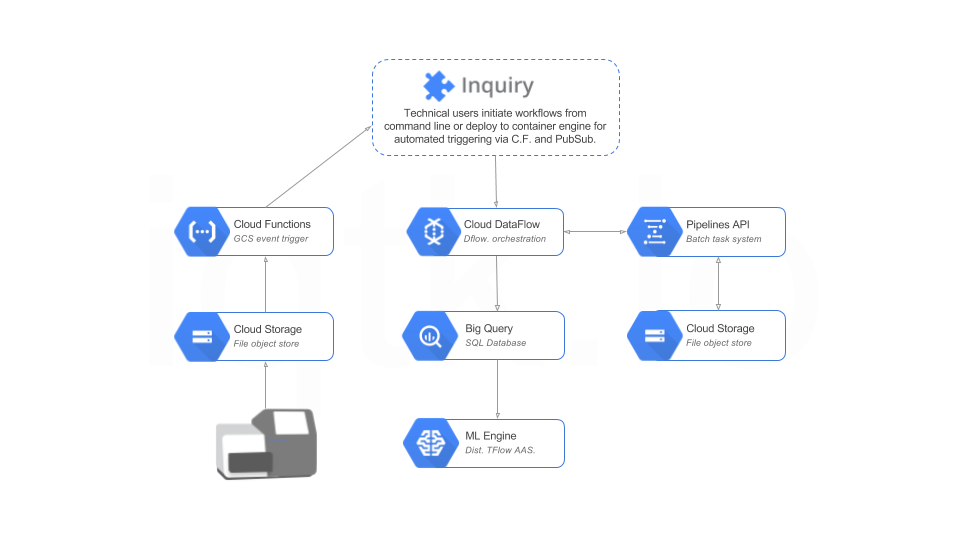
The following diagram provides a non-technical summary of the cloud architecture implemented herein. Please refer to the design document for a technical diagram and per-component narratives.
We would like to acknowledge the value of input received from members of the Google Genomics team (summarized this post). See also DockerFlow for the Java implementation of container workflow orchestration with Beam that directly inspired this work. We also acknowledge the TensorFlow project, see their LICENSE, for various build-related tooling from their project we built upon.
Want to get in touch? You can provide feedback regarding this or other documentation, reach out to us regarding collaboration, or request a new feature or analytical capability.
This page was prepared as part of the Inquiry Toolkit project at the Joint BioEnergy Institute (JBEI). Learn more at https://www.jbei.org/.
The Joint BioEnergy Institute is a program of the U.S. Department of Energy Office of Science.
© Regents of the University of California, 2017. Licensed under a BSD-3 license.