- npm install exceljs
- 서버에서 createService 하는곳으로 간다.
- 엑셀 다운로드 전용 서비스를 만든다.
- exceljs의 규칙대로 엑셀파일을 구성하여 만들어준다.
예:
getFollowersExcel: async (repo, args) => {
    const [id, _, user] = args;

    const workbook = new Excel.Workbook();
    const worksheet = workbook.addWorksheet('팔로워목록');
    // src/pages/account/info/follower.js
    const columns = [
      {
        title: '아이디',
        key: 'signname',
      },
      {
        title: '닉네임',
        key: 'nickname',
      },
      {
        title: '이메일주소',
        key: 'email',
      },
      {
        title: '성별',
        key: 'gender',
      },
      {
        title: '팔로우 등록일자',
        key: 'created_at',
      },
    ]
    worksheet.columns = columns;
    worksheet.addRow({
      signname: '아이디',
      nickname: '닉네임',
      email: '이메일',
      gender: '성별',
      created_at: '팔로우 등록일자'
    })
    const data = await repo.getObjects(AccountHospital, {
      where: {
        hospital_id: id,
      },
      order: [['created_at', 'DESC']],
      exportTo: AccountHospitalDto,
    })
    data.forEach(v => {
      worksheet.addRow({
        signname: v.account.signname,
        nickname: v.account.nickname,
        email: v.account.email,
        gender: ({
          ALL: '전체',
          MALE: '남',
          FEMALE: '여',
        })[v.account.gender],
        created_at: moment(v.created_at).format('YYYY-MM-DD')
      });
    })
    // ...이하생략
  },
- 파일명에 한글이 포함되어 있을 경우, encode된 파일명을 만들어준다.
const fileName = encodeURI(`./병원팔로워목록_${moment().format('YYYY-MM-DD_hh:mm:ss_sss')}.xlsx`)
- xlsx파일을 전달해줄 callback을 작성하고, 서비스에서 파일명과 함께 리턴한다. (미들웨어를 사용할 수 없어서 사용하는 방법)
    const callback = async (res, fileName) => {
      await workbook.xlsx.write(res)
      res.status(200).end();
    };

    return { callback, fileName };
- execute함수에서 적절히 이어준다.
const execute = async (request, response, next) => {
  const { callback, fileName } = await HospitalService.getFollowersExcel(request.params?.hid, request.query, request.user);
  const fileNameWithoutDot = fileName.split('/')[1]
  response.header('Content-Type', 'application/vnd.openxmlformats-officedocument.spreadsheetml.sheet; charset=utf-8');
  response.header("Content-Disposition", "attachment; filename=" + fileNameWithoutDot);
  await callback(response);
};
- createRoute로 나머지를 채워준다.
export default createRoute(
  {
    uri: '/hospitals/{hid}/follow-excel',
    method: 'GET',
    query: {},
    roles: ['any'],
    response: AccountDto,
  },
  execute,
  {
    tags: ['2-0. 병원 관련'],
    summary: '병원 팔로우한 사람 목록 엑셀 다운로드',
    paging: false,
  },
);
-
다운로드할 때, 프론트엔드에서는 ajax요청이 아닌 <a href =${API경로}/> 를 사용하여 다운로드할 수 있게 만들어준다.
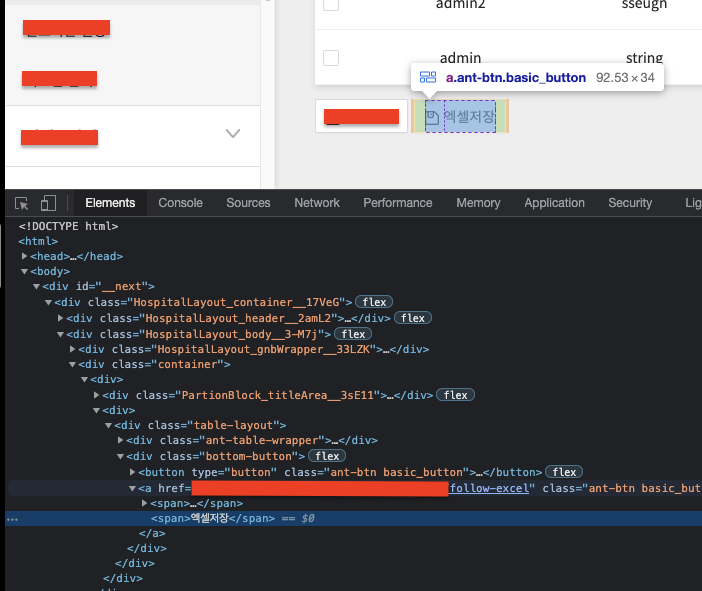
-
버튼 클릭하면 잘 다운로드된다.
주의: 초 대용량 파일(수 GB정도) 생성시 메모리 문제가 있을 수 있음. 이 경우, stream방식으로 전환해야 함. @actbase/node-server는 stream방식을 지원하기는 하나, 작은 파일에서는 이정도도 충분함.

예:
다운로드할 때, 프론트엔드에서는 ajax요청이 아닌 <a href =

${API경로}/> 를 사용하여 다운로드할 수 있게 만들어준다.버튼 클릭하면 잘 다운로드된다.
주의: 초 대용량 파일(수 GB정도) 생성시 메모리 문제가 있을 수 있음. 이 경우, stream방식으로 전환해야 함. @actbase/node-server는 stream방식을 지원하기는 하나, 작은 파일에서는 이정도도 충분함.